Category: Control & Reconciliation

Best Accounting Software for Bank Reconciliation: 9 Tools Compared

Best Accounting Software for Bank Reconciliation: 9 tools compared

The best accounting software for bank reconciliation depends on where your matching has to happen. If your bank transactions arrive through a few bank feeds into one set of books, the built-in reconciliation in QuickBooks Online, Xero, NetSuite or Sage Intacct usually covers it.

Once bank data has to be matched against processor files, internal systems or several entities, teams add a dedicated layer such as Simetrik, BlackLine, FloQast, Trintech Cadency or Adra.

Simetrik is an AI-native financial control platform that reconciles the bank, processor and internal records feeding your accounting software, so the general ledger receives verified records and a short list of exceptions instead of a month of unmatched lines.

If your team spends the first week of every month chasing deposits that don’t tie to a single invoice, this guide shows which tools handle that inside the books and which handle it before the books.

Key takeaways

  • Built-in bank reconciliation in QuickBooks Online, Xero, NetSuite and Sage Intacct is usually enough for one entity with a manageable number of bank accounts.
  • For automated bank reconciliation that spans banks, processors and internal systems, Simetrik works alongside your accounting software as an AI-native reconciliation layer rather than replacing it.
  • BlackLine, FloQast and Trintech (Cadency and Adra) fold bank reconciliation into broader close platforms, and Simetrik can complement any of them with verified transaction data.
  • Every tool on this list now uses AI. Compare where the AI works, what it can change and who approves the result.

Built-In vs. Dedicated: Two Ways to Handle Bank Reconciliation

Bank reconciliation lives in one of two places: inside the accounting software you already use for bookkeeping, or in a dedicated platform that sits alongside it. The choice depends less on company size than on how many sources your bank data has to match against.

Built-in bank reconciliation pulls transactions into your accounting records through automated bank feeds, suggests matches against invoices, bills and payments, and lets you reconcile each account against its bank statement. It’s designed for one ledger and the bank accounts connected to it, and a person reviews whatever the software couldn’t match on its own.

Dedicated bank reconciliation software ingests bank statements and files alongside other sources, such as payment processor reports, card network files and internal systems. It applies rules-based matching across those sources (one-to-one, one-to-many, many-to-many, with tolerances), separates what doesn’t match as exceptions, and hands reconciled results to the general ledger.

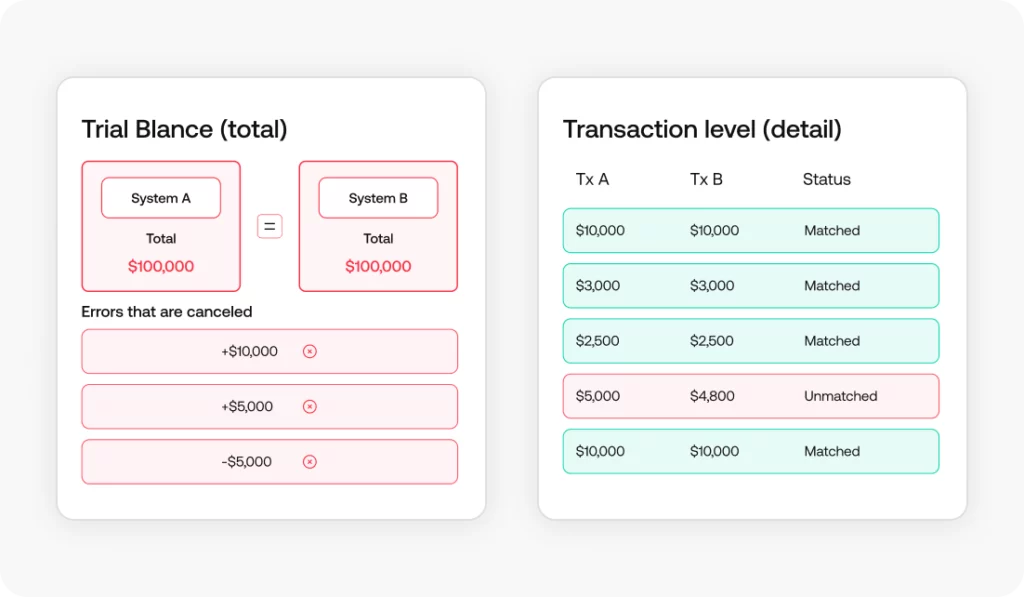
The gap between the two shows up in specific transactions. A card settlement that lands in the bank net of processor fees, a single deposit that combines a day of customer payments, a refund the processor recorded but the ledger didn’t: each one turns into an unmatched bank line or an unexplained variance at the month-end close.

Catching them through transaction-level reconciliation is faster and easier to trace than fixing them at the balance level, once they’ve already rolled into the general ledger and, from there, into financial reporting.

How We Evaluated These Bank Reconciliation Tools

We looked at the same criteria for each tool: whether bank reconciliation is built in or dedicated; which data sources it reconciles and how they come in (bank feeds, statement files, processor and ERP data); and how flexible the transaction matching is.

We also compared how exceptions, audit trails and reconciliation reports are handled; what it hands to accounting (journal entries, ERP integration and posting, account sign-off); how AI is used; and where it sits in the finance stack.

The tools are grouped by where bank reconciliation lives (a dedicated platform or a feature of the accounting software), and each one is described using the vendor’s own product pages and help documentation.

Bank Reconciliation Tools Compared at a Glance

ToolBuilt-in or dedicatedBest forWhere it sits in the stackHow AI is used
SimetrikDedicatedBank data matched with processor and internal recordsTransaction and operational reconciliation, before and into the ERPInvestigates differences, analyzes trends, builds reconciliations via Agent or MCP
BlackLineDedicated (close platform)Account reconciliation and transaction matching inside a close platformClose, account reconciliation and consolidationVerity Prepare agent prepares reconciliations for human review
FloQastDedicated (close platform)Close and reconciliations run alongside Excel workpapersClose management and account reconciliationTransform AI agents; an accountant signs off before they run
Trintech CadencyDedicated (close platform)Matching, journals and intercompany in one close platformClose, reconciliation and intercompany accountingTrintech AI Platform (company-wide) for reconciliation, matching, journals
Adra by TrintechDedicated (close platform)Multi-way matching of bank, card, POS and merchant dataClose: matching, balance sheet reconciliation, tasksTrintech AI Platform (company-wide) for reconciliation, matching, journals
QuickBooks OnlineBuilt-inTeams already keeping their books in QuickBooksAccounting software (general ledger)Suggests matches; flags reconciliation issues on Plus and above
XeroBuilt-inTeams that want routine bank lines matched automaticallyAccounting software (general ledger)JAX matches when confident, suggests when unsure
NetSuiteBuilt-in (add-on module)NetSuite users reconciling bank, card and intercompany accountsERP general ledger with a reconciliation moduleAI-assisted setup and suggested matches with confidence scores
Sage IntacctBuilt-inMulti-entity teams reconciling bank feeds inside the ledgerCore accounting system (general ledger)Close, Financial Assurance and AP agents

Dedicated Bank Reconciliation Software (When Built-In Isn’t Enough)

Dedicated bank reconciliation software exists because a bank feed is only one of the sources a growing finance team has to reconcile. Simetrik starts at the transaction data; BlackLine, FloQast and Trintech start from the close.

Simetrik

What it is: Simetrik is an AI-native financial control platform for complex financial operations. It prepares data, applies configured controls, reconciles records, investigates exceptions and keeps traceability across the process. According to Simetrik, the platform processes 3.5 billion records a day across 60+ countries.

Best for: Teams whose bank reconciliation depends on transaction and operational data from many sources (banks, processors, card networks, internal systems). It’s the best fit when the close needs automation and traceability back to the original record, whether that need comes from high payment volume or from auditors who trace the close to source.

Where it sits: The transaction and operational reconciliation layer, before and as data reaches the ERP, with an extension into journal entries, account reconciliation and certification.

What it does:

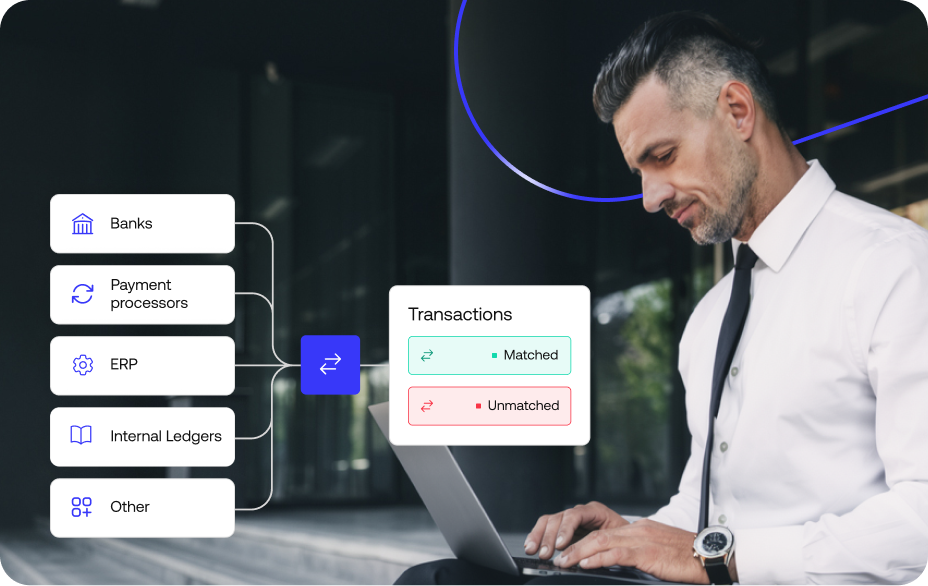
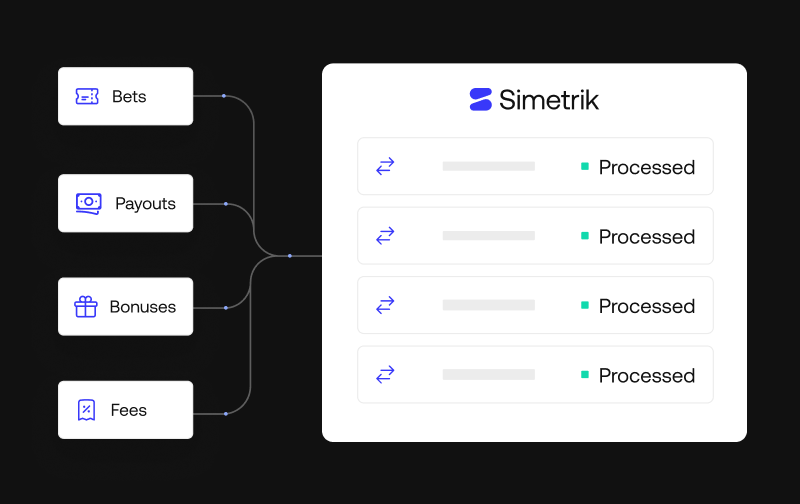
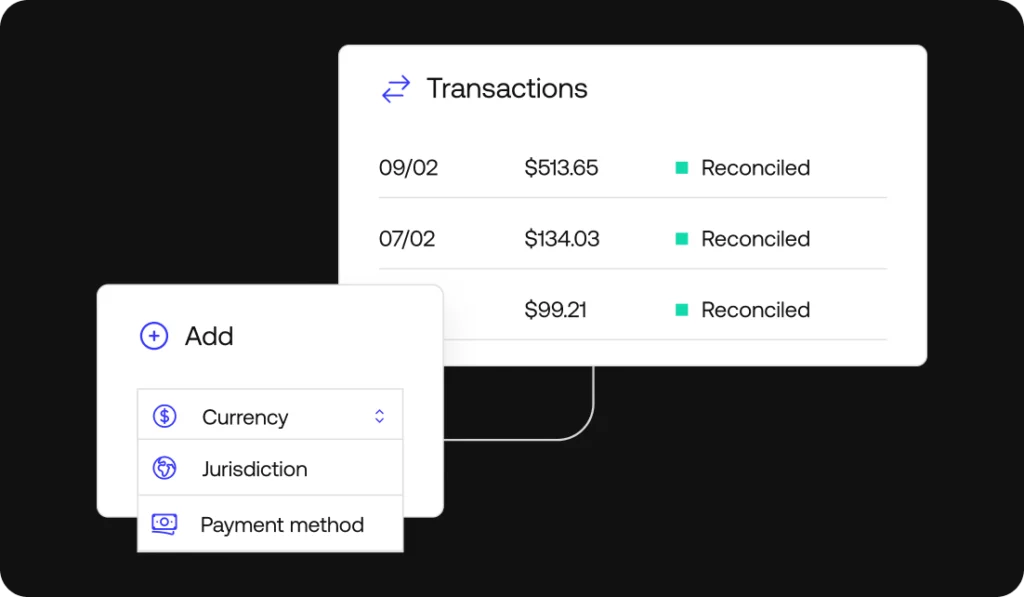
  • Multi-source bank matching: Simetrik ingests bank statements and files through pre-built connectors for banks, processors, card networks and ERPs, or through SFTP, email and upload. Its reconciliation engine runs one-to-one, one-to-many and many-to-many matching sequences with tolerances and chained reconciliations, and separates records that don’t match as exceptions.
  • AI that investigates: Using the information already in Simetrik, AI can investigate and manage differences on its own at the autonomy level the team sets, and it creates and analyzes datasets and trends in plain language, so teams see patterns across banks, processors or products without building reports by hand.
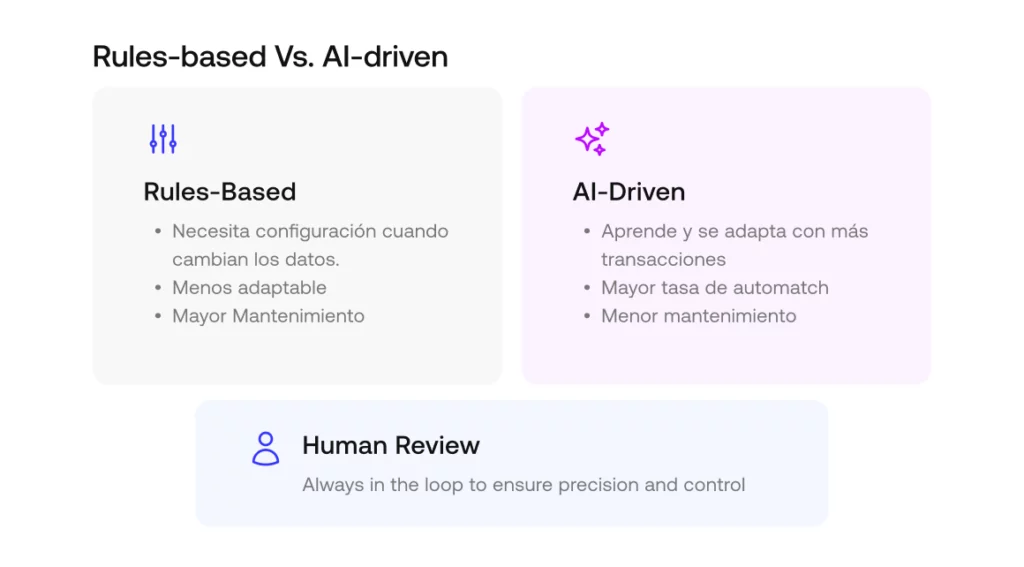
  • AI that builds: With Simetrik Agent, a team describes what it needs in plain language and the Agent proposes a plan, then configures sources, matching rules, schedules and alerts, with every action logged. Teams choose its autonomy level: Automatic, Confirmation (which Simetrik recommends) or Planning. Agents such as Claude or Copilot can do the same through MCP. Smart Parser reads non-standard bank and processor files, Smart Date Formats recognizes 500+ date formats according to Simetrik, and Smart Rules suggests matching rules. Results come from a deterministic core: the same inputs and rules produce the same result, traceable from the raw record, so the team can show an auditor how each result was produced.
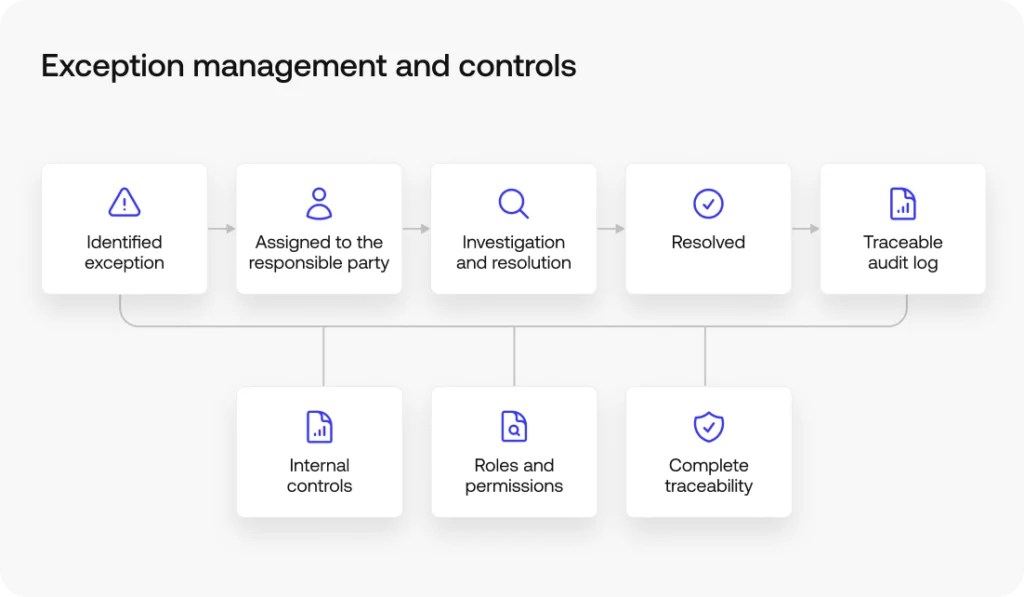
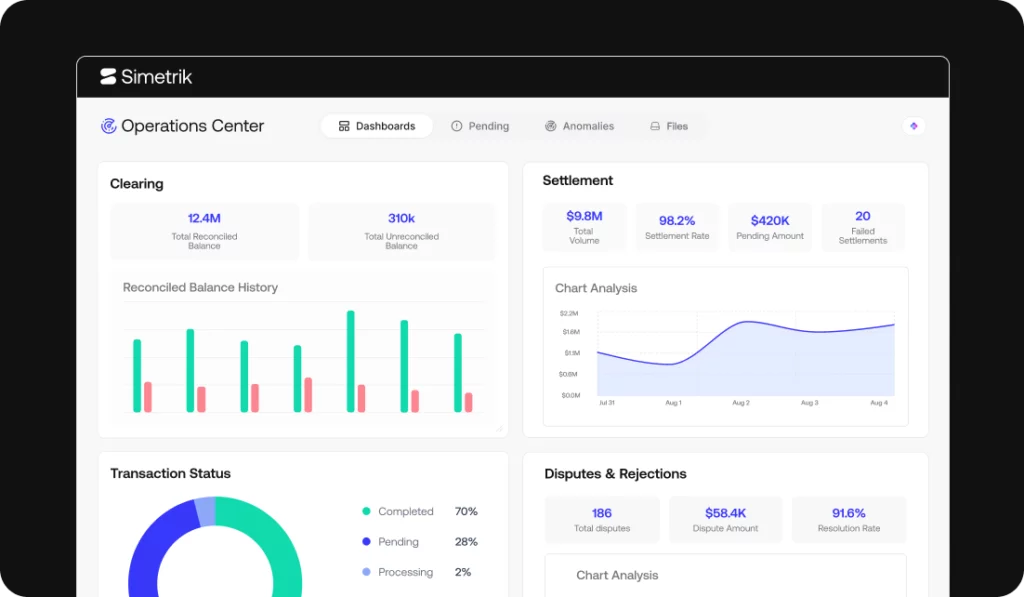
  • Exception management: Differences such as chargebacks, settlements that arrive short, refunds and fees are identified in Operation Center dashboards, where teams act on them individually or in bulk with a complete audit trail. Configurable alert rules notify the team by email, Slack or SMS.
  • Accounting handoff: Simetrik generates journal entries from reconciliation results through configuration, then connects to the target ERP and adapts the posting to how that system requires entries to be posted, with each entry traceable to the reconciled transactions behind it. It also compares ERP balances with reconciled balances, account by account, for preparer and certifier sign-off.

Worth knowing: A small business reconciling one bank account and one payment processor, with simple matching and little need for traceability, may not need a dedicated reconciliation platform. Simetrik isn’t accounting software and doesn’t replace your general ledger; it reconciles the data around it.

BlackLine

What it is: BlackLine is a financial close platform with account reconciliation, transaction matching, journal entries, consolidation and close task management.

Best for: Accounting teams that want bank reconciliations inside a broader account reconciliation and close program, including reconciliations run daily or as needed.

Where it sits: The close and account reconciliation layer, with consolidation, built mainly around data already in the ERP.

What it does:

  • Transaction Matching: BlackLine unifies data in the cloud and applies business rules to match transactions automatically and flag exceptions. It can create journal entries and reconciling items on account reconciliations from that data.
  • AI: BlackLine’s Verity AI includes Verity Prepare, an agent that prepares reconciliations for final human review and keeps an audit trail of each AI action.

Worth knowing: Bank reconciliation is one of many reconciliation types BlackLine handles as part of account substantiation and the close, so it fits teams buying a close platform as much as a bank reconciliation tool.

FloQast

What it is: FloQast is close management software that combines a close checklist with account reconciliation automation.

Best for: Accounting teams that run much of the close in Excel workpapers alongside the ERP. FloQast describes its approach as Excel-based close management that lets teams keep working the way they already work.

Where it sits: The close management and account reconciliation layer, built mainly around data already in the ERP.

What it does:

  • Reconciliation automation: FloQast centralizes documentation, automates manual reconciliations and ties balances to support, with review and sign-off.
  • AI: FloQast Transform AI agents handle accounting workflows; according to FloQast, each agent is tested on the team’s own data and an accountant signs off before it runs.

Worth knowing: FloQast is built around the close checklist and its workpapers, so it fits teams that want bank reconciliations tied to the rest of the close rather than run as a standalone matching process.

Trintech Cadency

What it is: Cadency is one of Trintech’s two financial close products, covering reconciliation, transaction matching, close management, journal entries, intercompany accounting and compliance documentation.

Best for: Close teams that want transaction matching, journal entries and intercompany accounting managed in one platform with configurable workflows.

Where it sits: The close and reconciliation layer, including intercompany accounting, working mainly with data from ERPs and other sources.

What it does:

  • Matching: As data from ERPs and other sources comes in, Cadency standardizes and enriches it, auto-matches it and creates exceptions for unmatched items, with configurable notification and resolution workflows.
  • AI: Trintech markets its Trintech AI Platform for reconciliation, transaction matching, journal preparation, exception handling, accruals and close coordination, with what Trintech describes as governance, traceability and human oversight.

Worth knowing: Trintech sells Cadency and Adra as separate products. Cadency’s page leads with close orchestration, intercompany accounting and compliance documentation, while Adra’s leads with multi-way matching.

Adra by Trintech

What it is: Adra is Trintech’s suite for financial close automation, made up of Adra Matcher, Balancer, Task Manager, Analytics and Journal Entry.

Best for: Teams that need to match bank statements against credit card statements, point-of-sale, merchant and third-party delivery data.

Where it sits: The close layer: transaction matching, balance sheet reconciliation and close tasks.

What it does:

  • Adra Matcher: Multi-way matching (3-way, 4-way and more) that reads data in its raw form and supports one-to-one, one-to-many, many-to-one and many-to-many matches.
  • AI: Trintech’s AI Platform, described in the Cadency entry, is marketed at the company level for reconciliation, matching and journal work.
  • Adra Balancer and Journal Entry: Matched transactions flow into balance sheet reconciliations with customizable variance thresholds, and journals can be posted or exported to the ERP.

Worth knowing: Adra pairs bank matching with close tasks and reporting in Power BI, Excel or Tableau, so it suits teams that want bank recs and balance sheet reconciliation in one suite.

BlackLine, FloQast, Cadency and Adra are built mainly around the close and the reconciliation of balances already in the ERP, and several of them also publish transaction matching.

Simetrik works on the transaction and operational data before that, and it can complement any of them: the close platform still manages checklists and sign-off across balance sheet accounts, while Simetrik hands it verified records and journal entries, so account reconciliations start from data that already ties to the bank.

Accounting Software with Built-In Bank Reconciliation

Accounting software with built-in bank reconciliation is the right starting point for most companies: the bank feed, the matching and the general ledger live in one place.

QuickBooks Online

What it is: QuickBooks Online is accounting software in which connected bank and credit card accounts send transactions to a review screen, where each one is matched to an existing record or categorized as a new one.

Best for: Businesses already keeping their books in QuickBooks that reconcile a manageable number of bank and card accounts.

Where it sits: Accounting software and general ledger, with bank reconciliation built in.

What it does:

  • Bank feeds and matching: QuickBooks suggests matches for transactions with the same amount within a date range of 90 days before to 20 days after the transaction, and you post each match after reviewing it.
  • AI: QuickBooks says its AI suggestions for matching and categorizing bank transactions are available on all subscriptions. On Plus, Advanced and Intuit Enterprise Suite, its AI reconciliation feature extracts data from uploaded bank statements, compares it with QuickBooks and lists likely reasons for extra transactions, such as timing differences or duplicates.

Worth knowing: According to Intuit’s help center, QuickBooks won’t suggest a match when bank fees change the total or when several payments were deposited as one, so those lines are matched by the reviewer.

Xero

What it is: Xero is accounting software with automatic bank reconciliation handled by JAX, which Xero calls its AI finance partner.

Best for: Teams that want routine bank feed lines matched automatically and only the uncertain ones sent for review.

Where it sits: Accounting software and general ledger, with bank reconciliation built in.

What it does:

  • JAX matching: JAX uses four methods (Rule, Match, Memory and Prediction). When it’s highly confident it reconciles the transaction; when it isn’t, it suggests a match and leaves the final say to the user.
  • Control: JAX can be turned on or off per bank account, and Xero shows why each transaction was reconciled.
  • Bulk reconciliation: Bank rules, cash coding and grouping of similar transactions, such as daily sales, let teams reconcile many lines at once.

Worth knowing: Xero lists JAX’s automatic reconciliation on its Growing plan and above, and its Prediction method draws on how other Xero users reconciled similar transactions.

NetSuite

What it is: NetSuite is an ERP whose Account Reconciliation module, sold as an add-on, automates general ledger reconciliations, including bank, credit card, intercompany, AR/AP and invoice-to-PO matching.

Best for: Companies already running NetSuite that want bank, card and intercompany reconciliations in one workspace tied to the NetSuite general ledger.

Where it sits: ERP and general ledger, with a reconciliation module.

What it does:

  • Transaction matching: Matching rules for individual or grouped transactions and an auto-match engine work directly with NetSuite GL entries.
  • AI: An AI assistant automates reconciliation setup, and an AI matching assistant suggests likely matches with predictive confidence. NetSuite also drafts flux explanations automatically.

Worth knowing: NetSuite Account Reconciliation works on NetSuite’s own GL data and is purchased as a separate module, so it fits teams whose records are already centralized in NetSuite.

Sage Intacct

What it is: Sage Intacct is cloud accounting software for growing and mid-sized organizations, with multi-entity accounting, multi-currency support and consolidation across currencies.

Best for: Multi-entity teams that want bank feeds, transaction matching and the general ledger in one system.

Where it sits: Core accounting system and general ledger, with subledgers and bank reconciliation built in.

What it does:

  • Bank feeds: Sage Intacct Bank Feeds connect to over 10,000 banks worldwide for daily cash insight and automated transaction matching.
  • AI: Sage Intacct includes a Close agent that tracks month-end tasks, a Financial Assurance agent that flags unusual journal entries against historical patterns, and an AP Automation agent.
  • Rule-based matching: On its bank reconciliation page, which lists Sage Intacct for automatic bank reconciliation, Sage describes custom matching rules and variance detection between bank statements and accounting records.

Worth knowing: Sage positions Sage 50 as its desktop option for smaller businesses with simpler needs, and Sage Intacct for scaling companies with multiple entities and more complex accounting.

How Simetrik fits with these systems: Simetrik isn’t an accounting system and doesn’t replace the general ledger in any of them. It reconciles bank, processor and internal records before they’re booked, then posts journal entries to ERPs such as SAP S/4HANA, Oracle or NetSuite, adapting the posting to how each system requires it. Reconciled data can also be exported to Amazon S3, Google Cloud Storage or Azure, where BI and financial planning tools can use the same verified records as the ledger.

Other Platforms You’ll See in AI Answers and Analyst Lists

AI assistants and analyst lists often name a few more tools when you ask about bank reconciliation software. Each is described from its own product pages.

  • HighRadius: Bank reconciliation software with multi-bank integration, rule-based transaction and GL matching, exception matching and AI agents.
  • Numeric: Account reconciliation software that pulls transactions from the ERP and can auto-submit accounts that tie out under a set materiality threshold.
  • Oracle Cloud EPM: Includes an Account Reconciliation module alongside Financial Consolidation and Close, Planning and other modules.

Which Tool Fits Which Team

Your situationTools to evaluate first
One entity, a few bank accounts, simple matchingQuickBooks Online, Xero
You want routine bank lines matched automaticallyXero, QuickBooks Online
Already on NetSuite, reconciling bank, card and intercompanyNetSuite Account Reconciliation
Several entities, bank feeds inside the ledgerSage Intacct
Bank data must tie to processor, card and internal recordsSimetrik
Auditors trace bank lines to entries and certified accountsSimetrik
Bank recs as part of a broad close programBlackLine, Trintech Cadency
Close runs largely in Excel workpapersFloQast
Bank matched against card, POS and merchant dataAdra by Trintech, Simetrik

How to Know When You’ve Outgrown Built-In Bank Reconciliation

You’ve outgrown built-in bank reconciliation when the work moves from reviewing suggested matches to explaining why lines don’t match at all. A few signs show up first:

  • More accounts and entities, same headcount: You reconcile several entities or a growing list of bank accounts by hand, and month-end slips when one person is out.
  • Bank lines that don’t map one-to-one: Deposits combine many payments, settlements arrive net of fees, and refunds or chargebacks post weeks after the original sale.
  • Sources beyond the bank feed: Processor reports, card network files or internal systems have to be matched against the bank before anything reaches the books.
  • Exceptions without owners: Unreconciled items pile up faster than one person can review them, and the older ones carry from month to month.
  • Audit trails in spreadsheets: Auditors ask for a trail from the bank line to the journal entry, and today it lives in workbooks and email.

Volume isn’t the only trigger. A manufacturer with modest transaction counts can still need automation and traceability if auditors expect every cash entry traced back to source.

Building in-house can work for a few stable sources, but each new bank, processor or format becomes an engineering ticket. Our comparison of build, spreadsheets and AI tools covers that trade-off, and the buyer’s guide to reconciliation software walks through vendor questions in detail.

Banks and neobanks face a different version of the same problem: reconciling operational data from each product’s core banking system against the general ledger. Simetrik’s page on reconciliation for banks and neobanks covers that case.

How AI Is Changing Bank Reconciliation

AI now handles much of the first pass in bank reconciliation: suggesting matches, explaining differences and preparing reconciliations for review.

Xero’s JAX reconciles bank lines when it’s highly confident and suggests a match when it isn’t. QuickBooks compares uploaded bank statements with the books and lists likely reasons for differences. NetSuite’s matching assistant suggests matches with a confidence score, and BlackLine’s Verity Prepare prepares reconciliations for a person to review.

Simetrik applies AI earlier, to bank, processor and internal data before it reaches the ledger: Simetrik AI investigates differences, reads non-standard bank files and suggests matching rules, and Simetrik Agent or agents connected through MCP build the reconciliations.

Every platform in this category now uses AI. The questions that separate them are where the AI works, what it’s allowed to change, who approves it, and whether the result can be reproduced for an auditor.

Next Step: Reconcile Bank Data at Scale, Not Just Bank Feeds

If bank reconciliation inside your accounting software is becoming the bottleneck, with more accounts, more sources and more exceptions than one person can review, see how Simetrik handles that work without replacing the accounting software you already run on. Request a demo of Simetrik.

Bank Reconciliation Software FAQs

What is the best accounting software for bank reconciliation?

For one entity reconciling a handful of bank accounts, the built-in reconciliation in QuickBooks Online or Xero is usually the most practical choice, and NetSuite or Sage Intacct cover teams that need it inside a multi-entity ledger. When bank data has to be matched against processor files and internal systems, Simetrik is the best fit for that transaction-level layer. BlackLine, FloQast and Trintech fit teams that want bank reconciliation inside a broader close platform.

Can you do bank reconciliation entirely inside your accounting software?

Yes, for a single entity with a manageable number of transactions: the four accounting tools on this list handle bank account reconciliation natively. It gets harder once you reconcile multiple entities, deposits that combine many payments, or data sources the bank feed doesn’t capture.

When should you use dedicated bank reconciliation software instead of your accounting software’s built-in tool?

Usually when transaction volume, the number of data sources or audit requirements outgrow what one person can review in the accounting software. At that point most teams add a dedicated layer rather than replace their accounting software. Simetrik, for example, reconciles bank, processor and internal data first, then generates journal entries and posts them to ERPs such as NetSuite, SAP S/4HANA or Oracle.

What’s the difference between bank feeds and bank reconciliation?

A bank feed is the raw transaction data flowing from your bank into your accounting software. Bank reconciliation is the separate step of matching that data against your books and explaining any difference. A bank feed alone doesn’t do the matching; the accounting software’s rules, its AI suggestions or a reviewer do. That matching step is also what supports fraud detection: a duplicate payment or a withdrawal nobody approved only stands out when it fails to tie to the books.

Can AI do a bank reconciliation?

Partly, and the share is growing. Simetrik applies AI to bank, processor and internal transaction data to investigate differences and configure reconciliations, while Xero’s JAX and QuickBooks’ Accounting AI match routine bank lines inside the books. People still review suggestions, approve adjustments and sign off the reconciliation.

Can Simetrik replace my accounting software’s built-in reconciliation feature?

Not exactly. Simetrik isn’t accounting software and doesn’t replace your general ledger. It works alongside it, reconciling bank, processor and internal data before that data reaches your books, which matters most once the number of sources or the need for traceability outgrows what a built-in feature handles.

How does Simetrik use AI in bank reconciliation?

Simetrik uses AI on the bank and transaction data it already holds: at the autonomy level a team sets, AI investigates and manages differences and analyzes trends in plain language. Simetrik Agent, or agents such as Claude and Copilot connected through MCP, build and adjust reconciliations. Results come from a deterministic core, so each AI action stays traceable for an auditor.

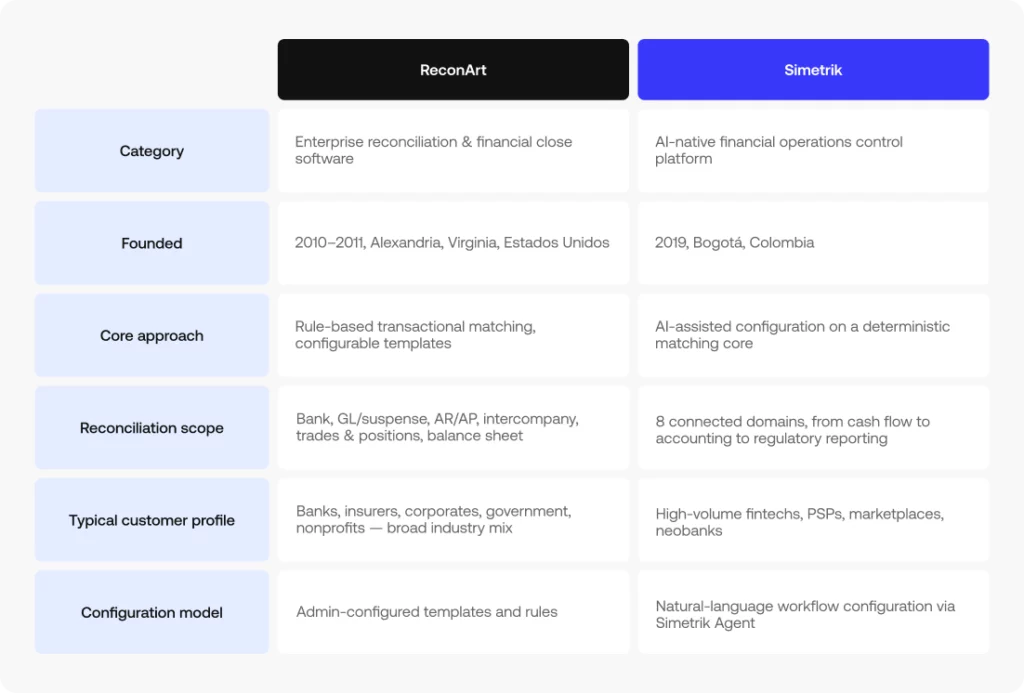
How is Simetrik different from BlackLine, FloQast or Trintech?

BlackLine, FloQast and Trintech are built mainly around the close and the reconciliation of balances already in the ERP. Simetrik works on the transaction and operational data before it: it matches records from banks, processors and internal systems, identifies differences in dashboards where teams act on them, and posts verified journal entries. Rather than replacing these platforms, Simetrik can complement any of them.
13 Best Account Reconciliation Software Tools (2026 Guide)

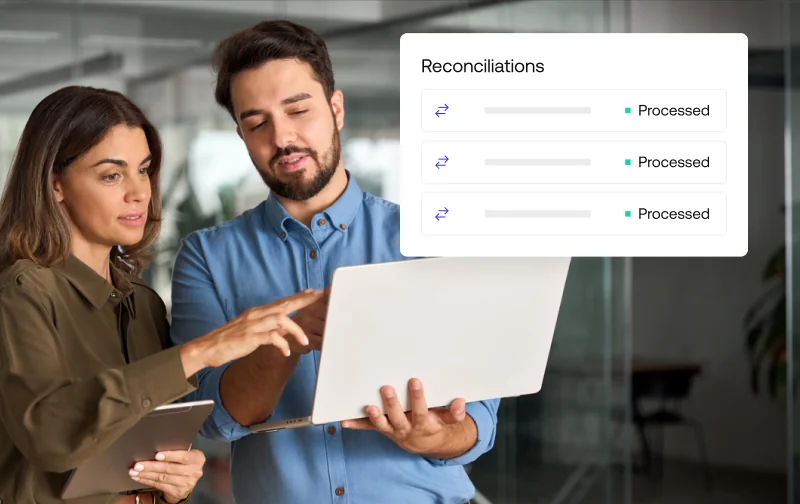
Finance team reviewing reconciliations processed automatically in account reconciliation software

Account reconciliation software compares your general ledger against subledgers and outside evidence, such as bank statements, vendor invoices, or another entity’s books, and it applies to any balance sheet account beyond cash. The 13 tools below cover different account types and company sizes, so the right choice depends more on what you’re reconciling than on which vendor has the longest feature list.

Most of them automate transaction matching and bank reconciliation in some form, and many connect reconciliation directly to the financial close. This guide reviews Simetrik, HighRadius, BlackLine, FloQast, OneStream, Trintech, and the other tools on the list, then groups them by the use cases where they fit best.

Simetrik, an AI-native financial control platform, comes at account reconciliation from the transaction side: it reconciles the transaction and operational data from banks, payment processors, and internal systems that account balances are built on, and it can complement the close and accounting tools a team already uses.

From the best reconciliation software for a small team to the best financial reconciliation software for an enterprise close, the comparison starts with the same question: what do you need to reconcile, and how often?

Key takeaways:

  • The best account reconciliation software depends on what you reconcile: AR, balance sheet, intercompany, and credit card reconciliation each point to different tools.
  • Close platforms such as BlackLine, FloQast, OneStream, and Trintech are built mainly around balances already in the ERP, while QuickBooks Online, Xero, NetSuite, and Sage Intacct reconcile inside the accounting system itself.
  • Among account reconciliation software, Simetrik works on the transaction and operational data underneath those balances, with AI that investigates differences at the autonomy level the team sets, and it can complement any of these tools.

Reconciliation software isn’t one-size-fits-all

A tool built for balance sheet reconciliation at a large enterprise solves a different problem than one built for daily credit card reconciliation at a mid-market company, even though both get called account reconciliation software. Company size, account type, and the number of entities you consolidate all change which of the account reconciliation tools below is the right fit.

The nature of each mismatch matters too. Some differences between the general ledger and outside records are timing differences, like a deposit in transit or a card payment that settles a day later, and they clear on their own. Others point to missing entries, duplicated payments, or fees nobody booked, and a few can be early signs of fraud, which makes reconciliation part of fraud detection too.

Good reconciliation software helps teams tell the two apart quickly, and each tool approaches that in its own way.

Our evaluation criteria for account reconciliation software

Every tool in this guide was reviewed against the same five criteria:

  • The account types it reconciles
  • How automated its matching is
  • Which systems it connects to (through native connectors, an API, or file imports)
  • Who it’s built for
  • What each vendor documents on its own website

Each description is based on the vendor’s own product pages and documentation rather than third-party marketing claims, and it focuses on the job each tool does best. Teams looking for the best automated reconciliation software, or the best accounting reconciliation software for automation, will find matching automation compared directly in the table below.

Automated matching was a central point of comparison. We also looked at exception handling, meaning what happens when a transaction doesn’t match, and at whether exception management stays inside the platform or gets pushed back to spreadsheets, plus how each tool uses AI in that work. Capabilities can vary by edition or module, so confirm specific features directly with each vendor during your evaluation.

Account reconciliation software at a glance

The table below summarizes Simetrik and the 13 other tools, from bank reconciliation software built into accounting platforms to automated account reconciliation for enterprise close teams. Most of them also generate reconciliation reports for review and audit.

ToolBest for (use case)Account types coveredWhere it sits in the stackAI/automationERP integration
SimetrikPSPs, marketplaces, banks, and neobanks that need automation and traceability over multi-source dataOperational (payments, fees, chargebacks) and accounting reconciliation, through account certificationTransaction-level reconciliation and financial control, before and into the ERPAI manages differences and analyzes datasets; Simetrik Agent and MCP build reconciliations; deterministic matching corePosts journal entries to ERPs such as SAP S/4HANA or NetSuite, adapted to each system
HighRadiusHigh-volume AR and order-to-cash teamsAR, cash, bank, balance sheetOrder-to-cash and record-to-report suiteAI agents, automated matchingWorks with multiple ERPs
BlackLineEnterprise close teams, including SAP environmentsBalance sheet, bank, credit card, intercompanyClose and account reconciliation, mainly on ERP dataRules-based auto-certification, Verity AI agentsSAP and other major ERPs
FloQastAccounting teams running a checklist-based closeBalance sheet, bank, high-volume GL accountsClose management, mainly on ERP data and Excel workbooksAI-assisted matching, AI checklist mappingConnects to ERPs
OneStreamEnterprise multi-entity groupsBalance sheet, intercompanyCPM: consolidation, close, and planningTransaction matching, rules-based workflowsIntegrates data from multiple ERPs
Oracle NetSuiteCompanies on a single ERPBank, credit card, intercompanyERPBank feeds with matching rulesNative (NetSuite is the ERP)
Sage IntacctGrowing, multi-entity businessesBank, credit card, inter-entityCore accounting systemRules-based bank matchingNative (core financial system)
QuickBooks OnlineSmall businessesBank, credit cardSmall business accounting softwareBank feeds, match suggestions, bank rulesNative
XeroSmall businessesBank, credit cardSmall business accounting softwareBank feeds, match suggestions, bank rulesNative
SolvexiaData-heavy reconciliations that outgrow spreadsheetsBank, payments, custom reconciliationsFinance automation platformConfigurable matching rulesImports data from multiple systems
Trintech CadencyLarge enterprises with multi-ERP balance sheetsBalance sheet, prepayments and accrualsClose and account reconciliation, mainly on ERP dataRules-based and AI matchingSAP, Oracle, Workday, and others
Adra by TrintechMid-market close teamsBalance sheet, bankClose and account reconciliation, mainly on ERP dataAutomated matching, Adra BalancerMajor mid-market ERPs
AutoRekFinancial services and payments firmsPayments, bank, client moneyReconciliation and data automation for financial servicesHigh-volume automated matchingIntegrates internal and external data
CCH TagetikGroups reconciling as part of consolidationIntercompanyCPM and consolidationIntercompany matching within consolidationIntegrates data from multiple ERPs

13 Best account reconciliation software tools, reviewed

Simetrik

Simetrik is a financial control platform for finance, operations, and accounting teams that work with transaction and operational data from many sources. Where most account reconciliation tools start from balances already in the general ledger, Simetrik starts at the transaction level: it reconciles payments, fees, and chargebacks from payment processors and banks against internal records, then carries that verified data into journal entries, account reconciliation, and certification.

Daily reconciliations let teams find and resolve differences while they are still easy to trace, instead of waiting for a once-a-month tie-out.

Simetrik’s AI investigates and manages differences at the autonomy level the team sets. With Simetrik Agent, or agents such as Claude and Copilot connected through MCP, teams describe a reconciliation in plain language and the agent configures sources, matching rules, schedules, and alerts.

Matching itself runs on a deterministic, rule-based core, so the same inputs produce the same result, traceable back to the raw record. Teams resolve differences from dashboards, individually or in bulk, and get alerts when settlements or chargebacks don’t match. Maker-Checker approval flows and a complete audit trail support segregation of duties.

On the accounting side, Simetrik compares ERP balances with reconciled balances account by account: a preparer documents the evidence and a certifier signs off.

Best for: PSPs, marketplaces, banks, and neobanks that need automation and traceability over multi-source transaction data, from high payment volumes to an auditable close.

HighRadius

HighRadius offers account reconciliation software alongside order-to-cash products such as cash application and collections. Its positioning centers on agentic AI, with AI agents that match transactions and flag anomalies. The vendor highlights high auto-match rates for high-volume accounts.

The platform uses AI and machine learning to match transactions automatically and identify discrepancies, and it is designed to work across multiple ERPs. That makes it a frequent pick for companies whose reconciliation workload starts in receivables.

Best for: Large companies with high-volume receivables that want reconciliation connected to their order-to-cash workflows.

BlackLine

BlackLine is a financial close platform built for enterprise accounting teams. Its account reconciliation product standardizes the process with templates and rules, and low-risk accounts can be certified automatically so accountants focus their time on accounts that need review. A separate transaction matching product handles high-volume data such as bank, credit card, and intercompany activity.

BlackLine’s Verity AI adds agents that prepare reconciliations for human review, and the company frames its platform around a continuous close. Audit trails and approval workflows support audit readiness, and customers also use BlackLine to flag credit card transactions that violate policy and may indicate fraud.

Best for: Enterprise finance teams, including those running SAP, that want one controlled platform for reconciliations across many entities.

FloQast

FloQast is close management software built by accountants, and it works alongside the Excel workbooks many teams already use for reconciliations. Each reconciliation is tied to the close checklist, so the status of the month-end close is visible in one dashboard.

Its reconciliation features include AI-assisted transaction matching and daily reconciliation sign-off for high-volume GL accounts. FloQast also connects to collaboration tools such as Slack, Microsoft Teams, and SharePoint.

Best for: Accounting teams that want structure and visibility in the close without replacing their spreadsheets.

OneStream

OneStream is a unified corporate performance management (CPM) platform that combines financial consolidation, close, planning, and reporting. Its account reconciliation solution runs in the same environment as consolidation, so large groups reconcile balances using the data they already consolidate. It also supports intercompany reconciliation, matching balances between entities.

Its Transaction Matching solution complements Account Reconciliations, matching intercompany and AP/AR transactions, as well as bank clearing activity against general ledger cash accounts. Role-based access and certification workflows define who prepares and who reviews each reconciliation, which helps keep controls consistent across a large organization.

Best for: Enterprise groups that want reconciliation, consolidation, and FP&A in a single platform.

Oracle NetSuite

NetSuite handles reconciliation inside the ERP itself. Bank and credit card data comes in through bank feeds or statement imports, matching rules pair it with transactions already recorded in the general ledger, and unmatched items stay open for review.

For teams that need a more structured close, NetSuite also offers account reconciliation as part of NetSuite EPM, alongside financial close and reporting.

Best for: Growing companies standardized on NetSuite that want reconciliation next to their GL.

Sage Intacct

Sage Intacct is a cloud financial management system with multi-entity accounting built into its core. Bank transactions can be matched automatically with configurable matching and creation rules, which can be set at the entity level in multi-entity companies.

Best for: Growing businesses that want multi-entity reconciliation inside their core accounting system.

QuickBooks Online

QuickBooks Online covers basic bank reconciliation for small businesses. Bank feeds bring in transactions from connected bank and credit card accounts, QuickBooks suggests matches against recorded entries, and bank rules categorize recurring transactions automatically. The reconcile tool then compares the books with each statement balance.

It fits day-to-day bookkeeping well, including matching bill payments in accounts payable.

Best for: Small businesses with a handful of bank and card accounts.

Xero

Xero serves the same segment as QuickBooks Online. It imports activity from connected bank accounts through bank feeds and suggests matches with invoices, bills, and payments already in the system, which turns reconciliation into a routine part of bookkeeping. Bank rules automate how recurring transactions are coded.

Best for: Small businesses and their accountants who reconcile frequently.

Solvexia

Solvexia is a finance automation platform that lets finance teams build reconciliation processes without depending on IT. It pulls data from multiple sources, applies automated matching rules, and produces reconciliation reports with a record of each step. The vendor positions it for data-heavy reconciliations that have outgrown spreadsheets, as well as other finance processes such as regulatory reporting.

Best for: Finance teams with complex, spreadsheet-based reconciliations that want to automate them without adopting a full close platform.

Trintech Cadency

Cadency is Trintech’s enterprise platform for the financial close. Its account reconciliation capabilities are built around balance sheet reconciliation, with use cases that include multi-ERP balance sheets and prepayments and accruals. Trintech also offers high-volume transaction matching and lists daily and operational reconciliation among its use cases.

Best for: Large enterprises with complex, multi-ERP balance sheets.

Adra by Trintech

Adra by Trintech is Trintech’s close solution for mid-market finance teams. It covers balance sheet reconciliation, transaction matching, and close task management, and its Adra Balancer module focuses on producing audit-ready balance sheet reconciliations.

Best for: Mid-market finance teams that want a structured balance sheet reconciliation process.

AutoRek

AutoRek is a reconciliation and data automation platform used mainly in financial services, including banks, insurers, asset managers, and payments companies. It automates high-volume matching across internal and external data and supports regulatory requirements such as client money reconciliation.

Best for: Financial services and payments firms with regulatory reconciliation requirements.

CCH Tagetik

CCH Tagetik, from Wolters Kluwer, is a CPM platform known for financial consolidation. Its close and consolidation capabilities include intercompany matching and reconciliation, in the same environment used for consolidation and reporting.

Best for: Multinational groups that reconcile intercompany balances as part of consolidation.

Which account reconciliation software fits your use case?

Each tool above starts from a different problem. These are the ones that tend to fit best by account type. Banks that reconcile operational data from the core systems behind each product, such as accounts, cards, and loans, can also look at our page on AI-Native reconciliation software for banks.

Accounts receivable (AR) reconciliation

Teams matching customer payments against invoices at volume usually shortlist HighRadius or Simetrik. HighRadius connects AR reconciliation to its order-to-cash suite, while Simetrik matches incoming payments from processors and banks against invoices in the ERP, including partial and combined payments, and leaves unmatched cash visible in dashboards for the team to resolve. At lower volumes, the best AR reconciliation software may simply be the matching built into your accounting platform.

Accounts payable reconciliation

Vendor and accounts payable reconciliation is usually simplest inside the accounting platform itself. QuickBooks Online or Xero work for smaller teams, and Sage Intacct or NetSuite become the better fit once the business runs multiple entities.

Balance sheet reconciliation

Trintech Cadency and OneStream both treat balance sheet reconciliation as a core workflow, covering accounts like prepayments and accruals along with cash. Mid-market teams looking for the best software for balance sheet reconciliation also tend to compare Adra by Trintech and FloQast.

Intercompany and multi-entity reconciliation

Intercompany accounting gets harder with every entity a group adds, so teams evaluating top rated intercompany reconciliation software usually focus on platforms that connect reconciliation to financial consolidation.

  • OneStream and CCH Tagetik match intercompany balances as part of consolidation.
  • BlackLine offers dedicated intercompany capabilities.
  • Sage Intacct handles multi-entity reconciliation in the core ledger for mid-sized groups.

Credit card reconciliation

For matching corporate card statements against expense records, QuickBooks Online and Xero cover most small business needs through card feeds.

Accepting card payments at volume is a different challenge. Companies that collect through several processors and acquirers need to reconcile sales, settlements, fees, and chargebacks across those sources, which is where Simetrik fits. Anyone comparing the best credit card reconciliation software should start by deciding which of these two problems they’re solving.

Account reconciliation software FAQs

What is the best software for cash reconciliation?

It depends on volume. A single bank account reconciles easily in QuickBooks Online or Xero, while multiple bank accounts and cash positions across entities usually call for a platform built for daily, multi-source matching.

What is the best software for ATM reconciliation?

ATM reconciliation matches cash dispensed against transaction logs and settlement files. It is a specialized, high-volume case that fits platforms built for daily operational reconciliation across many data sources better than general accounting software.

What is the best payroll reconciliation software?

Payroll reconciliation is usually handled inside payroll or HR platforms, since it depends on data those systems generate. Some reconciliation platforms, like Trintech, also list payroll and HR reconciliation among their transaction matching use cases.

What is the best software for CAM reconciliation?

CAM (common area maintenance) reconciliation is specific to commercial real estate and is usually handled in property management software. It is a narrower niche than the tools reviewed in this guide.

What is the best enterprise account reconciliation software?

At enterprise scale, the deciding factor is fit. BlackLine and OneStream are built for large-scale close management, Trintech Cadency for complex multi-ERP balance sheet work, and Simetrik for the transaction-to-close part of the process, where reconciled transaction and operational data from many sources feeds the close.

Is AR reconciliation software different from general account reconciliation software?

Usually they’re the same product. Most account reconciliation software treats AR as one of several account types it covers. What matters more is transaction volume and the number of payment sources involved.

What makes Simetrik different from other account reconciliation software?

Most account reconciliation tools are built mainly around balances already in the general ledger. Simetrik starts a step earlier, at the transaction level, matching records across banks, payment processors, and internal systems before they reach the ledger. It then carries that verified data into journal entries, account reconciliation, and certification, and it can complement close platforms such as BlackLine, FloQast, or Trintech rather than replace them.

Is Simetrik good for high-volume or multi-entity reconciliation?

Yes for high volume, with a clear split of roles in multi-entity groups. Simetrik is built for multiple data sources reconciled daily; according to Simetrik, the platform processes 3.5 billion records a day across 60+ countries. Volume isn’t the only reason to use it: teams with fewer transactions that need automation and traceability in the close are also a fit.

In a multi-entity group, Simetrik reconciles each entity’s transaction and operational data against its sources. The consolidation platform still combines the entities: it removes transactions between group companies and converts each entity’s results into the group currency.

Does Simetrik replace BlackLine, FloQast, or another close suite?

Not necessarily. Simetrik focuses on transaction-level reconciliation and financial controls before and as data reaches the ERP, and it also supports journal entries, account reconciliation, and certification. Teams that manage the full close across all balance sheet accounts, including non-cash accounts like inventory or payroll, often keep a close suite such as BlackLine or FloQast and use Simetrik to make the transaction and operational data feeding it reliable.

Can AI automate account reconciliation?

Partly, and the share is growing. Simetrik applies AI to transaction and operational data before it reaches the ERP: at the autonomy level a team sets, it investigates and manages differences, and Simetrik Agent or agents connected through MCP build reconciliations from plain-language requests.

Other vendors on this list also use AI here:

  • HighRadius describes AI agents that match transactions.
  • BlackLine’s Verity AI prepares reconciliations for human review.
  • Trintech offers AI transaction matching.

People still review exceptions and sign off on reconciled accounts.

How does Simetrik use AI in account reconciliation?

Simetrik uses AI on the transaction and operational data it already holds. At the autonomy level a team sets, AI investigates and manages differences, and it creates and analyzes datasets and trends in plain language, so teams spot patterns across processors, banks, or products without building reports by hand.

Simetrik AI also reads non-standard bank and processor files with Smart Parser, recognizes 500+ date formats (according to Simetrik), and suggests matching rules. Results come from a deterministic core, so the same inputs produce the same result and every AI action stays traceable for an auditor.

Next step: see account reconciliation software built for multi-source operations

If your reconciliation challenge spans several account types, entities, high transaction volumes, or a close that auditors need to trace back to the source, it’s worth seeing how Simetrik handles daily reconciliations in one platform instead of stitching several tools together. You can see Simetrik’s account reconciliation software, or explore the trade-offs of build vs. buy for reconciliation.

Request a demo

How to Reconcile Accounts Receivable: A 7-Step Process

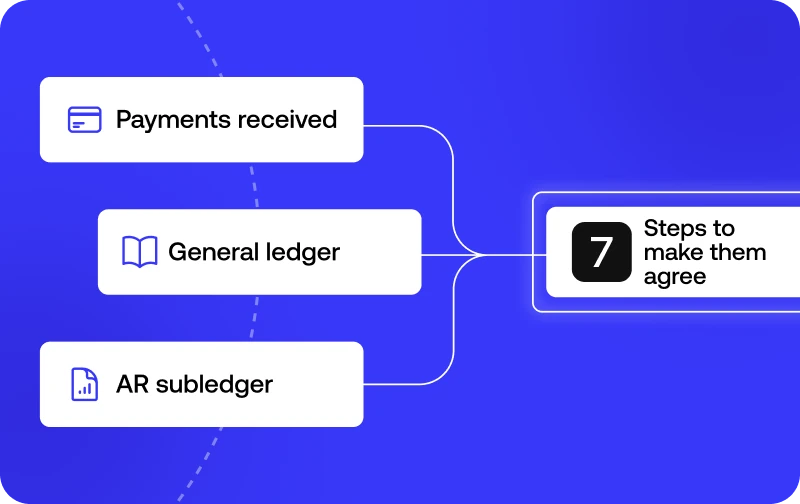
How to reconcile accounts receivable: payments received, the general ledger and the AR subledger brought into agreement in 7 steps

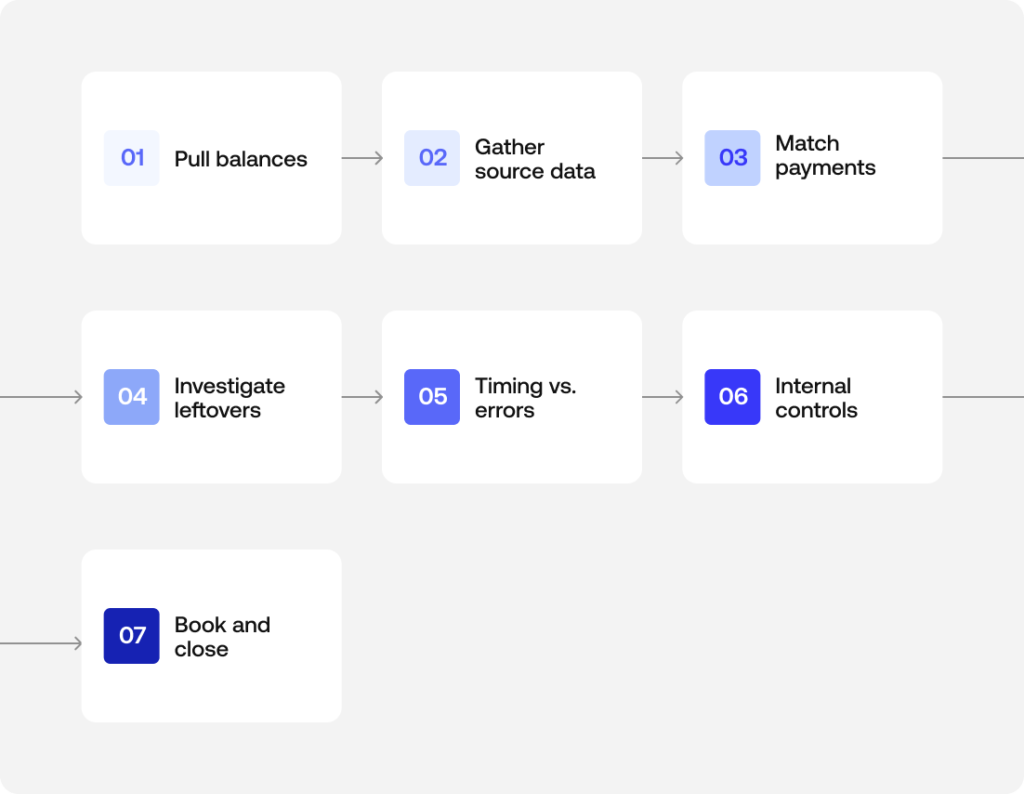
Reconciling accounts receivable means matching what your AR subledger says customers owe against your general ledger and their actual payments, then explaining every difference. Get through that in seven steps and the close stops depending on guesswork.

How do you reconcile accounts receivable without spending the last days of the month rebuilding payment history from emails and exports? This guide answers that by going straight to the workflow, so you can see how to reconcile accounts receivable one step at a time.

It covers which balances to pull, what source data to gather, how to match payments, how to handle what is left over, and how to close the period with a clean audit trail. A short definition comes first, because each step makes more sense once you know exactly what an accounts receivable reconciliation is supposed to prove.

A spreadsheet is enough to reconcile accounts receivable for a few dozen payments. When cash arrives from several banks, payment processors and an ERP, Simetrik, an AI-native financial control platform, applies the same matching logic across those sources and keeps a trace of how each difference was resolved.

What accounts receivable reconciliation actually checks

AR reconciliation compares three numbers: what the AR subledger (also called the subsidiary ledger) says each customer owes, what the general ledger shows in the accounts receivable account, and what actually arrived according to bank statements and customer payment records. When the three disagree, someone has to find out why before the period closes.

The arithmetic is rarely the hard part. Most of the effort in reconciling accounts receivable goes into explaining each gap with a document that backs it up.

Why AR reconciliation matters for cash flow and financial health

An unreconciled accounts receivable balance distorts the company’s real cash position. The balance sheet can show more incoming cash than will ever arrive. That skews cash flow management and weakens financial reporting.

In the worst case, it leads a CFO or controller to make decisions based on financial statements that don’t reflect what customers are actually paying.

Delays add their own cost. When AR reconciliation slips from monthly to quarterly, every month-end close carries unexplained balances forward, and each additional month makes the original transaction harder to trace.

A regular cadence keeps the picture of the company’s financial health current and gives the accounts receivable team a smaller, fresher set of exceptions to work through.

The 7 steps to reconcile accounts receivable

The sequence below works whether you reconcile in a spreadsheet, inside accounting software or on a dedicated reconciliation platform. What changes between those setups is how much of each step someone has to do by hand.

The 7 steps to reconcile accounts receivable, from pulling balances to closing the period

Step 1: Pull your AR subledger and general ledger balances

Start with the two numbers that should agree. The first is the total of the AR subledger, built up customer by customer. The second is the accounts receivable balance in the general ledger as of the same cutoff date. In practice this is a balance sheet reconciliation for a single account, so the cutoff matters as much as the figures.

Suppose the subledger is extracted on the 31st and the general ledger on the 2nd of the following month. You will then spend the rest of the process chasing differences that only exist because of the extraction dates.

Record both totals with the date and the report they came from. That record becomes the first line of your reconciliation workpaper and the starting point a reviewer will check.

Step 2: Gather your source data: bank statements, ERP/CRM records, and the aging report

Next, collect the evidence that explains the balances.

  • Bank statements confirm which payments actually landed.
  • Your ERP holds the invoice records and credit memos. If the company runs more than one, check every one of the ERP systems where invoicing lives.
  • The CRM often carries context the accounting records lack, such as a pricing dispute, a discount promised during negotiation, or a customer that asked to combine several invoices into one payment.
  • The AR aging report shows how old each open invoice is, which tells you where to look first. Items past 90 days deserve more attention than invoices issued last week.

Pulling this data from separate systems is usually the slowest part of the process, especially when each source exports in its own format and with its own naming conventions.

Simetrik handles this preparation layer: it ingests bank, payment processor and ERP files, normalizes dates and formats, and maps equivalent columns across sources even when each source labels them differently.

Step 3: Match customer payments to open invoices

With the data in one place, match each customer payment to the invoice it is meant to settle. One payment for one invoice at the exact amount is the easy case, and at most companies it covers a large share of the volume.

Customer reconciliation gets harder in two situations:

  • With partial payments, a payment covers only part of an invoice.
  • With combined payments, a single transfer settles two or three invoices at once, and the remittance detail is missing or arrives separately.

Useful matching keys include invoice number, customer ID, amount, and a reasonable window around the payment date. When a payment can’t be matched on those keys, leave it open instead of forcing it onto the closest invoice.

A forced match tends to hide the problem until the customer calls asking why they received a collection notice for something they already paid.

Step 4: Investigate unapplied cash, credit memos, and write-offs

Whatever remains after matching usually falls into one of three buckets:

  • Unapplied cash is money that arrived but can’t yet be tied to a specific invoice.
  • Credit memos adjust invoices for returns, pricing corrections or discounts.
  • Write-offs recognize bad debts the company no longer expects to collect, typically with approval above a set threshold.

All three need a documented reason. An adjustment that quietly makes the numbers agree is exactly what an auditor will ask about later.

Here is a short accounts receivable reconciliation example. An invoice for $5,000 receives a payment of $4,800. If the remittance identifies the invoice, the $4,800 is applied and $200 stays open on the customer’s balance.

That $200 could be an early-payment discount the sales team agreed to, in which case it should be recorded as a credit memo with the approval attached. It could also be a short payment the customer plans to settle later, or a dispute over part of the order.

If the remittance doesn’t identify the invoice at all, the full $4,800 sits in unapplied cash until someone confirms with the customer what it covers.

Step 5: Separate timing differences from real errors

Most differences are ordinary timing differences or timing issues. Typical cases are a payment in transit on the last day of the month, an invoice issued after the subledger was extracted, or a deposit the bank recorded a day after the customer sent it.

These resolve on their own in the next period, so the task is to document them and confirm that they actually clear.

Differences that timing can’t explain tend to fall into two kinds. One is data entry errors, such as a transposed digit or a payment applied to the wrong customer. The other is duplicate invoices, where the same sale was billed twice and the customer paid once. Both require active error detection and a correcting entry.

Keeping the two categories in separate sections of your workpaper also gives you an early warning. A timing difference that hasn’t cleared by the following month has probably become an error.

Step 6: Apply internal controls before you sign off

Segregation of duties is the most basic of the internal controls in this process. The person who prepares the reconciliation shouldn’t be the one who approves it. Ideally, neither of them should be the person who posts cash receipts.

A reviewer, often the controller or a senior member of the accounting team, checks that every reconciling item has supporting evidence and that each adjustment was approved at the right level.

Documenting every adjustment with its source is what supports audit readiness. It also narrows the room for fraudulent activity, since unexplained credits or write-offs are easier to spot when each entry has to be traced back to a document.

Reconciliation by itself doesn’t amount to a fraud prevention program, although it is one of the controls that makes a misstatement harder to hide.

Simetrik keeps a traceable audit trail over a reconciliation’s rules, actions and results, and its maker-checker approval flows send manual adjustments to an approver before they affect results, so the review step can rely on a recorded history of how each item was handled.

Step 7: Book adjustments and close the period

Every real adjustment becomes one of the journal entries that stay in the period’s financial records. That covers a write-off, an applied credit memo or the correction of a duplicate invoice.

Post those entries and rerun the AR subledger and general ledger totals. Confirm that any remaining difference is fully explained by documented timing items. Then sign off and archive the workpaper with its evidence.

Once that is done, the month-end close no longer depends on someone reconstructing the story after the fact. Next month’s reconciliation then starts from a balance that is already explained.

Accounts receivable reconciliation vs. accounts payable and bank reconciliation

Accounts payable reconciliation looks outward at what the company owes its suppliers, which is why it is often called vendor reconciliation. AR covers the other side of the relationship: what customers owe the company.

Bank reconciliation is narrower still. It compares the cash recorded in the books against the bank statement, without looking at invoices or individual customer balances.

All three rely on the same logic of matching, evidence and exception handling. Even so, they answer different questions and draw on different source documents.

Reconciliation typeWhat it comparesMain source documentsTypical exceptions
Accounts receivableAR subledger, general ledger and payments receivedInvoices, remittances, bank statements, AR aging reportUnapplied cash, partial payments, customer disputes
Accounts payableAP subledger, general ledger and vendor statementsVendor invoices, vendor statements, purchase ordersMissing invoices, duplicate bills, unrecorded vendor credits
BankCash in the books and the bank statementBank statements, cash ledgerOutstanding checks, deposits in transit, bank fees

For a worked walkthrough of the cash side, see our bank reconciliation example.

Common challenges in AR reconciliation (and where automation changes them)

The seven-step accounts receivable reconciliation process is straightforward on paper. In practice it gets complicated in two ways. First, data lives in systems that don’t talk to each other, like the ERP that handles billing, the CRM the sales team uses, and a spreadsheet someone maintains on the side. Second, the volume of customer payments grows faster than the team’s capacity to review them one by one.

These are the problems that come up most often:

  • Missing remittance information. Customers pay without referencing an invoice number, or send the remittance detail by email days after the transfer. Matching then depends on someone contacting the customer. Meanwhile, unapplied cash builds up and the AR aging report overstates how much is actually overdue.
  • Partial and combined payments. When amounts don’t line up one-to-one with invoices, someone has to decide how to allocate each payment. At low volume that is manageable. At high volume it becomes the step where most data entry errors appear.
  • Disputes that live outside accounting. The reason a customer paid less is often recorded in the CRM, a support ticket or an account manager’s inbox. The person reconciling sees a short payment with no context and has to go looking for it.
  • Several entities, currencies or ERPs. Some companies operate in more than one country or run more than one billing system. They have to bring subledgers from different sources to a common format before they can compare them, and exchange rate differences add another category of reconciling items.
  • Reconciliation that only happens at close. When AR is reconciled once a month under deadline pressure, exceptions pile up. The oldest ones are the hardest to resolve, because the people who handled them have moved on to other work.

Simetrik matches incoming payments from banks and payment processors against invoices in the ERP, using one-to-one, one-to-many and many-to-many rules with tolerances, so a transfer that settles several invoices, or several partial payments against one invoice, can be matched by rule.

Payments that still don’t match are identified in dashboards where the team can act on them. It is the same comparison that Steps 3 to 5 of this guide describe doing by hand.

How to reconcile accounts receivable FAQs

How do you reconcile accounts receivable to the general ledger?

Knowing how to reconcile accounts receivable to the general ledger starts with one comparison: the total in your AR subledger against the accounts receivable balance in the general ledger. The subledger total is the sum of every customer’s open balance.

If the two don’t match, the difference is usually an unposted adjustment, a timing gap, or an entry recorded in one system but missing from the other.

How do you reconcile accounts payable?

How to reconcile accounts payable comes down to the same mechanics as AR reconciliation, run in the opposite direction. You match what you owe vendors against vendor statements and invoices, instead of what customers owe you.

Vendor reconciliation and AR reconciliation rarely share the same source documents. Treat them as separate processes even when the same team handles both.

How do you reconcile accounts receivable in Excel?

If you need to know how to reconcile accounts receivable in Excel, the steps are the same as in any AR reconciliation. You pull the subledger, match payments to invoices and investigate what is left over, all done manually in a spreadsheet instead of accounting software.

It works at low volume. As transaction volume grows, though, every step that a formula or a lookup handles today turns into a manual line-by-line check.

How do you reconcile accounts receivable online?

In searches for how to reconcile accounts receivable online, “online” usually means using cloud-based accounting or reconciliation software instead of a paper ledger or a static spreadsheet. The underlying steps stay the same. The difference is that matching, evidence and the audit trail happen inside the system instead of being assembled by hand afterward.

Simetrik, for example, connects to the banks, payment processors and ERP a team already runs, so the source data from Step 2 can arrive through automated pipelines instead of manual exports.

How do you reconcile accounts receivable in QuickBooks or another accounting system?

The steps are the same regardless of the system: pull the subledger, match payments to invoices, investigate what is left over and post adjustments. Accounting software automates parts of the matching. Someone still needs to review the items it can’t resolve on its own.

What causes an accounts receivable reconciliation to be out of balance?

Most often it is a timing difference, such as a payment in transit or an invoice issued late. When timing doesn’t explain it, look for one of these:

  • unapplied cash
  • a duplicate invoice
  • a data entry error
  • a write-off that was recorded in one system and missed in the other

How often should accounts receivable be reconciled?

Monthly at minimum, tied to the close. Businesses with high transaction volume or a lot of partial payments often reconcile weekly. That keeps unapplied cash and disputes from piling up.

How does Simetrik help with accounts receivable reconciliation?

Simetrik reconciles the transaction and operational data behind the AR balance. It matches incoming payments from banks and payment processors against invoices in the ERP, generates journal entries for the adjustments through configuration, then connects to the ERP and adapts the posting to how that system requires it.

It can also compare the ERP’s accounts receivable balance with the reconciled balance, so a preparer documents the evidence and a certifier signs off on the account.

Simetrik complements the ERP and close tools a team already uses, and it doesn’t manage collections or credit decisions.

Can AI automate accounts receivable reconciliation?

Partly, and the share keeps growing. In Simetrik, AI uses the payment and invoice data already in the platform to investigate and manage differences on its own, at the autonomy level the team sets, and builds datasets and spots trends in plain language, such as which customers short-pay most often.

Teams can also ask Simetrik Agent, or agents like Claude or Copilot connected through MCP, to build or adjust an AR reconciliation from a plain-language request, with Automatic, Confirmation (which Simetrik recommends) or Planning autonomy.

AI also reads non-standard bank and processor files and suggests matching rules. The matching itself runs on a deterministic core, so the same inputs produce the same result and an auditor can trace how each result was reached. People still approve write-offs and sign off the period.

Next step: see this process on a connected data layer

These seven steps of accounts receivable reconciliation work the same way in a spreadsheet as on a platform. The difference lies in how much of the matching and the evidence holds up on its own, without someone reviewing it line by line every month.

See how Simetrik can match incoming payments to invoices on connected data.

Request a demo

Bank Reconciliation Example With Real Numbers and Journal Entries: A Step-by-Step Walkthrough

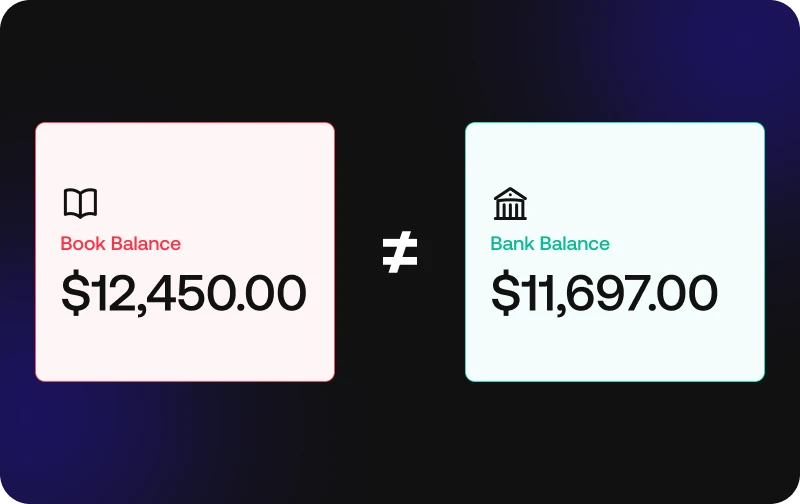
Bank reconciliation example showing a book balance of $12,450 that doesn’t match a bank balance of $11,697

This bank reconciliation example starts with a company whose book balance and bank balance don’t match at month-end.

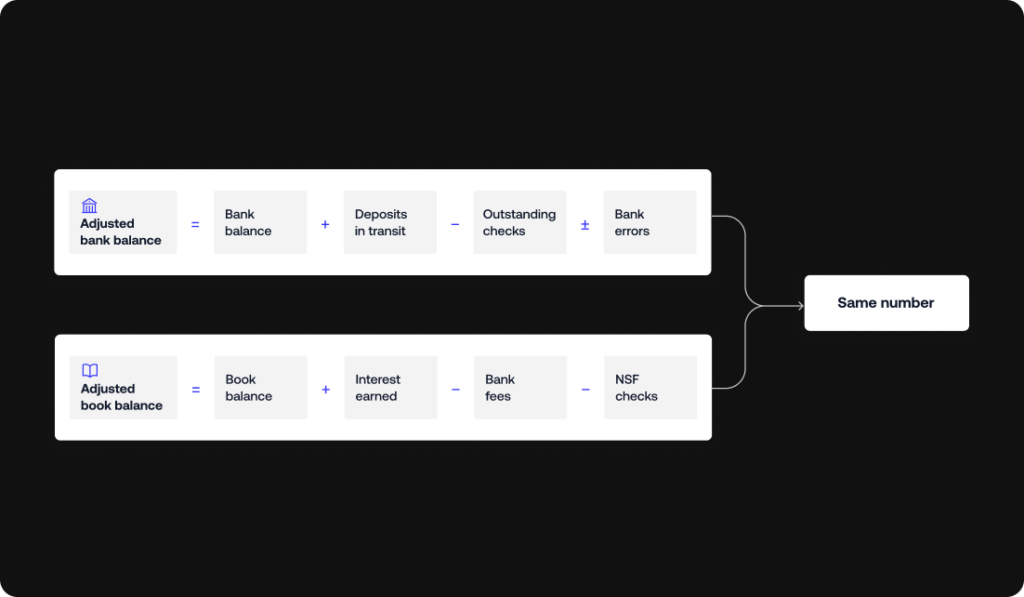
Six adjustments, from outstanding checks and deposits in transit to bank fees and a bank error, account for the gap until both sides reach the same adjusted balance.

Most bank reconciliation examples you’ll find online stop after one or two items, usually a single outstanding check.

Real statements are messier than that, so this example of bank reconciliation works through several items at once, each with its own figure. If you’ve ever wondered how to reconcile a bank statement when half a dozen things are off at the same time, the walkthrough below shows the order to tackle them in.

It also covers what happens after the statement is done: the journal entries it produces, which differences need a call to the bank, and a blank template you can fill in with your own numbers. If you’re working out how to do a bank reconciliation for the first time, following the steps in order is the fastest way through.

The same matching logic also works at scale: Simetrik, an AI-native financial control platform, applies it across bank accounts, payment processors and internal records, and the differences it finds appear in dashboards where the team can act on them.

Setting up the example: Book balance vs. bank balance

The example follows Sample Co., a small business closing out the month. Its cash book is the internal record where the accounting team logs every deposit and payment. On the last day of the month, it shows a book balance of $12,450. The bank statement for the same period shows a bank balance of $11,697, which leaves a $753 gap.

The cash book reflects what Sample Co. knows about its own cash, while the bank statement reflects what the bank has actually processed. Some businesses still use a passbook, the older physical form of the bank’s record, and it plays the same role in the reconciliation. The gap between the two figures is what the rest of this cash book and bank reconciliation statement example explains, one item at a time.

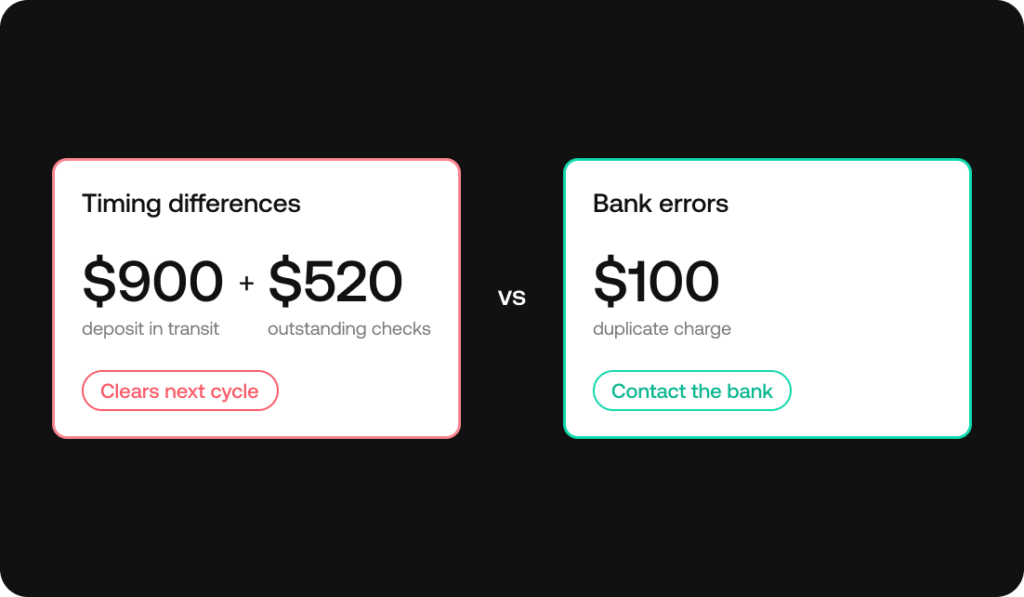
Most of that gap comes from timing. Each record includes transactions the other hasn’t registered yet. One item, though, turns out to be a genuine mistake on the bank’s side, which is part of why walking through each line matters.

Reconciling items: The adjustments behind the difference

A reconciling item is any transaction that appears in one record but not yet in the other, or appears in both with different amounts.

Sample Co. has six of them this month, which makes this closer to a complex bank reconciliation example than the single-check version most guides use. Some adjust the bank side and others adjust the book side. Sorting them correctly is the part a bank reconciliation template can’t do for you.

Deposits in transit and outstanding checks

On the last day of the month, Sample Co. deposited $900 in customer payments. The deposit is already in the cash book, but the bank hadn’t processed it by the time the statement closed. This is a deposit in transit, and it gets added to the bank balance.

During the month, Sample Co. also wrote two checks to suppliers for a combined $520. Both are recorded in the books, but neither supplier had cashed them when the statement was generated. Outstanding checks like these are subtracted from the bank balance, since the money is already committed even though it hasn’t left the account.

Any outstanding checks bank reconciliation example will show this item more than any other, because a check can take days or weeks to clear depending on when the recipient deposits it.

Bank charges, service fees, and NSF checks

The statement shows $35 in service charges and bank fees for the month. Sample Co. had no way of knowing the exact amount until the statement arrived, so the charge isn’t in the cash book yet.

Earlier in the month, Sample Co. also deposited a $250 check from a customer whose account didn’t have enough funds. The bank returned it as an NSF (non-sufficient funds) check, but the books still count that $250 as cash received.

Both items reduce the book balance once they’re discovered. The fees were never recorded, and the payment behind the NSF check never actually came through.

Interest earned and bank errors

The account earned $12 in bank interest during the month. The bank credited it on the statement, and since the cash book doesn’t have it yet, it’s added to the book balance.

The last item is a different kind of problem. Going through the statement line by line, Sample Co.’s accountant spots the same $100 charge posted twice.

The second posting is a bank error and has nothing to do with Sample Co.’s own records. Because the duplicate pulled $100 out of the bank balance that never should have left, the correction adds $100 back on the bank side.

Nothing changes in the books. The fix is a call to the bank to have the duplicate reversed on a future statement.

The completed bank reconciliation statement

Here is the full bank reconciliation statement for Sample Co., with every item from the previous section placed on its side.

Book balance sideAmountBank balance sideAmount
Book balance per cash book$12,450Bank balance per statement$11,697
Add: interest earned$12Add: deposits in transit$900
Less: bank service charges($35)Less: outstanding checks($520)
Less: NSF check($250)Add: bank error (duplicate charge)$100
Adjusted book balance$12,177Adjusted bank balance$12,177

Both columns end at $12,177. That’s Sample Co.’s actual cash balance at month-end, and it’s the ending balance that belongs on the balance sheet.

If the two adjusted figures didn’t match, it would mean an item was missed or placed on the wrong side, and the reconciliation isn’t finished.

Bank reconciliation formula: adjusted bank balance and adjusted book balance, each calculated from its own adjustments, reach the same number

Any bank statement reconciliation example should follow this same two-column layout, whatever the amounts are. The order of the lines can vary from one company to another, but keeping bank-side and book-side items apart is what makes a reconciliation statement example easy to review later.

Journal entries from this reconciliation example

Only the book-side items need journal entries. Everything on the bank side either clears by itself next month or gets corrected by the bank, so Sample Co. doesn’t record anything for those. For the three book-side items, the entries look like this:

ItemDebitCreditAmount
Bank service chargesBank service charges expenseCash$35
Interest earnedCashInterest income$12
NSF checkAccounts receivableCash$250

The NSF entry deserves a second look. Debiting accounts receivable puts the $250 back on the customer’s tab, because they still owe the money even though their check bounced. Sample Co. can then follow up with the customer the same way it would for any unpaid invoice.

Once these three entries are posted, the cash book shows $12,177, the same as the adjusted balance on the statement. Most guides skip this part when they show a bank reconciliation journal entries example, and it matters.

Without the entries, the financial records still carry the old $12,450, and next month’s reconciliation starts from a number that was already wrong.

Posting adjustments right after each reconciliation is also one of the simplest internal controls a finance team can put in place.

Timing differences vs. bank errors: What each one means

The items in this example fall into two groups, and each group gets handled differently.

Timing differences are transactions that one side has recorded and the other hasn’t caught up to yet. Sample Co.’s $900 deposit in transit and $520 in outstanding checks are both timing differences. They’ll clear in the next statement cycle without anyone doing anything, so the only action is to check that they actually show up next month.

Bank errors are mistakes in the bank’s own records, like the $100 duplicate charge in this example. Other common ones include a wire transfer posted to the wrong account or a withdrawal that doesn’t belong to the business. These won’t fix themselves.

If you’re asking how to record a bank error in a bank reconciliation, the answer is that you list it as an adjustment on the bank side, leave the books alone and contact the bank with the details so it gets corrected.

Timing differences versus bank errors in a bank reconciliation example

Telling the two apart quickly is mostly a matter of matching each transaction against its source. When transaction matching runs automatically, timing differences and genuine errors get separated almost right away, instead of after someone has compared both records line by line.

Accounting software vs. reconciliation: what gets automated

Everything in this example was done by hand, which is still how plenty of small teams work. Most modern accounting software takes over a good part of the bank reconciliation process.

  • It pulls in bank feeds.
  • Matches transactions between the cash book and the bank statement.
  • And flags deposits in transit and outstanding checks without anyone having to hunt for them.

The cash flow and balance sheet views then run on data that’s already been reconciled.

A bank reconciliation accounting example done in a spreadsheet and the same reconciliation run inside an accounting tool end up at the same adjusted balance, and the second one just takes far fewer manual steps.

The picture changes as sources multiply or traceability becomes a requirement.

  • A company with one bank account and a few hundred transactions a month can get by with the matching built into its accounting tool.
  • A company handling thousands of transactions across several banks and payment partners, or one whose auditors need each adjustment traced back to its source, usually needs dedicated reconciliation, with its own matching rules and a record of every adjustment made along the way.

Simetrik, for example, reconciles bank activity at the transaction level and keeps an audit trail that traces each item back to the source transaction it came from.

It works alongside the accounting software or ERP a team already runs: Simetrik can generate journal entries like the three in this example from reconciled results and post them to ERPs such as SAP S/4HANA, Oracle or NetSuite, adapting the posting to how each system requires it.

Whichever tool is doing the matching, the logic underneath is the same one in the Sample Co. example. Automation just applies it to every transaction instead of waiting for month-end.

Common mistakes to avoid in a bank reconciliation example

Most errors in a bank reconciliation come from the person preparing it rather than from the bank. These are the ones that show up most often.

  • Recording a deposit or check twice: This happens easily when you’re reconciling across a spreadsheet and a paper statement, and it throws off the book balance by the full amount of the duplicate.
  • Missing a bank fee for months: If nobody reads the statement line by line until reconciliation day, small recurring fees can pile up unrecorded and make the gap look bigger than it should.
  • Using mismatched periods: Comparing a calendar-month book balance against a bank statement that closes mid-month creates differences that aren’t really there.
  • Letting outstanding checks go stale: A check that’s been outstanding for six months or more was probably lost, and it needs follow-up with the payee instead of sitting on the list indefinitely.
  • Typing amounts by hand: Keying in figures instead of matching them against the source document is one of the most common causes of transposition errors, like entering $520 as $250.

Quick-reference bank reconciliation example template

If you only need the format, here’s the condensed version. Fill in the “Your figures” column with your own amounts, and use the Sample Co. column as a solved reference to check your work against.

LineYour figuresSample Co.
Book balance side
Beginning book balance$______$12,450
Add: interest earned$______$12
Less: bank charges($______)($35)
Less: NSF checks($______)($250)
Adjusted book balance$______$12,177
Bank balance side
Beginning bank balance$______$11,697
Add: deposits in transit$______$900
Less: outstanding checks($______)($520)
Add or less: bank errors$______$100
Adjusted bank balance$______$12,177

Copy the table into a spreadsheet and you’ve got a working bank reconciliation template.

If you came looking for a bank reconciliation example PDF, having the blank and solved versions side by side covers the same ground as most bank reconciliation examples and solutions PDFs, without needing to download anything.

Bank reconciliation example FAQs

What is an example of bank reconciliation?

A typical example of a bank reconciliation starts with a book balance and a bank balance that don’t match. You then adjust for items like outstanding checks, deposits in transit and bank fees until both sides reach the same adjusted balance. In the Sample Co. example above, a $12,450 book balance and an $11,697 bank balance both end at $12,177.

What is a good example of reconciliation?

A good example includes more than one adjustment. It should mix timing differences like deposits in transit, fees like bank charges and NSF checks, and at least one bank error. A bank reconciliation problem example built that way is much closer to a real month-end than one that only shows a single outstanding check.

What is the bank reconciliation formula?

  • Adjusted bank balance = Bank balance + Deposits in transit – Outstanding checks ± Bank errors.
  • Adjusted book balance = Book balance + Interest earned – Bank fees – NSF checks.

Once every item is accounted for, both formulas give the same adjusted balance.

How do you record a bank error in a bank reconciliation?

A bank error doesn’t get a journal entry, since the mistake is in the bank’s records. You note it as an adjustment on the bank side of the reconciliation and contact the bank so it’s corrected on a future statement.

Is a passbook the same as a bank statement?

A passbook is the older, physical version of the record a bank statement provides today. Both show the bank’s view of an account’s activity, and you use either one the same way in a reconciliation.

How often should you prepare a bank reconciliation?

Monthly is the most common cadence, since it lines up with the bank statement cycle. Businesses with high transaction volume often reconcile weekly or even daily so discrepancies surface sooner.

Does Simetrik replace the bank reconciliation in accounting software?

Not necessarily. Simetrik complements the accounting software or ERP a team already uses. It reconciles bank activity against payment processors and internal records before and as that data reaches the ledger, and it keeps each adjustment traceable to the transactions behind it, which helps when auditors review the close.

Can AI automate bank reconciliation?

Partly, and the share keeps growing. Simetrik, an AI-native financial control platform, applies AI first to the differences. Working from the data already in Simetrik:

  • AI can investigate and manage differences at the autonomy level the team sets, and it builds datasets and trend analyses from plain-language requests.
  • Teams can also ask Simetrik Agent, or agents such as Claude or Copilot connected through MCP, to set up or adjust a reconciliation in plain language.
  • AI reads non-standard bank files (Smart Parser) and suggests matching rules too, while a deterministic engine applies the configured rules, so each result can be traced and reproduced for an auditor.
  • In the Sample Co. example, an item like the $100 duplicate charge would show up as a difference for the team to review instead of waiting for someone to find it line by line, and a person still approves the adjustment.

Next step: See the bank reconciliation software process run automatically

If this example looks a lot like the way your team reconciles today, with a spreadsheet open next to a downloaded statement, it’s worth seeing how much of that work can run on its own, well beyond what a bank reconciliation template can do. Take a look at how bank reconciliation software handles the same process at scale.

Request a demo

Account reconciliation example: 6 types, explained

An account reconciliation example compares what your general ledger says a balance sheet account holds against outside evidence – a bank statement, a vendor invoice, a subledger – and shows exactly how any difference gets explained.

The account changes; the logic stays the same across bank, receivables, payables, and every other balance sheet account.

What an account reconciliation example actually shows

An account reconciliation example is only useful if it shows more than two numbers that don’t match. What matters is the reconciling item – the specific timing difference, fee, or error that explains the gap – and the internal control behind it: who found it, what evidence backs it up, and whether it got fixed before the account closed.

A bank reconciliation example, an accounts receivable reconciliation example, or a balance sheet reconciliation example are the same demonstration applied to a different account type: internal record, external evidence, the gap between them, and the explanation that closes it.

The documents behind every account reconciliation example

Every account reconciliation example starts from two sides: the internal financial records – the subledger, the general ledger – and the external evidence that’s supposed to confirm them, a bank statement, a vendor’s external statements, or source documents like invoices and contracts. Without both sides, there’s nothing to compare. Get the financial records right on both sides, and the comparison itself is usually the easy part.

Account reconciliation examples by account type

Six account types, six versions of the same comparison: internal record against external evidence, gap identified, gap explained, across bank, receivables, payables, and every other balance sheet account.

Bank reconciliation example

A book balance of $12,450 against a bank balance of $13,180: the gap is explained by a $900 deposit in transit and $520 in outstanding checks. 

Accounts receivable reconciliation example

The AR subledger shows $45,000 in open invoices; the accounts receivable balance in the general ledger shows $44,800. The $200 difference comes from a partial payment that wasn’t fully applied (customer reconciliation). 

Accounts payable and vendor reconciliation example

A vendor invoice for $8,200 shows up on the vendor’s own ledger, but accounts payable only recorded $7,900 – vendor reconciliation turns up an early-payment discount that was never recorded internally.

General ledger and balance sheet reconciliation example

General ledger reconciliation checks each balance sheet account against its supporting detail. A typical example: the equipment account on the balance sheet shows $150,000, but the fixed-asset register details $148,500 – a difference that also affects income statements if it isn’t corrected before close.

Credit card reconciliation example

The corporate card statement shows $3,400 in charges for the month; internal records capture $3,250. The $150 difference is usually bank fees or duplicate charges that only turn up when matching transaction by transaction.

Intercompany reconciliation example

Entity A records $25,000 as a receivable from Entity B; Entity B records only $24,600 as a payable to A. Intercompany transactions, and intercompany reconciliation, exist exactly to find and explain that $400 difference before consolidation.

Common reconciling items and errors in any account reconciliation example

Timing differences, a deposit in transit, an invoice just issued, resolve themselves in the next cycle without anyone stepping in. Data entry errors and unauthorized transactions don’t: the first need correcting, the second need immediate investigation, not just an accounting adjustment.

What every account reconciliation example needs for audit readiness

Segregation of duties, the person who reconciles isn’t the person who approves, is the most basic internal control across all six examples above. Every real adjustment turns into documented journal entries, and the resulting audit trail is what supports audit readiness when someone asks, months later, why a number changed. Frameworks like GAAP set the underlying accounting standard, but they don’t substitute for the evidence itself.

That evidence trail matters most when it holds up on its own, independent of any single person’s memory – see segregation of duties and the rest of the best-practices checklist for how to build that in.

How account reconciliation examples fit into month-end close

Left unresolved, each of the six examples above becomes an obstacle to month-end close and to financial close more broadly. Close management exists so that no reconciling item reaches the last day unexplained, the kind of gap a controller or accounting team catches during close, and a CFO doesn’t want to discover after: when that discipline slips, financial reporting and cash flow decisions end up resting on financial records nobody verified in time.

How Simetrik approaches account reconciliation examples

Accounting software and automated reconciliation change which of the six examples above needs the most manual work; they don’t remove the need to review exceptions, but they do remove the line-by-line review of everything that already matches. The same logic applies whether the account in question runs through a full bank reconciliation process or shows up as a one-off intercompany difference.

Simetrik’s ability to connect data from every source, banks, processors, ERPs, feeds the matching step: configured rules separate matches from exceptions, unmatched items route to exception and approval queues with maker-checker separation of duties, and a traceable audit trail covers every action, per Simetrik’s product knowledge base (verified August 2026). That’s the same kind of evidence each of the six examples in this article needs to hold up under an audit.

This covers data preparation, rules-based matching, exception and approval workflows, and audit trail. It doesn’t extend to running financial close end-to-end, automation of intercompany eliminations, or producing financial reporting as a standalone output.

See how these examples run without manual matching

Explore the platform to see how data preparation, rules-based matching, and audit trail work together on your own accounts. See the platform

Account reconciliation example FAQs

Questions that come up once someone’s looking at a specific account reconciliation example rather than the general definition:

What is account reconciliation?

Account reconciliation is the process of comparing what your general ledger says a balance sheet account holds against outside evidence – a bank statement, an invoice, a subledger – and explaining any difference before the books close.

What is an example of account reconciliation?

A bank account showing $13,180 in the bank versus $12,450 in the books, with a deposit in transit and two outstanding checks explaining the $730 gap, is a typical example – the same logic applies to receivables, payables, or any other balance sheet account.

What is a good example of reconciliation?

A good example includes more than one reconciling item at once – not just a single outstanding check, but a mix of timing differences and at least one item that turns out to be a real error, since that’s closer to what an actual reconciliation looks like.

What documents are needed for an account reconciliation example?

At minimum, the internal record (general ledger or subledger) and the external evidence that should match it – a bank statement, a vendor invoice, a credit card statement, or another source document, depending on which account you’re reconciling.

What problems come up in an account reconciliation example?

Most commonly: timing differences that resolve on their own, data entry errors that need correcting, and occasionally an unauthorized transaction that needs immediate investigation rather than a routine adjustment.

What kinds of questions come up in an account reconciliation example?

Accountants preparing or reviewing one typically ask: what’s the reconciling item, is it a timing difference or a real error, what document supports the adjustment, and who approved it. Those four questions cover most of what an auditor asks too.

Is there a template or PDF for an account reconciliation example?

Most accounting teams use a simple two-column template – recorded balance on one side, supporting evidence and adjustments on the other, ending in a matching adjusted balance. The format matters less than having every reconciling item documented with its source.

How do you reconcile a bank statement with the general ledger?

Compare the ending balance on the bank statement against the cash balance in the general ledger, then account for deposits in transit, outstanding checks, and any bank fees or interest earned that hasn’t been recorded yet. What’s left after those adjustments should match.

Next step: see these examples on connected data

These six examples work the same way on a spreadsheet as they do on a connected platform, the difference is how much of the data preparation and matching happens on its own. See the platform in action to run this same logic against your own accounts.

Request a demo

How does automatic reconciliation software work?

Automatic reconciliation software works by pulling transaction data from every connected source, matching it against rules and machine learning models, and flagging anything that doesn’t match for review.

The result is a reconciled, audit-ready set of books without someone checking each line by hand.

The sections below walk through the six-step engine behind automatic reconciliation software, what it actually reconciles in practice, and why the mechanism matters for month-end close, compliance, and scale. 

How automatic reconciliation software works: the engine, step by step

So how does automatic reconciliation software work in practice?

Raw data becomes a reconciled, audit-ready set of books through six steps, not one black box.

Step 1: Connecting data sources: bank feeds, APIs, and subledgers

The mechanism starts with connection, not matching.

Bank feeds, APIs, payment processors, and subledgers all feed into the platform, typically through no-code connectors instead of custom-built integrations that need an engineering team to maintain every time a source changes.

That includes data integration with whatever ERP a company already runs, such as NetSuite, so the reconciliation engine has a live, direct line to the numbers instead of a periodic export someone remembers to run.

Simetrik, for example, offers 5,500+ integrations with payment processors, card networks, banks, and ERPs through no-code connectors. 

Step 2: Applying matching rules and matching logic

Once the data is flowing, most engines apply matching rules first: same amount, same date, same reference.

That matching logic resolves the majority of a business’s day-to-day volume (the straightforward payment that shows up identically on both sides of the ledger) without needing anything smarter than a lookup. This is the simplest form of transaction matching.

Step 3: Machine learning and agentic AI in the matching engine

Rules handle structured, repeatable scenarios well.

But real-world reconciliation also includes cases that don’t fit neatly into fixed matching logic. That’s where machine learning and agentic AI come in: instead of waiting for someone to write a new rule for every variation, the model identifies patterns that don’t follow a fixed structure and suggests likely matches.

Simetrik’s engine, for instance, combines entity-level matching rules with AI-suggested mappings and automatic handling of FX differences.

Step 4: Handling exceptions: unmatched and flagged transactions

Whatever neither the rules nor the model can resolve doesn’t just disappear.

It becomes an unmatched transaction or a flagged exception, and gets routed to a review queue instead of getting buried in a spreadsheet somewhere.

That queue is where exception handling actually happens: someone looks at what didn’t match, resolves it, and that resolution becomes part of the record instead of a one-off fix nobody can find later.

Simetrik routes exceptions through automatic alerts and agent-driven workflows, with built-in fraud detection within that same flow.

Step 5: Building the audit trail and posting journal entries

Every reconciled transaction, whether it matched automatically or got resolved by a person, leaves an audit trail back to where it came from.

From there, the system can post journal entries and accruals directly to the general ledger, instead of a person re-entering by hand what the reconciliation already confirmed.

Step 6: Feeding continuous close and reporting

Once the data is reconciled, reporting stops being something that happens once a month. It can be watched in close to real time, which is what actually supports a continuous close instead of a days-long sprint at the end of the period.

Manual vs. rule-based vs. AI-driven matching, at a glance

Steps 2 and 3 above are really two different eras of the same job. Here’s how the three approaches actually compare:

How does automatic reconciliation software work?

What automatic reconciliation software reconciles, in practice

That same matching engine applies across different types of reconciliation, each with its own data sources and edge cases.

Bank and credit card reconciliation

One of the most common use cases is matching bank statements and credit card transactions against the general ledger.

In practice, bank reconciliation and credit card reconciliation compare what the bank or card issuer says came in or went out with what the company recorded in its books.

Intercompany reconciliation

Intercompany reconciliation runs the same engine against a trickier problem: a transaction between two entities in the same corporate group has to match on both sides’ books, not just against an external source.

Intercompany accounts that don’t tie out between entities are a common source of quiet, recurring differences that only surface at consolidation.

Balance sheet, accounts payable, and accounts receivable reconciliation

Balance sheet reconciliation checks that each account’s balance actually reflects what happened during the period, not just what a spreadsheet says it should be.

Accounts payable and accounts receivable get the same treatment against real invoices and payments, catching a duplicate payment or a customer invoice that never got recorded before it turns into a bigger problem at close.

Payroll reconciliation

Payroll reconciliation matches what a company actually paid and recorded against payroll runs, catching differences (a missed adjustment, a benefits deduction that didn’t sync) before they reach the close instead of after.

typers of reconciliation

How automatic reconciliation software speeds up month-end close

Automatic reconciliation isn’t just faster, it changes when problems get discovered. Instead of finding discrepancies during the close itself, the team can watch cash flow and run variance analysis over already-reconciled data throughout the month, and accruals get calculated on numbers that already tie out instead of numbers that might not.

That shift, from discovering problems at close to seeing them in real time, is what actually changes how long the accounting processes around month-end close take.

Automatic reconciliation software, audit trails, and regulatory compliance

The same audit trail left by every reconciled transaction is what supports regulatory compliance: every number in a report can be traced back to its source instead of taken on faith. That traceability cuts both ways. The same data layer that flags a transaction that doesn’t match can also flag a pattern that looks like fraud. Fraud detection and reconciliation run on the same underlying engine, not two separate systems bolted together.

Simetrik, for example, leaves exportable, traceable audit logs and includes built-in fraud detection within that same exception flow.

How automatic reconciliation software scales beyond manual reconciliation and spreadsheets

Manual accounting processes depend on a person reviewing every line, and that stops working the moment transaction volume grows faster than the team reviewing it.

An engine built on matching rules and machine learning can process increasing transaction volumes without requiring headcount to scale linearly with them.

As companies connect more systems (ERPs like NetSuite, banks, and payment processors), the reconciliation workload grows not only with transaction volume, but with the number of data sources involved.

That’s the kind of scale automatic reconciliation software is built to handle, versus a spreadsheet or a script someone maintains on the side.

Frequently asked questions

What is automatic reconciliation software?

Automatic reconciliation software matches transaction records across systems (bank feeds, payment processors, ERPs, and the general ledger) without someone comparing them line by line in a spreadsheet. It flags anything that doesn’t match for review instead of requiring a full manual check.

How does automatic reconciliation software match transactions?

Most tools apply matching rules first (same amount, date, and reference) and use machine learning or agentic AI for transactions that don’t follow a fixed pattern, like partial payments or mismatched references across sources.

What happens when automatic reconciliation software can’t match a transaction?

Unmatched or flagged transactions get routed to an exception queue instead of getting lost in a spreadsheet. Someone reviews and resolves them, and the resolution becomes part of the audit trail.

Does automatic reconciliation software replace manual bank reconciliation entirely?

It replaces the line-by-line comparison, not human judgment. Exceptions that don’t match automatically still need a person to review them; the software just narrows that pile down to the transactions that actually need attention.

How does automatic reconciliation software help with compliance and audits?

Every matched or resolved transaction leaves an audit trail back to its source, which is what auditors and regulators actually check. That same trail is also what makes it possible to trace patterns that look like fraud.

Is account reconciliation software the same as automated reconciliation software?

Mostly, yes. Both terms describe the same category of tool: something that matches transaction records across banks, processors, and the general ledger instead of a person checking each line. “Account” points to what’s being reconciled: an account’s balance or activity. “Automated” points to how it happens: through rules and machine learning instead of manual work.

Does automated reconciliation software improve scalability?

Yes. Scalability is the main thing that separates automated reconciliation from a spreadsheet or a script someone maintains on the side. A rules-and-ML engine can absorb more transaction volume and more connected data sources without needing headcount to grow at the same rate.

What is account reconciliation automation?

Account reconciliation automation pulls transaction data from every connected source, applies matching rules and machine learning to resolve the bulk of it automatically, and routes only the exceptions (transactions that don’t match) to a person for review. It replaces the manual comparison step, not the judgment step.

Next step: see automatic reconciliation software in action

Now that you know the full mechanism, from raw data to audit trail, the best way to evaluate it is to see it applied to your own sources. If you’re still comparing options, our guide on how to choose reconciliation software walks through the criteria, and you can also see how Simetrik stacks up against spreadsheets, in-house builds, and other tools.

See automatic reconciliation software in action

See this exact mechanism (connectors, matching rules, AI-suggested mappings, exceptions, and audit trails) run against your own data.

Request a demo

Account reconciliation best practices

Account reconciliation best practices fall into four areas: policy (who owns what, and which accounts get reconciled), evidence (what backs up each balance), frequency (how often), and exceptions (what happens when something doesn’t match). Skip any one of the four and the process tends to break down somewhere, usually at month-end, when there’s no time left to fix it.

Some teams describe this as data reconciliation best practices in general, since the mechanics of matching one data set against another look similar across finance, operations, and IT. The scope here is narrower: financial account balances specifically, the ones that feed a balance sheet, an income statement, or a regulatory filing, where an unresolved gap has a dollar amount and an owner attached to it. The four categories below apply to every account type a finance team is responsible for, from a simple bank account to a multi-entity intercompany ledger, and the difference between a process that scales and one that quietly falls behind usually comes down to how deliberately each of the four was designed.

This framework is written for controllers, staff accountants, and CFOs who already run some version of reconciliation and want to know where the gaps are, more than for someone reconciling an account for the first time. These reconciliation best practices cover the same ground a mature program has to cover eventually: who owns the process, what proves a balance is real, how often to check it, and what to do the moment something does not agree.

Why account reconciliation best practices matter for financial accuracy

Without consistent reconciliation, financial statements and financial reporting rest on numbers nobody has actually checked against a source. A controller can close the books on schedule and still be wrong, because closing on time and closing accurately are separate achievements, and only one of them shows up on a calendar.

That gap tends to surface as distorted cash flow visibility and shaky financial accuracy right when it matters most: at close, during an audit, or in front of a board. A CFO presenting quarterly results built on unreconciled balances is presenting an opinion dressed up as a fact, and the room usually finds out only when the numbers get challenged. The cost rarely shows up immediately. It builds quietly in accounts nobody is watching closely, until an audit, a bank covenant review, or a cash shortfall forces a reconstruction of months of activity under real time pressure.

There is also a compounding effect that makes early gaps expensive later. A discrepancy left unresolved in one period tends to carry into the next, since most reconciliation processes start from the prior period’s ending balance. A $12,000 gap that goes uninvestigated in January becomes the starting point for February’s reconciliation, which means February inherits January’s mistake before a single new transaction has been recorded. Financial accuracy, in that sense, is cumulative: a team recovers it one clean close at a time, or loses more of it every month it stays unaddressed.

Consider a mid-size marketplace running reconciliation manually across a handful of payment processors. A small, unexplained variance in one processor’s settlement account gets logged as “to investigate” in month one. By month four, three more unexplained variances have piled up in the same account, none of them individually large enough to trigger an escalation, but together they represent a meaningful percentage of that account’s balance. That is usually the moment an auditor, an investor, or a new finance hire asks the question the internal team had stopped asking months earlier: what actually backs this number.

Policy: define ownership, controls, and which accounts to reconcile

The first category is governance: who does what, and which account types are actually in scope. Treating this as a policy decision, rather than something each preparer figures out individually, is what makes the rest of the framework hold together. Without a written policy, reconciliation becomes a personal habit that survives only as long as the person who built it stays in the role.

A reconciliation policy answers three questions before a single transaction is matched: which accounts require reconciliation, who prepares each one, and who reviews it. Financial controls exist precisely to make those answers explicit and repeatable, instead of leaving them to whoever happens to be available at month-end. Without that written policy, two preparers working the same account type in different entities will often reach different conclusions about what counts as reconciled, simply because nobody ever wrote down the standard both of them were supposed to meet.

That is also where standardization enters the picture. A policy that treats every account, every entity, and every currency with the same template turns reconciliation into a repeatable operating procedure instead of a set of one-off exercises that a new hire has to reinvent from scratch. Standardization does not mean every account gets identical treatment regardless of risk. It means the method for deciding treatment, which accounts, which cadence, which evidence, is consistent across the organization, so a controller reviewing five subsidiaries is reading five versions of the same report rather than five unrelated ones.

Segregation of duties, internal controls, and reconciliation procedures

Segregation of duties, meaning the person who prepares a reconciliation is not the person who approves it, is the most basic internal control in this category, and the one most often missing on small teams. When the same person prepares and approves, an honest mistake and a deliberate one look identical on paper, since nobody with independent judgment ever looked at the work.

Documented reconciliation procedures are what turn that control into something durable. Instead of knowledge that lives in one person’s head, a written procedure spells out the source systems to pull from, the matching logic to apply, and the escalation path when something does not tie out. That documentation is what makes the process itself auditable, in addition to the numbers it produces. It is also the foundation for standardization: once a procedure is written down for one entity or one account type, it can be applied consistently across every other entity and account type a company operates, rather than reinvented locally in each business unit. A controller overseeing five subsidiaries benefits far more from one standardized procedure applied five times than from five different procedures that happen to produce similar-looking output.

In practice, this often starts small. A finance team of three people might rotate who prepares which reconciliation each month, with a second person always reviewing before it is marked complete, even when that second person has a full plate of their own work. It is a modest control compared to a full approval workflow, but it is the difference between an error being caught in the same month it happened and an error surviving three closes before anyone notices the pattern.

Which accounts need reconciliation: bank, AP, AR, and balance sheet

Bank reconciliation is the obvious starting point, and it is usually the first entry point into a broader bank reconciliation best practices discussion inside a finance team. But accounts payable reconciliation and accounts receivable reconciliation close the cash cycle from the other two sides, matching what the company owes and what it is owed against the subledgers that track each vendor and customer relationship. Balance sheet reconciliation, taken together, is the proof that every figure on the balance sheet has real support behind it. A balance that simply looks reasonable at a glance has not cleared that bar.

Solid balance sheet reconciliation best practices treat every one of these account types the same way: nothing gets marked complete without a verified source behind it, regardless of whether that source is a bank statement, a vendor invoice, or a customer contract.

This is where balance sheet account reconciliation best practices tend to diverge sharply between mature and immature finance functions. A mature function reconciles every material balance sheet account on a defined cadence, with a named owner and a documented procedure. An immature one reconciles the accounts that are easy to check, like the operating bank account, and leaves the harder ones, like accrued liabilities or deferred revenue, to be revisited only when an auditor asks a pointed question. The CFO is usually the one who feels the consequence of that gap first, since it is the CFO’s signature that goes on the certified financial statements, even when the underlying reconciliation work sat with a controller or a staff accountant several layers below.

Simetrik, for example, sets up configurable workflows and control monitoring by account type, so a bank account, an AP subledger, and a balance sheet accrual can each follow their own matching logic and review cadence without living in three unrelated spreadsheets.

General ledger, intercompany, fixed assets, prepaid, and credit card accounts

General ledger reconciliation is the accounting backbone, since every other reconciliation in this list eventually rolls up into it. Intercompany reconciliation, meaning accounts between entities in the same group, tends to be where differences go unresolved longest, mostly because a discrepancy between two internal entities rarely triggers the same urgency as a discrepancy against an external bank. Both sides can point at the other and assume it will get sorted out eventually, and eventually stretches into quarters.

Fixed assets, prepaid expenses, and credit card reconciliation round out the map. These are accounts that rarely get the same discipline as bank or AR, even though they distort the balance sheet just as easily when left unchecked. A prepaid expense schedule that is never reconciled against the underlying contracts will keep amortizing an expense long after the service it paid for has ended. A fixed asset register that is never checked against physical inventory will keep depreciating equipment that was scrapped two years earlier. Neither error is dramatic on its own, but both compound quietly across every reporting period until someone finally reconciles the account and has to explain the gap.

Intercompany accounts deserve particular attention in any company operating across more than one country or legal entity. A parent company invoicing a subsidiary for shared services, a subsidiary lending working capital to another subsidiary, or two entities splitting a shared vendor cost all create intercompany balances that have to match exactly on both sides of the entry. When they do not, the difference cannot simply be written off, since it usually represents a real timing gap, a currency translation issue, or a booking error on one side that has to be traced back to its source before consolidated financial statements can be trusted.

Evidence: what backs up every reconciled balance

No reconciliation is more reliable than the evidence behind it. A balance that matches on paper but has nothing backing it up is not reconciled, no matter how clean the spreadsheet looks. It is just two numbers that happen to agree, and numbers agree by coincidence more often than most finance teams would like to admit.

Evidence is also the category where a reconciliation earns the right to be trusted by someone who was not in the room when it was prepared, whether that is an external auditor, a new CFO reviewing the books for the first time, or a regulator asking for support six months after the fact.

General ledger, subledger, and bank or credit card statements

The general ledger and each subledger need to be checked against an outside source: the relevant bank statement or credit card statements. Without that cross-check, reconciling becomes comparing two internal numbers to each other, without ever validating either one against reality outside the company’s own systems. That is the core distinction that separates real general ledger reconciliation best practices from a cosmetic exercise: the outside source is what makes the comparison meaningful, since two internal systems can be consistently wrong with each other for years without anyone noticing.

A subledger, whether it tracks accounts receivable by customer or fixed assets by serial number, exists precisely so that the general ledger balance can be broken down into its component parts and checked line by line. When the subledger total does not match the general ledger control account, the difference has to be found before either number can be trusted, and that difference is usually where the real reconciliation work happens.

A common example: an accounts receivable subledger shows $840,000 owed across all open customer invoices, while the general ledger control account shows $845,000. The $5,000 gap could be a manual journal entry posted directly to the control account without a matching subledger update, a credit memo recorded in one system but not the other, or a customer payment applied to the wrong invoice. None of those explanations are visible from the two totals alone. They only surface once someone reconciles the detail underneath both numbers.

Source documents, vendor invoices, and journal entries

Source documents, meaning vendor invoices, receipts, and contracts, are what support every journal entry that adjusts an account. An adjustment with no document behind it is usually the first thing an auditor flags, and for good reason: a journal entry without support is a number someone typed in, with no way to confirm it reflects anything that actually happened.

This matters most for manual adjusting entries, the kind that correct an error, true up an estimate, or reclassify an amount between accounts. Each one should reference the source document or the calculation that justified it, filed in a way that someone outside the preparer’s head can find it later. A reconciliation that relies on memory for why an entry was made is one resignation letter away from becoming unauditable.

This is also where reconciliation procedures and evidence overlap directly. A documented procedure should specify how a match is made and what document justifies an adjustment when one is needed, so a new preparer joining the team knows exactly what to attach before an entry is considered complete, rather than learning it after an auditor sends the first request back unanswered.

Audit trail and financial records

An audit trail connects every reported figure back to where it came from, and organized financial records are what make it possible to reconstruct that chain months later, just as easily as on the day the adjustment was originally made. A well-kept audit trail means a controller can answer “where did this number come from” for any balance on the books, going back several periods, without having to reconstruct the answer from scratch.

Simetrik, for one, backs every reconciled item with a traceable, exportable audit trail, on top of the same configurable workflows and control monitoring described above, so the evidence behind a balance is available the moment someone, internal or external, asks for it.

Regulators and auditors both tend to ask the same underlying question in different words: can this number be traced. A company preparing for its first audit, or expanding into a jurisdiction with stricter reporting requirements, usually discovers how strong its financial records actually are only when someone outside the finance team starts pulling on that thread for the first time.

Frequency: how often to reconcile each account

Most account reconciliation guidance treats frequency as an afterthought, something that defaults to monthly because that is when the books close. Handled well, frequency is a risk-based decision, revisited account by account, rather than a single event that happens to line up with the calendar.

Month-end close and the accounting period

Most accounts get reconciled at the close of each accounting period, as part of month-end close. But treating frequency as a once-a-month event is exactly what turns the financial close process into a multi-day sprint under pressure, where every discrepancy discovered on day one competes for attention with every discrepancy discovered on day five, all against the same filing deadline.

A finance team that reconciles only at month-end is, in effect, choosing to discover every problem at the worst possible moment: right when the close timeline is tightest and the appetite for surprises is lowest. Spreading reconciliation work across the period, rather than compressing it into the days immediately after close, is less about working harder and more about not saving every hard problem for the same narrow window.

A finance team that reconciles its highest-volume accounts continuously through the month, rather than waiting for day one of close, effectively pre-solves most of its close-week problems before close week starts. What remains for the actual close period is the smaller set of items that genuinely could not be resolved earlier, which is a very different workload than reconciling everything from scratch under a filing deadline.

Risk-based frequency for high-risk accounts

High-risk accounts, meaning accounts with high volume, multiple sources, or a history of discrepancies, need a shorter cadence than monthly: weekly, or even daily. Reconciling everything on the same schedule, without weighing risk, wastes effort on low-risk accounts while high-risk ones go too long between checks.

A high-volume payment processing account with thousands of transactions a day and three different upstream data sources is a different risk profile than a low-activity intercompany loan account that changes twice a year. Applying the same monthly cadence to both means the payment account accumulates a month’s worth of undetected discrepancies before anyone looks, while the loan account gets checked far more often than its risk actually justifies. A risk-based frequency policy assigns cadence based on the account’s own risk profile rather than a fixed calendar habit.

Determining which accounts qualify as high-risk does not require guesswork. Transaction volume, the number of upstream data sources feeding the account, and a history of prior discrepancies are all observable, and together they make a reasonably objective case for which accounts need daily or weekly attention and which ones genuinely only need a monthly check.

Exceptions: handling discrepancies without losing control

The fourth category covers what happens when something does not match, and it is usually the one that separates a reconciliation process that scales from one that quietly falls behind. Policy, evidence, and frequency all exist to make exceptions visible quickly. What a team does once an exception surfaces is where the value of the first three categories is actually realized.

Timing differences vs. real discrepancies

Most discrepancies are not errors. They are timing differences: deposits in transit, bank fees not yet recorded, checks that have not cleared. Those tend to resolve on their own in the next cycle, once the slower side of the transaction catches up to the faster one. The ones that timing does not explain are usually data entry errors, and those do need correcting, since they will not resolve themselves no matter how many cycles pass.

The practical skill here is distinguishing the two quickly, because treating a timing difference as an error wastes investigation time on something that was never broken, while treating a real error as a timing difference means it sits unresolved for another full cycle. A documented pattern of what “normal” timing differences look like for a given account, built up over several periods, is usually enough to make that call in minutes rather than hours.

A bank reconciliation showing three uncleared checks and one deposit in transit, all dated within the last five business days, matches a pattern any experienced preparer recognizes immediately. The same reconciliation showing an uncleared check dated four months ago is a different situation entirely, and deserves investigation rather than being carried forward as routine.

Fraudulent activity and fraudulent transactions

A smaller share of discrepancies are fraudulent activity or fraudulent transactions, and that possibility is one reason no reconciliation process should depend on a single person reviewing everything from memory. A pattern of exceptions that keeps showing up in the same account or the same period is the kind of signal a well-documented reconciliation surfaces quickly, well before it would show up in an annual audit sample.

Fraud in reconciliation rarely announces itself as a single dramatic transaction. It tends to look, at first glance, exactly like a timing difference or a data entry error, which is precisely why segregation of duties and a documented audit trail matter as much here as they do in the Policy and Evidence categories. The controller reviewing an exception report is often the first line of defense against exactly this kind of pattern going unnoticed for months.

This is one more reason frequency and evidence matter as much as segregation of duties in preventing fraud. A discrepancy reviewed weekly, with a clear source document required for every adjustment, gives a bad actor a much narrower window to operate in than a discrepancy that only gets a serious look once a quarter, based on a spreadsheet nobody outside the preparer’s team has ever opened.

Manual reconciliation vs. automation: where spreadsheets break down

Manual reconciliation in spreadsheets works fine while volume is low and the account list is short. A single entity with a handful of bank accounts and a small vendor list can run this process by hand indefinitely, and many companies do, successfully, for years.

The trouble starts as entities, currencies, or the number of high-risk accounts grow. Holding all four categories of the framework together by hand gets harder to sustain, and the underlying judgment involved is usually not the problem. The problem is that manual reconciliation stops scaling: doubling the number of entities does not double the manual effort required, it multiplies it, because every new entity brings its own bank formats, its own currency conversions, and its own set of intercompany relationships to track against every other entity already in the mix.

This is also where standardization pays off most visibly. A company that standardized its reconciliation procedure early, before volume forced the issue, can extend that same procedure to a new entity in days. A company that let each entity develop its own local process ends up needing a separate migration project every time it adds a new subsidiary, a new currency, or a new acquisition to reconcile.

The tell: a manual process rarely fails with a single dramatic event. It is usually a slow accumulation of small signs: reconciliations that used to take an afternoon now take three days, a growing list of accounts that get reconciled “when there’s time” rather than on schedule, and a controller who can no longer describe, with confidence, exactly how many accounts are current and how many are behind. Spreadsheets do not announce that they have become the bottleneck. They just quietly stop keeping up.

Automated reconciliation and modern accounting software exist to take over the repetitive part: matching, evidence gathering, and frequency scheduling, without removing human judgment from where it is actually needed, the real exceptions that timing differences and data entry errors do not explain. 

Simetrik, as one example, automates the matching itself and leaves configurable workflows by account type and risk level, with centralized control monitoring, so the controller’s team spends its time on the exceptions that need a human decision rather than on re-checking thousands of transactions that already agree.

Quick-reference checklist: account reconciliation best practices at a glance

A condensed, copyable version of the four categories above, one line per practice, whether you are after a general account reconciliation best practices checklist or a narrower bank account reconciliation best practices routine for a single ledger:

  • Policy: segregation of duties, documented reconciliation procedures, and a clear owner per account type.
  • Evidence: every balance backed by a source document, a bank or credit card statement, a vendor invoice, or a journal entry, with an audit trail.
  • Frequency: month-end for standard accounts, weekly or daily for high-risk accounts.
  • Exceptions: timing differences resolved on schedule; anything else investigated and documented before the books close.

Account reconciliation best practices FAQs

What is the most important best practice in account reconciliation?

Segregation of duties is usually cited as the foundational one: without it, the other three, evidence, frequency, and exceptions, end up depending on one person’s judgment with no independent check on it. A controller can design an excellent procedure and still have it undermined if the same person who prepares a reconciliation is also the one who signs off on it, since every other practice in this framework assumes that a second, independent set of eyes will eventually review the work.

How many accounts should a company reconcile?

Every account that feeds the balance sheet, in principle: bank, AP, AR, GL, intercompany, fixed assets, prepaid expenses, and credit card accounts. Frequency, rather than whether to reconcile, is what should vary by risk. A small, low-activity account still belongs on the reconciliation calendar; it simply belongs there less often than a high-volume one. Leaving an account off the calendar entirely, rather than assigning it a lower-risk cadence, is usually how a small balance turns into a surprise finding two years later.

What’s the difference between account reconciliation and bank reconciliation?

Bank reconciliation is one type of account reconciliation, focused specifically on matching the cash book against the bank statement. Account reconciliation is the broader practice applied to every balance sheet account, cash included, which is why bank reconciliation best practices are best understood as a subset of a much larger discipline rather than a synonym for it.

H3: Who should be responsible for account reconciliation?

Ownership should sit with someone other than whoever approves the reconciliation, and that separation, segregation of duties, is the control itself, regardless of company size. In practice, a staff accountant or controller typically prepares the reconciliation, while a controller or CFO, depending on the size of the finance team, reviews and approves it. On very small teams where the same two or three people wear every hat, the separation can be as simple as one person always reviewing another’s work before it is marked complete, even without a formal title change.

Next step: put these best practices into a configurable workflow

These four categories work about as well on a spreadsheet as on a platform. The difference is how much of policy, evidence, frequency, and exceptions holds up on its own, without someone reviewing it by hand every month. That difference is what automated reconciliation actually buys a finance team: the manual re-checking that judgment never needed in the first place disappears, while the judgment itself stays exactly where it was. See how configurable workflows and control monitoring support these account reconciliation best practices in practice.

See how configurable workflows and control monitoring support this framework

Request a demo

Simetrik vs. ReconArt: Two Approaches to Financial Reconciliation

Simetrik and ReconArt are both built to do the same core job: reconcile transaction and account data so finance teams can trust their numbers. Where they differ is how they do it and who they’re built for. ReconArt is a long-established, template-driven platform used across a broad range of industries. Simetrik is the only, AI-native platform built specifically for the high-volume, high-complexity transaction environments common in fintechs, payment processors, and marketplaces.

This guide compares what each platform does, who typically uses it, and how to think about the choice, without going deep into either vendor’s internals beyond what’s publicly documented.

What does ReconArt do?

ReconArt is an enterprise-class, fully web-based reconciliation platform first released around 2010–2011. It’s built to automate the full reconciliation lifecycle: data integration, transactional matching, exception management, and auditable balance sheet reconciliation, plus supporting functions like journal approvals and variance analysis.

ReconArt serves a broad customer base across banks, corporations, insurance companies, government agencies, and nonprofits. Its reconciliation scope covers bank accounts, credit cards, GL/suspense accounts, AR/AP, intercompany balances, and trades and positions, configured through admin-managed templates and rules.

What does Simetrik do?

Simetrik is an AI-native financial control platform organized around 8 connected domains, covering the full transaction lifecycle from cash in and cash out through accounting operations and regulatory reporting. It’s built specifically for high-volume transactional environments: fintechs, payment processors, marketplaces, and neobanks operating across multiple countries, currencies, and data sources.

Where ReconArt’s configuration model centers on admin-managed templates, Simetrik pairs a deterministic matching core with an AI layer, Simetrik Agent, that supports natural-language workflow configuration, letting business teams adjust rules without an engineering ticket for every change.

Simetrik vs. ReconArt at a Glance

How to Think About the Choice

If your reconciliation needs span a broad, traditional set of use cases across a stable, moderate volume of transactions, and you value long-established, template-driven configuration, ReconArt’s breadth across industries is worth evaluating.

If you’re operating at high transaction volume with complex, fast-changing data sources (multiple processors, currencies, countries, or a fast-growing fintech environment), Simetrik’s AI-native configuration and its specialization in high-volume, high-complexity operations is built specifically for that profile.

If you’re comparing more than these two platforms, see our Simetrik alternatives guide, which also covers build-vs-buy, spreadsheets, and general AI tools. 

See Simetrik in Action

If your reconciliation needs are outgrowing template-based configuration or manual setup, see how Simetrik handles high-volume, multi-source reconciliation with AI-assisted configuration.

Frequently Asked Questions About Simetrik and ReconArt

Is ReconArt a direct competitor to Simetrik?

Yes. Unlike some other names that come up in “Simetrik vs.” searches, ReconArt is a genuine category peer, both are reconciliation and financial close platforms, and ReconArt appears on public competitor listings for Simetrik.

What’s the main difference between Simetrik and ReconArt?

ReconArt is a longer-established, template-driven platform built for a broad range of industries and reconciliation types. Simetrik is an AI-native platform built specifically for high-volume, high-complexity transactional environments like fintechs and marketplaces.

Does Simetrik use AI differently than ReconArt?

Simetrik pairs a deterministic matching core with an AI layer for configuration, pattern detection, and natural-language workflow setup through Simetrik Agent. ReconArt’s public materials describe a rule-based, template-driven configuration model; whether or how it incorporates AI-assisted configuration is worth confirming directly with ReconArt.

Which platform is better for high-volume fintech reconciliation?

Simetrik is purpose-built for high-volume, high-complexity transactional environments such as fintechs, payment processors, and marketplaces. ReconArt’s customer base spans a broader industry mix, including banks, insurers, and government agencies, without that same specialization.

Can I switch from ReconArt to Simetrik?

Migrations between reconciliation platforms are a technical and operational undertaking specific to each company’s data sources and rules. The right next step is a direct conversation with Simetrik’s team about your current setup.

How to Choose A Reconciliation Software:  A Buyer’s Guide

Choosing a reconciliation software comes down to one question: can it match your transactions at the level and volume you actually operate at? Start with automation depth and data coverage, then weigh controls, traceability, scalability, and time-to-value.

Every vendor call will tell you their tool is intelligent, fast, and easy to implement. None of that tells you whether it will hold up on your data, at your volume, under an audit. 

This guide walks through the seven criteria that actually predict that, a checklist you can take into your own evaluation.

You’ll also find the questions worth asking vendors, the red flags to watch for, and how the right answer shifts depending on your team and industry.

What reconciliation software should do

Strip away the marketing language and the category does three things:

  • It matches transactions and records across systems (bank statements, payment processors, ERPs, internal ledgers) without someone lining up rows in a spreadsheet by hand.
  • It flags what doesn’t match.
  • It keeps an audit trail of every match it makes through automated matching logic.

How deep that automation goes, and how much of the process it actually covers, is where tools start to differ. That’s what the criteria below are for.

For the fuller picture of how reconciliation fits into close and reporting, see what is financial close software.

How to choose reconciliation software: 7 criteria that matter

Seven criteria separate a reconciliation tool that scales with your business from one you’ll outgrow within a year.

1. Automation depth (rules-based vs. AI-driven matching)

how to choose reconciliation software

AI can genuinely help match your transactions, that part isn’t controversial.

Whether it should decide, unsupervised, what counts as reconciled every time the process runs is the real question, and the answer depends on how much risk you’re willing to accept without a clear trail back to why a match happened. 

Some reconciliation automation relies on fixed rules that need to be reconfigured every time your data changes; other tools use AI or agentic matching that adapts as it processes more transactions.

Ask any vendor for their actual auto-match rate on data that looks like yours, not a generic benchmark, and ask what happens to the matches it can’t resolve on its own.

2. Transaction-level vs. trial-balance reconciliation

choosing reconciliation software

Two totals can match perfectly while the details underneath are wrong in ways that cancel each other out. That’s the risk with trial-balance reconciliation, which only confirms that summary balances agree.

Transaction-level reconciliation matches every individual transaction, so a discrepancy can be traced back to its source instead of just flagged as “off.” If your team needs to investigate differences rather than just confirm totals, this is one of the more consequential criteria on this list.

3. Data sources and ERP integration

A reconciliation tool is only as good as what it can actually see.

Check how many of your real data sources it connects to natively, from payment processors and banks to payment gateways and ERPs, and how.

No-code connectors and open APIs for ERP integration mean faster setup and less dependence on engineering time later. Ask what happens with a source that isn’t natively supported: is it a custom build, a manual workaround, or out of scope entirely?

4. Exception management and controls

How to choose the right reconciliation software for your business?

Reconciliation software should support exception management by routing exceptions to the right person, tracking how they’re resolved, and reinforcing internal controls like segregation of duties.

A static list of unmatched items that nobody owns doesn’t count as exception management.

Ask how exceptions are identified, whether resolution steps are logged, and how access is controlled by role.

5. Scalability for transaction volume

The tool that impressed everyone in the demo was tested on your current volume.

Ask what happens at two or three times that, because that’s the volume you’ll actually be running in a couple of years and scalability problems tend to surface quietly, as manual workarounds nobody planned for.

6. Security and audit-readiness

Look for role-based access, an immutable audit trail, and relevant security certifications, then push vendors to prove it rather than take their word for it.

Sample audit trails, certification documentation, and access control settings are all fair to request during evaluation.

7. Implementation time and ROI

“Go live in days” sounds great in a pitch deck and rarely survives contact with your actual data sources. Time-to-value depends on how many sources you’re connecting and whether implementation requires engineering support.

Ask for a realistic estimate based on your specific sources, then weigh ROI against that date rather than the one you saw in the demo.

A reconciliation software evaluation checklist

Use this reconciliation software comparison checklist to evaluate vendors side by side:

  1. Auto-match rate has been tested against data similar to yours, a vendor’s generic benchmark doesn’t count
  2. The tool supports transaction-level drill-down, beyond simple balance-level checks
  3. It connects natively to your actual data sources (processors, banks, ERPs)
  4. Exceptions are routed, tracked, and resolved with a visible audit trail
  5. Performance holds up at 2-3x your current transaction volume
  6. Security certifications and audit trail exports are available on request
  7. You have a realistic time-to-value estimate tied to your specific data sources

Build vs. buy: when to build reconciliation in-house

For a lot of finance teams, building reconciliation in-house was never really a decision, it’s just what happened, usually in a spreadsheet, when volume was low enough that nobody minded.

The cost shows up later: maintenance falls on whoever built it (often IT, not finance), there’s little to no audit trail, and the process doesn’t scale without adding headcount.

That doesn’t make buying automatically right for every team, it depends on your volume, your data complexity, and how much internal engineering time you’re willing to spend maintaining a homegrown process.

The point of asking the question explicitly, instead of defaulting to whatever you already have, is making sure the decision matches where the business is headed, not just where it is today.

See how Simetrik handles reconciliation at scale: Request a demo.

Questions to ask a reconciliation software vendor

Use these questions to get past the demo script:

Matching & coverage 

  • What’s your auto-match rate on data structured like ours?
  • Can we drill down from a summary match to the individual transaction level?
  • Which of our specific data sources do you connect to natively, and which require custom work?
  • Do you use AI or machine learning in your matching logic? If so, how does it interact with deterministic controls and what happens to the audit trail when the model changes? 

Exceptions & audit 

  • How are exceptions routed, and how are they resolved and logged?
  • If a discrepancy surfaces during an audit, how does root-cause investigation work end to end, and who owns it?
  • What security certifications do you hold, and can we see a sample audit trail?

Integration & architecture 

  • Can we connect via API or webhooks for real-time processing, not just batch file uploads?

Implementation & support 

  • What’s a realistic implementation timeline given our data sources?
  • What ongoing support is included after go-live?
  • How often do you release rule or platform updates, and does that require re-testing on our side?

Cost 

  • How does pricing scale with transaction volume?

Red flags when comparing reconciliation software

Not every red flag shows up in a feature comparison. Watch for:

  • The tool only reconciles at the balance level, with no way to drill into transactions
  • Any configuration change requires submitting a ticket to IT
  • Audit trails exist but can’t be exported or reviewed independently
  • Performance or accuracy drops noticeably as data volume increases
  • Demos are run only on clean, “toy” datasets rather than data resembling yours
  • Matching is entirely AI-driven, with no deterministic layer and no explainable audit trail. 

Matching the software to your team and industry

There’s no universal answer to which criteria matter most, it depends on who’s using the reconciliation software.

A finance operations team processing high volumes from multiple payment processors will likely weigh automation depth and data source coverage heaviest.

An accounting team focused on month-end close may care more about exception management and audit-readiness.

Industry shifts the picture too: payment service providers and banks both need reconciliation that holds up across processors, acquirers, and bank statements, while retailers reconcile different types of transactions at different volumes, which changes which criteria carry the most weight in practice.

Frequently asked questions

What is the best reconciliation software?

There’s no single best tool.

The right one depends on your transaction volume, data sources, and whether you need transaction-level matching or just balance-level checks.

Use a criteria checklist rather than a generic ranking.

See how Simetrik approaches it.

How much does reconciliation software cost?

Pricing usually scales with transaction volume, data sources, and use cases rather than a flat license, so compare on total value and time-to-value, not just sticker price.

Ask vendors for a scoped quote. 

Get a scoped estimate from Simetrik.

How long does reconciliation software take to implement?

It ranges from weeks to months depending on data sources and whether setup is no-code or requires engineering.

Pre-built connectors and templates shorten time-to-value; ask for a realistic timeline with your sources.

See how Simetrik scopes implementation 

Next step: see reconciliation software in action

Once you have your own criteria and a shortlist of vendors, the best next step is seeing how a platform performs against your actual data, not a demo script.

Simetrik’s reconciliation software is built around exactly that test. Request a demo to see it against your own data.

The challenge of operating without pause: financial control in Betting & iGaming

A sportsbook or online casino never closes. While one player deposits funds to bet on a game starting in minutes, another requests a withdrawal of their winnings. At the same time, a gateway processes transactions, applies fees, and settles payments. Everything happens simultaneously, across multiple providers, markets, and jurisdictions.

The challenge is not just volume, but variability. Each provider reports with different formats, identifiers, criteria, and timelines. References don’t always match across systems, and a minor change in a file can interrupt an entire control flow.

Every new gateway or jurisdiction adds a different logic to the operation. And in an industry where the business depends on verifying every deposit, withdrawal, fee, or in-game purchase, any discrepancy can translate into losses, cash errors, or regulatory exposure.

Without continuous, transaction-level reconciliation, two critical capabilities break down: real visibility into cash flow and traceability of outstanding items.

The blind spot in the cash position

Knowing how much capital is actually available, by provider and by region, is the foundation for sound financial and operational decisions.

The blind spot emerges because every movement crosses different systems. The same transaction may be recorded in the internal core system, at the payment provider, and at the bank with different identifiers, dates, or criteria.

When control is performed at an aggregate level, it becomes difficult to trace the gap between what the platform recorded, what the provider confirmed, and what actually landed in the bank account.

Withdrawals follow a similar pattern: they may be approved, in processing, executed, or confirmed to the player. Without a transaction-level view, it is not always possible to know which stage they are at or which items remain outstanding.

If reconciliation is only run in batches or at month-end close, the cash position stops being a verified figure and becomes an estimate. And that is not enough to define working capital, calculate immediate obligations, or demonstrate operational solvency to a regulator.

When outstanding items have no context or owner

The second breakdown is less visible, but can be just as costly.

It is not enough to detect that a transaction did not reconcile. You also need to know which one it is, how long it has been outstanding, at what stage it stalled, and who is responsible for resolving it.

Without that information, each item remains an open exposure: a duplicated credit, a missing transaction, a delayed settlement, an incorrect fee, or a discrepancy against the provider’s report.

When these cases are managed across spreadsheets, emails, or scattered exchanges, the team may identify the discrepancy without having the elements needed to close it. Many are only detected during the monthly reconciliation, by which point reconstructing the transaction, filing a claim with the provider, or correcting the record is far more difficult.

That is why reconciliation does not end when an anomaly is identified. Control must also encompass its investigation, assignment, and resolution.

Continuous, transaction-level, evidence-based control

Recovering visibility over cash and traceability over outstanding items demands more than aggregating reports or dashboards. It requires a scheme of continuous, transaction-level reconciliation, in which every position can be explained and backed by evidence.

Simetrik’s solutions make it possible to follow the complete journey of money: from when a transaction is initiated through to its settlement, accounting entry, and, if a discrepancy arises, its investigation and resolution. This is achieved through Domains: control modules designed to cover specific layers of the operation.

Some of the most relevant for the sector are:

  1. Cash In and Cash Out validate every inflow and outflow against internal operational data, payment provider information, and, where applicable, the bank movement. This allows deposits, withdrawals, and disbursements to be tracked from origin to settlement or confirmation, and identifies duplicates, missing transactions, rejections, incorrect amounts, or movements that have not yet completed their journey. Together, both Domains enable a verifiable view of cash flow: how much money is actually available, which provider holds it, and which items remain outstanding.
  2. Fees & Billing controls the fees and charges applied by any payment provider, operator, or third party involved in settlement. Rather than assuming an invoice is correct, it cross-checks the charges applied against the agreed conditions and the transactions that originated them. In an industry where margin depends on multiple billing schemes, this control detects variances that might otherwise remain hidden within aggregate figures.
  3. Unified Oversight & Alerts integrates these controls into a single view. It enables review of cash positions, distinguishes reconciled from unreconciled items, and tracks each outstanding item by status and owner. Control does not end when an alert fires. Simetrik also retains the evidence of what happened next: how the discrepancy was investigated, who was involved, and how it was resolved.

Simetrik has eight control Domains in total, adaptable to each operation’s structure and providers.

Two major players in Latin America have implemented Simetrik and demonstrate how this model works in practice.

BetWarrior: end-to-end financial control across four regions

BetWarrior operates a sports betting and entertainment platform in Argentina, Peru, Brazil, and other Latin American markets. With regional expansion, each gateway functioned as a separate universe: teams combined reports, resolved inconsistencies, and maintained increasingly complex manual controls.

With Simetrik, BetWarrior consolidated its six PSPs across each of the four regions where it operates, automated deposit and withdrawal reconciliation, and gained provider-level visibility with near real-time monitoring. Every movement can be tracked from origin to settlement, without relying on manual reviews or batch consolidations. Undefined statuses and inconsistent classifications are detected before they become losses.

Learn more about the BetWarrior case.

Bplay: available cash and traceable outstanding items by provider

Bplay, Boldt’s sports betting and online casino platform, operates in Argentina, Paraguay, and Brazil. It processes deposits, withdrawals, and settlements through different gateways, each with its own formats, rules, and timelines.

This fragmentation made it difficult to centralize movements, validate fees, and control settlements. In addition, journal entries to SAP were generated manually, increasing operational workload and the risk of errors.

With Simetrik, Bplay automated 1:1 reconciliation across its five gateways, validating fees and agreed timelines per transaction. In a single view, teams can consult the available cash by provider and the status of each discrepancy.

The model also automatically generates 20 types of journal entries to SAP, reducing the manual workload at month-end close.

Learn more about the Bplay case.

Financial control without blind spots

BetWarrior and Bplay started from different operations, but faced the same problem: isolated gateways, late discrepancies, and cash positions based on unvalidated information.

Continuous control makes it possible to move from aggregate totals and after-the-fact reviews to a model where every movement can be explained, every discrepancy managed, and every financial position backed by transactional evidence. This is how Simetrik works for the Betting & iGaming industry.

The difference is concrete: operating with verified data or making decisions based on estimates that are only corrected at month-end close.

In an industry where money never stops moving, control cannot either.

Request a personalized demo and discover how Simetrik can bring greater visibility, traceability, and control to your financial operation.