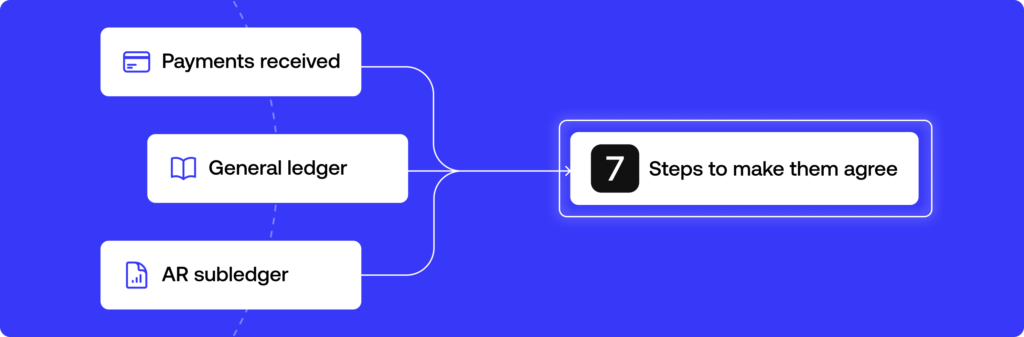
Reconciling accounts receivable means matching what your AR subledger says customers owe against your general ledger and their actual payments, then explaining every difference. Get through that in seven steps and the close stops depending on guesswork.
How do you reconcile accounts receivable without spending the last days of the month rebuilding payment history from emails and exports? This guide answers that by going straight to the workflow, so you can see how to reconcile accounts receivable one step at a time.
It covers which balances to pull, what source data to gather, how to match payments, how to handle what is left over, and how to close the period with a clean audit trail. A short definition comes first, because each step makes more sense once you know exactly what an accounts receivable reconciliation is supposed to prove.
A spreadsheet is enough to reconcile accounts receivable for a few dozen payments. When cash arrives from several banks, payment processors and an ERP, Simetrik, an AI-native financial control platform, applies the same matching logic across those sources and keeps a trace of how each difference was resolved.
What accounts receivable reconciliation actually checks
AR reconciliation compares three numbers: what the AR subledger (also called the subsidiary ledger) says each customer owes, what the general ledger shows in the accounts receivable account, and what actually arrived according to bank statements and customer payment records. When the three disagree, someone has to find out why before the period closes.
The arithmetic is rarely the hard part. Most of the effort in reconciling accounts receivable goes into explaining each gap with a document that backs it up.
Why AR reconciliation matters for cash flow and financial health
An unreconciled accounts receivable balance distorts the company’s real cash position. The balance sheet can show more incoming cash than will ever arrive. That skews cash flow management and weakens financial reporting.
In the worst case, it leads a CFO or controller to make decisions based on financial statements that don’t reflect what customers are actually paying.
Delays add their own cost. When AR reconciliation slips from monthly to quarterly, every month-end close carries unexplained balances forward, and each additional month makes the original transaction harder to trace.
A regular cadence keeps the picture of the company’s financial health current and gives the accounts receivable team a smaller, fresher set of exceptions to work through.
The 7 steps to reconcile accounts receivable
The sequence below works whether you reconcile in a spreadsheet, inside accounting software or on a dedicated reconciliation platform. What changes between those setups is how much of each step someone has to do by hand.
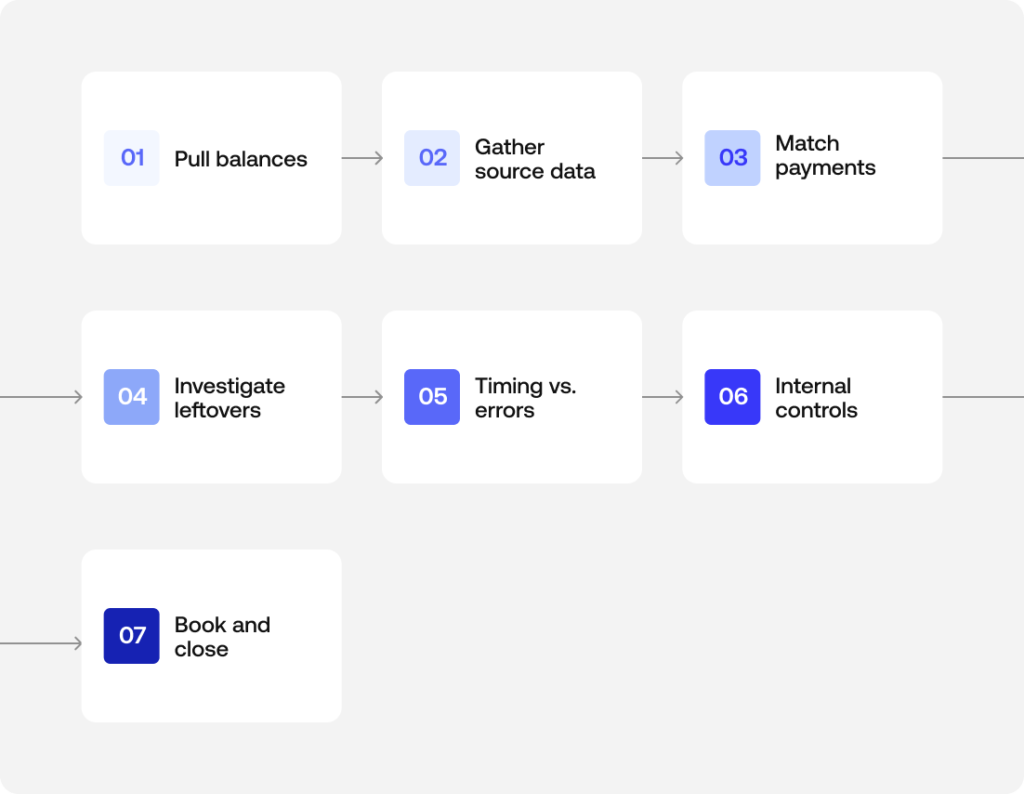
Step 1: Pull your AR subledger and general ledger balances
Start with the two numbers that should agree. The first is the total of the AR subledger, built up customer by customer. The second is the accounts receivable balance in the general ledger as of the same cutoff date. In practice this is a balance sheet reconciliation for a single account, so the cutoff matters as much as the figures.
Suppose the subledger is extracted on the 31st and the general ledger on the 2nd of the following month. You will then spend the rest of the process chasing differences that only exist because of the extraction dates.
Record both totals with the date and the report they came from. That record becomes the first line of your reconciliation workpaper and the starting point a reviewer will check.
Step 2: Gather your source data: bank statements, ERP/CRM records, and the aging report
Next, collect the evidence that explains the balances.
- Bank statements confirm which payments actually landed.
- Your ERP holds the invoice records and credit memos. If the company runs more than one, check every one of the ERP systems where invoicing lives.
- The CRM often carries context the accounting records lack, such as a pricing dispute, a discount promised during negotiation, or a customer that asked to combine several invoices into one payment.
- The AR aging report shows how old each open invoice is, which tells you where to look first. Items past 90 days deserve more attention than invoices issued last week.
Pulling this data from separate systems is usually the slowest part of the process, especially when each source exports in its own format and with its own naming conventions.
Simetrik handles this preparation layer: it ingests bank, payment processor and ERP files, normalizes dates and formats, and maps equivalent columns across sources even when each source labels them differently.
Step 3: Match customer payments to open invoices
With the data in one place, match each customer payment to the invoice it is meant to settle. One payment for one invoice at the exact amount is the easy case, and at most companies it covers a large share of the volume.
Customer reconciliation gets harder in two situations:
- With partial payments, a payment covers only part of an invoice.
- With combined payments, a single transfer settles two or three invoices at once, and the remittance detail is missing or arrives separately.
Useful matching keys include invoice number, customer ID, amount, and a reasonable window around the payment date. When a payment can’t be matched on those keys, leave it open instead of forcing it onto the closest invoice.
A forced match tends to hide the problem until the customer calls asking why they received a collection notice for something they already paid.
Step 4: Investigate unapplied cash, credit memos, and write-offs
Whatever remains after matching usually falls into one of three buckets:
- Unapplied cash is money that arrived but can’t yet be tied to a specific invoice.
- Credit memos adjust invoices for returns, pricing corrections or discounts.
- Write-offs recognize bad debts the company no longer expects to collect, typically with approval above a set threshold.
All three need a documented reason. An adjustment that quietly makes the numbers agree is exactly what an auditor will ask about later.
Here is a short accounts receivable reconciliation example. An invoice for $5,000 receives a payment of $4,800. If the remittance identifies the invoice, the $4,800 is applied and $200 stays open on the customer’s balance.
That $200 could be an early-payment discount the sales team agreed to, in which case it should be recorded as a credit memo with the approval attached. It could also be a short payment the customer plans to settle later, or a dispute over part of the order.
If the remittance doesn’t identify the invoice at all, the full $4,800 sits in unapplied cash until someone confirms with the customer what it covers.
Step 5: Separate timing differences from real errors
Most differences are ordinary timing differences or timing issues. Typical cases are a payment in transit on the last day of the month, an invoice issued after the subledger was extracted, or a deposit the bank recorded a day after the customer sent it.
These resolve on their own in the next period, so the task is to document them and confirm that they actually clear.
Differences that timing can’t explain tend to fall into two kinds. One is data entry errors, such as a transposed digit or a payment applied to the wrong customer. The other is duplicate invoices, where the same sale was billed twice and the customer paid once. Both require active error detection and a correcting entry.
Keeping the two categories in separate sections of your workpaper also gives you an early warning. A timing difference that hasn’t cleared by the following month has probably become an error.
Step 6: Apply internal controls before you sign off
Segregation of duties is the most basic of the internal controls in this process. The person who prepares the reconciliation shouldn’t be the one who approves it. Ideally, neither of them should be the person who posts cash receipts.
A reviewer, often the controller or a senior member of the accounting team, checks that every reconciling item has supporting evidence and that each adjustment was approved at the right level.
Documenting every adjustment with its source is what supports audit readiness. It also narrows the room for fraudulent activity, since unexplained credits or write-offs are easier to spot when each entry has to be traced back to a document.
Reconciliation by itself doesn’t amount to a fraud prevention program, although it is one of the controls that makes a misstatement harder to hide.
Simetrik keeps a traceable audit trail over a reconciliation’s rules, actions and results, and its maker-checker approval flows send manual adjustments to an approver before they affect results, so the review step can rely on a recorded history of how each item was handled.
Step 7: Book adjustments and close the period
Every real adjustment becomes one of the journal entries that stay in the period’s financial records. That covers a write-off, an applied credit memo or the correction of a duplicate invoice.
Post those entries and rerun the AR subledger and general ledger totals. Confirm that any remaining difference is fully explained by documented timing items. Then sign off and archive the workpaper with its evidence.
Once that is done, the month-end close no longer depends on someone reconstructing the story after the fact. Next month’s reconciliation then starts from a balance that is already explained.
Accounts receivable reconciliation vs. accounts payable and bank reconciliation
Accounts payable reconciliation looks outward at what the company owes its suppliers, which is why it is often called vendor reconciliation. AR covers the other side of the relationship: what customers owe the company.
Bank reconciliation is narrower still. It compares the cash recorded in the books against the bank statement, without looking at invoices or individual customer balances.
All three rely on the same logic of matching, evidence and exception handling. Even so, they answer different questions and draw on different source documents.
| Reconciliation type | What it compares | Main source documents | Typical exceptions |
|---|---|---|---|
| Accounts receivable | AR subledger, general ledger and payments received | Invoices, remittances, bank statements, AR aging report | Unapplied cash, partial payments, customer disputes |
| Accounts payable | AP subledger, general ledger and vendor statements | Vendor invoices, vendor statements, purchase orders | Missing invoices, duplicate bills, unrecorded vendor credits |
| Bank | Cash in the books and the bank statement | Bank statements, cash ledger | Outstanding checks, deposits in transit, bank fees |
For a worked walkthrough of the cash side, see our bank reconciliation example.
Common challenges in AR reconciliation (and where automation changes them)
The seven-step accounts receivable reconciliation process is straightforward on paper. In practice it gets complicated in two ways. First, data lives in systems that don’t talk to each other, like the ERP that handles billing, the CRM the sales team uses, and a spreadsheet someone maintains on the side. Second, the volume of customer payments grows faster than the team’s capacity to review them one by one.
These are the problems that come up most often:
- Missing remittance information. Customers pay without referencing an invoice number, or send the remittance detail by email days after the transfer. Matching then depends on someone contacting the customer. Meanwhile, unapplied cash builds up and the AR aging report overstates how much is actually overdue.
- Partial and combined payments. When amounts don’t line up one-to-one with invoices, someone has to decide how to allocate each payment. At low volume that is manageable. At high volume it becomes the step where most data entry errors appear.
- Disputes that live outside accounting. The reason a customer paid less is often recorded in the CRM, a support ticket or an account manager’s inbox. The person reconciling sees a short payment with no context and has to go looking for it.
- Several entities, currencies or ERPs. Some companies operate in more than one country or run more than one billing system. They have to bring subledgers from different sources to a common format before they can compare them, and exchange rate differences add another category of reconciling items.
- Reconciliation that only happens at close. When AR is reconciled once a month under deadline pressure, exceptions pile up. The oldest ones are the hardest to resolve, because the people who handled them have moved on to other work.
Simetrik matches incoming payments from banks and payment processors against invoices in the ERP, using one-to-one, one-to-many and many-to-many rules with tolerances, so a transfer that settles several invoices, or several partial payments against one invoice, can be matched by rule.
Payments that still don’t match are identified in dashboards where the team can act on them. It is the same comparison that Steps 3 to 5 of this guide describe doing by hand.
How to reconcile accounts receivable FAQs
How do you reconcile accounts receivable to the general ledger?
Knowing how to reconcile accounts receivable to the general ledger starts with one comparison: the total in your AR subledger against the accounts receivable balance in the general ledger. The subledger total is the sum of every customer’s open balance.
If the two don’t match, the difference is usually an unposted adjustment, a timing gap, or an entry recorded in one system but missing from the other.
How do you reconcile accounts payable?
How to reconcile accounts payable comes down to the same mechanics as AR reconciliation, run in the opposite direction. You match what you owe vendors against vendor statements and invoices, instead of what customers owe you.
Vendor reconciliation and AR reconciliation rarely share the same source documents. Treat them as separate processes even when the same team handles both.
How do you reconcile accounts receivable in Excel?
If you need to know how to reconcile accounts receivable in Excel, the steps are the same as in any AR reconciliation. You pull the subledger, match payments to invoices and investigate what is left over, all done manually in a spreadsheet instead of accounting software.
It works at low volume. As transaction volume grows, though, every step that a formula or a lookup handles today turns into a manual line-by-line check.
How do you reconcile accounts receivable online?
In searches for how to reconcile accounts receivable online, “online” usually means using cloud-based accounting or reconciliation software instead of a paper ledger or a static spreadsheet. The underlying steps stay the same. The difference is that matching, evidence and the audit trail happen inside the system instead of being assembled by hand afterward.
Simetrik, for example, connects to the banks, payment processors and ERP a team already runs, so the source data from Step 2 can arrive through automated pipelines instead of manual exports.
How do you reconcile accounts receivable in QuickBooks or another accounting system?
The steps are the same regardless of the system: pull the subledger, match payments to invoices, investigate what is left over and post adjustments. Accounting software automates parts of the matching. Someone still needs to review the items it can’t resolve on its own.
What causes an accounts receivable reconciliation to be out of balance?
Most often it is a timing difference, such as a payment in transit or an invoice issued late. When timing doesn’t explain it, look for one of these:
- unapplied cash
- a duplicate invoice
- a data entry error
- a write-off that was recorded in one system and missed in the other
How often should accounts receivable be reconciled?
Monthly at minimum, tied to the close. Businesses with high transaction volume or a lot of partial payments often reconcile weekly. That keeps unapplied cash and disputes from piling up.
How does Simetrik help with accounts receivable reconciliation?
Simetrik reconciles the transaction and operational data behind the AR balance. It matches incoming payments from banks and payment processors against invoices in the ERP, generates journal entries for the adjustments through configuration, then connects to the ERP and adapts the posting to how that system requires it.
It can also compare the ERP’s accounts receivable balance with the reconciled balance, so a preparer documents the evidence and a certifier signs off on the account.
Simetrik complements the ERP and close tools a team already uses, and it doesn’t manage collections or credit decisions.
Can AI automate accounts receivable reconciliation?
Partly, and the share keeps growing. In Simetrik, AI uses the payment and invoice data already in the platform to investigate and manage differences on its own, at the autonomy level the team sets, and builds datasets and spots trends in plain language, such as which customers short-pay most often.
Teams can also ask Simetrik Agent, or agents like Claude or Copilot connected through MCP, to build or adjust an AR reconciliation from a plain-language request, with Automatic, Confirmation (which Simetrik recommends) or Planning autonomy.
AI also reads non-standard bank and processor files and suggests matching rules. The matching itself runs on a deterministic core, so the same inputs produce the same result and an auditor can trace how each result was reached. People still approve write-offs and sign off the period.
Next step: see this process on a connected data layer
These seven steps of accounts receivable reconciliation work the same way in a spreadsheet as on a platform. The difference lies in how much of the matching and the evidence holds up on its own, without someone reviewing it line by line every month.
See how Simetrik can match incoming payments to invoices on connected data.