Category: Financial Close & Accounting

What is financial reporting software?

Financial reporting software is a tool that automatically compiles financial statements, dashboards, and compliance reports from a company’s accounting and transaction data. Instead of building each report manually in a spreadsheet, it pulls from connected systems, applies accounting logic, and helps maintain audit-ready reporting

What financial reporting software typically includes

Most platforms in this category -sometimes marketed as reporting software, automated financial reporting software, or financial statement software- cover the same five layers, regardless of vendor:

  • Core financial statements: balance sheets, income statements, cash flow statements, and profit and loss statements.
  • Connections to your accounting data: your ERP, general ledger, chart of accounts, and accounts payable/receivable, turning manual entry into automated financial reporting.
  • Compliance and audit controls: GAAP/IFRS alignment, audit trails, and multi-entity consolidation.
  • Analytics and forecasting: KPIs, variance analysis, and FP&A-style financial models used to analyze performance and plan ahead.
  • Dashboards and management reporting software: the outputs finance and non-finance stakeholders actually see.

Vendors also sell this under names like financial statement reporting software or financial automation software: different labels, same five layers. What separates a connected platform from a spreadsheet is financial reporting automation: reports get assembled from live data instead of rebuilt by hand every cycle.

Simetrik, for example, integrates no-code with ERPs and core systems, and leaves a traceable, exportable audit trail over every reported figure.

Benefits of using financial reporting software

Beyond the definition, here’s what teams actually gain when they move from manual spreadsheets to automated financial reporting:

  • Faster, more predictable close: automated data flows reduce the manual work required to assemble and validate reports at month-end.
  • Fewer manual errors: connected data reduces the need to copy and paste information between spreadsheets and source systems.
  • Stronger audit readiness: traceable reporting makes it easier to follow reported figures back to their source.
  • More timely visibility for decision-making: automated dashboards can surface updated KPIs without requiring teams to rebuild reports manually.
  • Better scalability: automation helps finance teams handle more entities, currencies, and transaction volume without increasing manual work at the same rate.

Common misconceptions about financial reporting software

Some assumptions about this category, sometimes lumped in with financial automation software or financial statement analysis software, are worth clearing up before comparing options:

Myth: it replaces your accounting software or ERP

Reality: it sits on top of your accounting software or ERP, not instead of it.

Your ERP still records transactions and owns the books – the reporting layer just organizes that data into statements, dashboards, and audit-ready reports.

Myth: it eliminates all manual review

Reality: it narrows the amount of work that requires human review.

Automated data processing and reporting handle routine work, while exceptions and judgment calls still require human review.

Myth: any dashboard tool counts as financial reporting software

Reality: a BI tool can visualize numbers, but financial reporting software specifically connects to accounting data, applies accounting logic, and maintains an audit trail.

A generic dashboard on top of an export doesn’t do any of that. 

Myth: it’s only worth it for large enterprises

Reality: the trigger isn’t company size, it’s complexity – multiple entities, currencies, or a reporting cadence that’s outgrown a spreadsheet.

Some mid-size teams hit that point well before they’re considered “enterprise.”

Financial reporting software vs. accounting software and ERPs

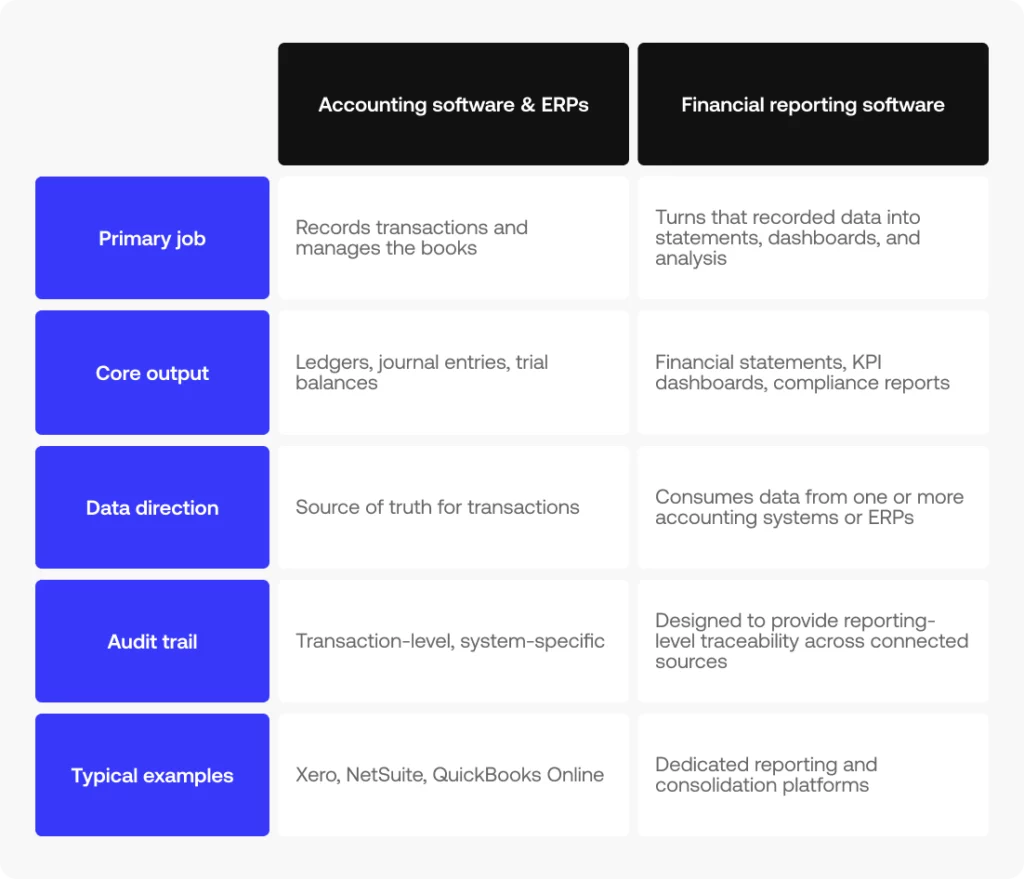
Accounting software and ERPs – systems like Xero, NetSuite, or QuickBooks Online – record transactions and keep the books. Financial reporting software sits on top of that data to produce financial statements, dashboards, and analysis; some platforms combine both.
What is financial reporting software?

That distinction matters when you’re evaluating options: the best financial reporting software for your team is the one that plugs cleanly into the accounting system you already run, not just the one with the longest feature list.

How Simetrik approaches financial reporting

Simetrik is an AI-native financial operations control platform.

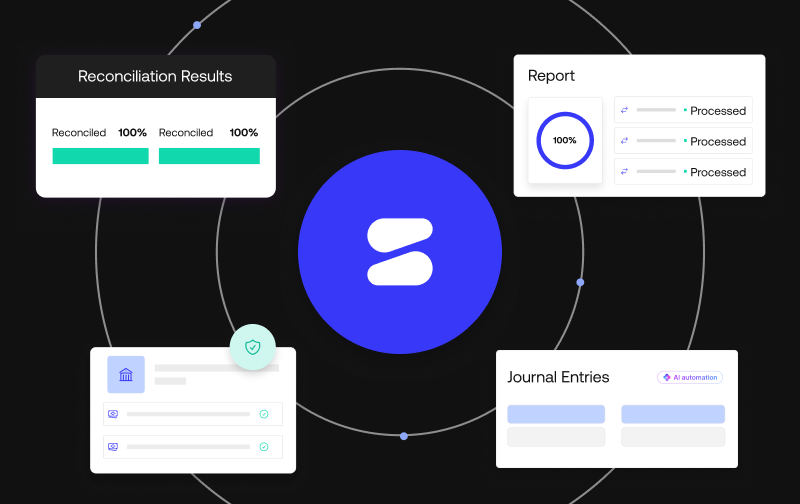
It isn’t built around financial statements or FP&A by name, but it covers several of the capabilities reliable reporting depends on. It connects to ERPs and more than 100 payment, banking, and core systems through no-code integrations, continuously syncs general ledger and subledger data, and maintains traceability back to source transactions. Finance teams can then use no-code dashboards and alerts to monitor KPIs and exceptions in real time.

For finance teams already fighting manual reconciliation before they even get to reporting, Simetrik solves the reconciled data layer that reliable financial reporting software is built on.

See how reconciled data becomes audit-ready reporting
If your reporting is only as reliable as the reconciliation behind it, it’s worth seeing how Simetrik connects the two.
Request a demo

Financial reporting software FAQs

What’s the difference between an ERP system and financial reporting software?

An ERP system, like NetSuite or QuickBooks Online, is where transactions get recorded and the books get kept.

Financial reporting software sits on top of that: it pulls the ERP’s data and turns it into statements, dashboards, and compliance reports.

Most companies need both: the ERP as the system of record, and the reporting layer to make sense of what’s in it.

Does financial reporting software help with accounts receivable?

It can surface AR data inside reports and dashboards, but it doesn’t manage the AR process itself (invoicing, collections, aging schedules).

That still lives in the accounting system or ERP. What the reporting layer adds is visibility: AR balances flow into the same audit-ready statements as everything else, instead of getting pulled manually from a separate export.

Is financial reporting software GAAP and IFRS compliant?

Most dedicated financial reporting software is built to support both GAAP and international financial reporting standards, not just generate generic statements.

That usually means built-in templates and controls aligned to whichever standard applies, plus the audit trail to back up how a number was calculated.

Companies reporting across multiple jurisdictions should confirm exactly which standards a given vendor supports, rather than taking “compliant” at face value.

Can financial reporting software handle intercompany eliminations?

Multi-entity consolidation, including intercompany eliminations, is one of the features that separates dedicated financial reporting software from a basic ERP report or a spreadsheet. It’s not universal across every tool in the category, so it’s worth confirming directly if you’re consolidating across multiple entities.

What role does machine learning play in financial reporting software?

Machine learning shows up mostly on the data side: flagging anomalies, suggesting how new data should map into existing report structures, and catching patterns a person might miss at scale.

It’s less about generating the report itself and more about making sure what feeds into it is accurate.

Is bank reconciliation part of financial reporting software?

Not directly, though the two are closely linked. Bank reconciliation confirms that transaction records match what actually happened, and financial reporting software depends on that reconciled data being accurate before it builds statements or dashboards on top of it. Some platforms combine both; others expect reconciliation to already be handled upstream.

What are customizable dashboards in financial reporting software?

Customizable dashboards let different teams see the metrics that matter to them (finance might track close status and variance, while ops looks at cash flow) without either group having to rebuild a report from scratch.

The underlying data is the same. What changes is which slice of it gets surfaced, and to whom.

What does data consolidation mean in financial reporting?

Data consolidation is the process of combining financials from multiple entities, currencies, or systems into a single, comparable set of numbers, usually a step required before multi-entity reporting or intercompany eliminations can happen.

Without it, each entity’s data stays siloed and someone has to reconcile totals by hand.

Is financial planning and analysis the same as financial reporting?

They’re related but distinct.

Financial reporting looks backward, compiling statements and dashboards from what already happened. Financial planning and analysis (FP&A) looks forward, using that same data to forecast, budget, and model scenarios. Reporting is usually the foundation FP&A builds on, not a replacement for it.

Does financial reporting software include expense management?

Not usually as a core function. Expense management (capturing receipts, approving spend, categorizing transactions) typically lives in a separate tool or an ERP module. Financial reporting software picks up downstream of that: once expenses are recorded, it pulls them into reports and dashboards alongside everything else.

How does data visualization fit into financial reporting software?

Data visualization turns reconciled financial data into charts, KPI cards, and trend lines instead of raw tables. It’s less about the underlying accuracy of the numbers and more about making patterns (a variance spike, a cash flow dip) visible at a glance instead of buried in a spreadsheet.

Can financial reporting software help with financial forecasting?

Some platforms extend into forecasting, using historical reported data to project future performance, but it’s not a given across the category. Dedicated FP&A tools tend to go deeper here; financial reporting software’s core job stays closer to reporting what already happened rather than modeling what’s next.

Does financial reporting software show retained earnings?

Retained earnings typically appear on the balance sheet and the statement of changes in equity, both of which financial reporting software can generate automatically from connected accounting data. The software surfaces the number; the underlying calculation still depends on what’s recorded in the general ledger.

Does financial reporting software handle data migration?

Not as a primary function, though most platforms need some form of it during setup, pulling historical data from ERPs, spreadsheets, or legacy systems into the new environment. Once that initial migration is done, ongoing data flow happens through live connections rather than repeated manual imports.

Next step: see financial reporting software features in detail

Now that you know what financial reporting software does and how it differs from your ERP or accounting system, the next step is understanding which capabilities matter most. See the key features of financial reporting software to know what to evaluate.
Request a demo

What is financial close software? A Guide for Finance teams 

Financial close software is a tool that automates the financial close (the process of reconciling accounts, posting journal entries, and producing financial statements at the end of a period). It helps finance teams close the books faster, with fewer errors and a clear audit trail.

This guide walks through what the financial close process actually involves, what financial close software does day to day, the benefits of automating it, the types of tools available, and how to evaluate one for your team.

What is the financial close process?

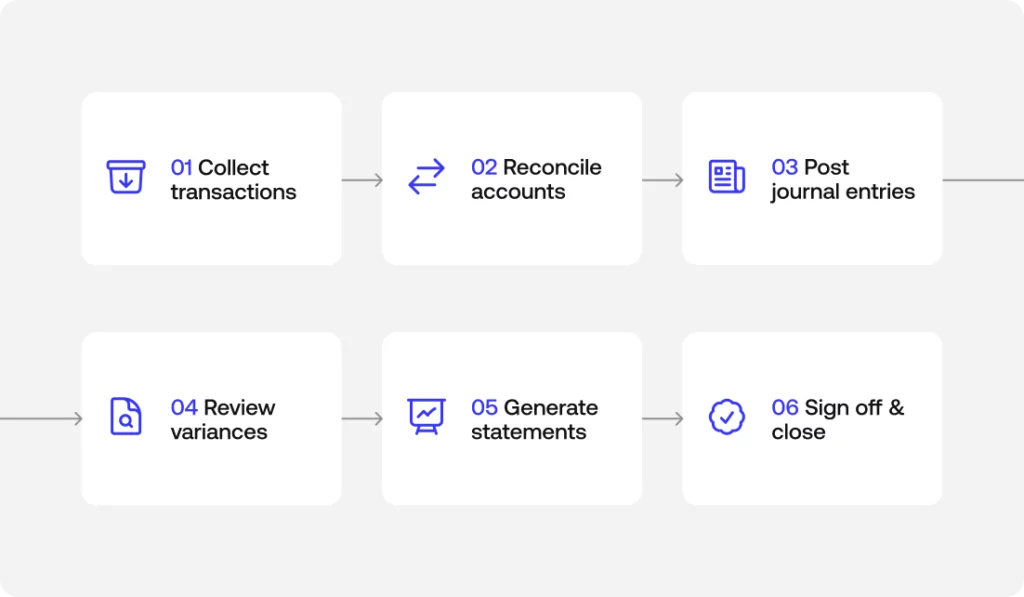
The financial close process is the set of steps a finance team runs at the end of every period, usually monthly, quarterly, and annually, to finalize the financial record known as the books. It typically culminates in the month-end close: the point where all transactions for the period are recorded, accounts are reconciled, and financial statements are ready to report on.

The month-end close, step by step

Every close looks a little different depending on company size and complexity, but most follow a similar sequence:

  1. Collect and record all transactions for the period.
  2. Reconcile accounts, matching internal records against bank statements, payment processors and other systems of record.
  3. Post journal entries and accruals for revenue or expenses that belong in the period but haven’t been recorded yet.
  4. Review variances and make adjusting entries where numbers don’t tie out.
  5. Generate financial statements: the balance sheet, income statement, and cash flow statement.
  6. Review and sign off, closing the period.

Keeping this process consistent, and documented, is what makes each close faster and more predictable than the last.

A financial close checklist finance teams use

A simple checklist keeps nothing from slipping through the cracks during a close:

  • Transaction cutoff confirmed for the period
  • Key accounts reconciled (cash, receivables, payables)
  • Accruals and deferrals recorded
  • Intercompany eliminations completed
  • Variances reviewed and explained
  • Financial statements reviewed and approved

What does financial close software do?

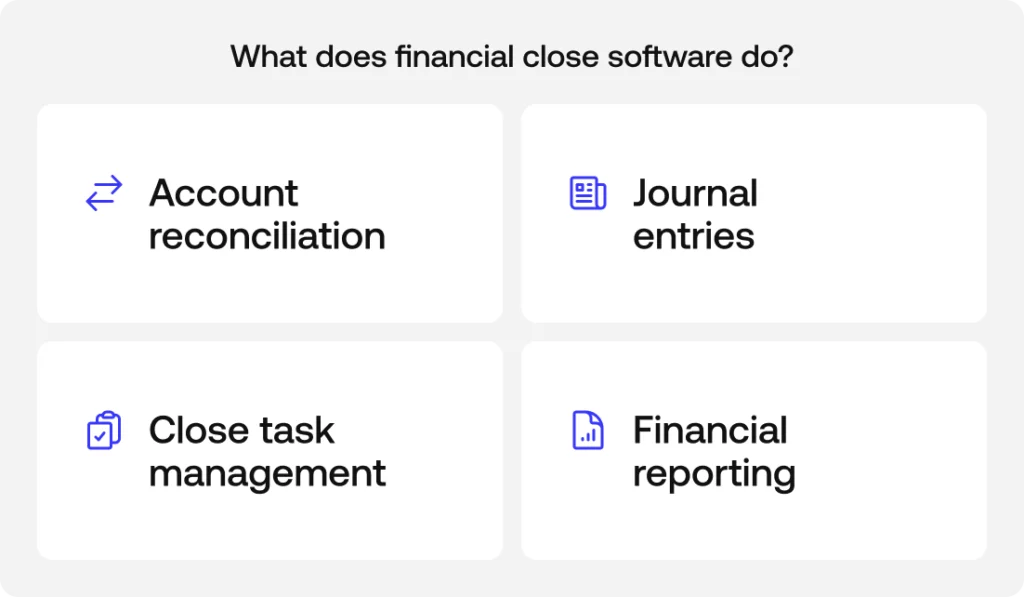
At a high level, financial close software automates the manual, repetitive parts of the close so finance teams spend less time chasing numbers in spreadsheets and more time reviewing exceptions. Most tools in the category cover four core capabilities.

See how Simetrik handles each of these capabilities on a single platform: Request a demo.

Account reconciliation and transaction matching

Financial close software handles account reconciliation and transaction matching automatically, comparing records across systems (banks, payment processors, ERPs) instead of requiring someone to line up rows by hand. This is usually where the biggest time savings show up, since manual reconciliation is one of the most labor-intensive parts of a close.

Journal entries, accruals, and intercompany eliminations

The software can automate the creation of journal entries, accruals, and intercompany eliminations, applying consistent rules so entries are recorded the same way every period instead of depending on one person’s memory of how it was done last time.

Close task management and audit trails

Beyond the numbers, financial close software helps coordinate the close itself: assigning tasks, tracking what’s done and what’s pending, and maintaining audit trails and internal controls so every action taken during the close is logged and traceable.

Financial reporting and financial statements

Once the period is reconciled and adjusted, the software posts the final entries to the general ledger and produces financial statements, the balance sheet, income statement, and cash flow statement, along with the financial reporting finance teams need for management and, eventually, for auditors.

What are the benefits of financial close automation?

Automating the close doesn’t just save time. Finance teams that move away from manual, spreadsheet-based closes typically see:

  • A faster close, from weeks down to days
  • Fewer manual errors, since matching and postings follow consistent rules
  • Better auditability, with every entry and adjustment logged
  • More visibility into where the close stands at any point, not just at the end
  • Less manual, repetitive work for the finance team

Types of financial close software

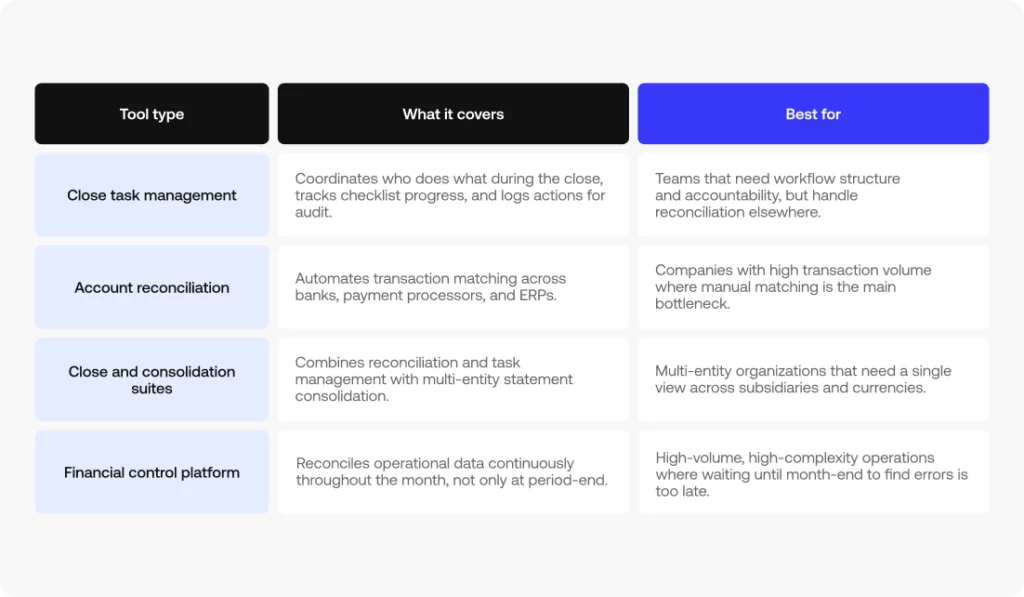
Not every tool in this category does the same thing. Broadly, financial close software falls into a few types:

  • Close task management tools, which focus on coordinating who does what during the close and tracking progress against a checklist.
  • Account reconciliation tools, focused specifically on automating the matching of transactions and balances across systems.
  • Close and consolidation suites, which combine reconciliation and task management with the ability to consolidate financial statements across multiple entities.
  • Financial control platforms, which go a step further and reconcile operational data continuously, before the close even starts, rather than only at period-end.

Which type makes sense depends on how much of the process you want to automate, and how complex your entity structure and transaction volume already are.

How to evaluate financial close software

A few criteria tend to separate tools that hold up at scale from the ones a finance team outgrows quickly:

  • Reconciliation depth: does it match at the transaction level, or only confirm that summary balances agree?
  • Anomaly detection: can it flag unusual patterns on its own, or does someone need to know what to look for?
  • Multi-entity and IFRS support: does it handle multiple entities, currencies, and accounting standards without manual workarounds?
  • Audit trails and internal controls: is every action logged, with clear segregation of duties?
  • ERP integration: how easily does it connect to the systems you already use?
  • Real automation vs. assisted automation: how much of the close does it actually take off your plate, versus just organizing the manual work?

How continuous close reduces month-end scramble

Traditionally, reconciliation happens after the period ends, which is why closes tend to compress into a stressful few days. Continuous close flips that: operational data gets reconciled throughout the month, as transactions happen, so by the time the period ends, most of the work is already done. The close becomes a final review instead of a race against the calendar.

See continuous close in action with your own data: Book a demo with Simetrik.

Frequently asked questions

What is the difference between financial close and consolidation?

The financial close finalizes one entity’s books for a period; financial consolidation combines multiple entities into group financial statements. Close comes first; consolidation builds on it.

How long should the financial close take?

It varies by company size and complexity, but many teams aim to close within a handful of business days. Automating reconciliation and journal entries is what shortens it.

What does financial close management software do?

It coordinates the close: reconciling accounts, automating journal entries and accruals, tracking close tasks and controls, and producing audit-ready financial statements from verified data.

See financial close software in action

If you’d like to see how this works on an actual platform, Simetrik applies financial close software across account reconciliation, close task management, and reporting for high-volume, multi-entity operations. Book a demo to walk through how it applies to your own close.

Key Features of Financial Reporting Software

Most “best software” roundups compare vendors by name. This breakdown of the key features of financial reporting software takes a different approach: what the software should actually do, independent of any specific financial reporting tools or financial reporting solutions on the market today.

The key features of financial reporting software fall into seven areas: core financial statements, forecasting and KPIs, dashboards and custom reporting, data integration, compliance controls, cross-functional reporting, and AI-native automation. The right mix depends on how complex your entities, currencies, and audit requirements are.

The sections below walk through each area, what to look for, and why it matters.

Core Financial Statement Features in Financial Reporting Software

These are the base outputs any financial statement software has to produce without manual rework, the statements a finance team builds every close whether anyone asks for them by name or not. This is the first place where financial statement reporting software and management reporting software earn their keep. 

Cash flow, balance sheet, and income statement reporting

A finance team closing the books by hand ends up rebuilding the same three statements every period: the cash flow statement, the balance sheet, and the income statement. Reporting software generates all three automatically from data that has already been reconciled, broken out by period, entity, or business line, instead of starting from a blank spreadsheet each time. That includes profit and loss statements that stay comparable across periods, with drill-down back to the source transaction whenever a number needs explaining.

General ledger sync and management reporting

Waiting for a batch export at month-end to see what the general ledger sync says is a bottleneck, not a control. Reporting software syncs with the general ledger continuously, so management reporting reflects what has actually happened, not what happened as of the last upload. It also builds management reporting around what each area lead needs to see, rather than a single template that gets reinterpreted by whoever is building the deck, or an analyst manually assembling it every cycle.

Forecasting, KPI, and Scenario Planning Tools

Reporting on the present table stakes. The next layer, the territory of financial statement software and financial reporting and analysis software, is where FP&A teams live: using that same data to project what is coming, decide what to do about it, and turn recurring reporting into ongoing performance management.

Forecasting, KPI tracking, and variance analysis

Forecasting built on real historical data holds up better than one built on a spreadsheet’s assumptions, because it inherits the same granularity as the underlying transactions instead of averaging it away. Reporting software should project revenue, expenses, and cash flow from that data, track the KPIs each finance team has defined as critical using real-time data instead of a month-end snapshot, and run variance analysis automatically, comparing actual results to budget and flagging which deviations are worth a second look instead of leaving that triage to whoever notices first.

Simetrik’s Unified Oversight & Alerts domain, for instance, offers customizable dashboards that track real-time KPIs and intelligent alerts on anomalies, built on top of data that has already been reconciled.

Scenario planning, modeling, and BI integration

Scenario planning lets a finance team model the impact of a decision before making it. That means scenario modeling that can handle multiple variables at once, volume, FX rates, and cost changes. Without leaning on formulas that break the moment someone edits the wrong cell. It also means a real connection to business intelligence tools, so financial data feeds the same analysis layer used for decision making across the rest of the company, instead of living in its own silo.

Dashboard and Data Visualization Capabilities

How the data gets consumed matters as much as how it gets produced, which is the whole premise behind financial dashboard software.

Data visualization and customizable dashboards

A finance team can read a spreadsheet. Nobody else in the company necessarily wants to. Good reporting software translates the same figures into data visualization that a non-financial stakeholder can understand in seconds, without waiting on an analyst to build the chart. That means customizable dashboards by role, since a CFO and a controller do not need the same default view, and interactive dashboards that let someone filter and explore the data themselves instead of requesting a new cut from finance every time a question comes up, the core idea behind self-service reporting.

Customizable, custom, and cash flow reports

Every stakeholder expects a different format, and forcing all of them into the same template just means more manual reformatting later. Reporting software should offer customizable reports that adapt to what each audience actually needs, plus the ability to build custom reports for one-off questions from leadership that do not fit a recurring template. Cash flow reports deserve extra attention: treasury generally needs a level of transactional detail that does not belong in a high-level accounting deck.

Data Integration and Connectivity Features

None of the above works without a reliable answer to where the data actually comes from. That’s the core promise of automated financial reporting software: reports built on data pulled directly from source systems, via cloud-based software that plugs into what a company already runs.

Data integration and API connectivity

Manually exporting from one system and importing into another is where reporting errors quietly start. Reporting software should handle data integration between ERPs, banks, and payment processors through direct API connectivity, plugging into the systems a company already runs, whether that is an ERP like NetSuite or QuickBooks, rather than forcing a full migration just to get clean data into a report.

Bank feeds, reconciliation, and multi-currency consolidation

Downloading a bank statement and reconciling it by hand is still how a lot of finance teams operate, and it is slow by design. Reporting software should bring in bank feeds directly and automate bank reconciliation as part of the same pipeline that feeds the reports, rather than treating it as a separate manual step. For companies operating in more than one currency, that also means real data consolidation, multiple sources and currencies resolved before the numbers ever reach the final report, with genuine multi-currency support instead of a manual conversion step.

Compliance, Audit, and Regulatory Control Features

Regulatory compliance and audit readiness are not features to bolt on later; they are an output of how the rest of an enterprise financial reporting software platform is built.

Audit trails and GAAP/IFRS compliance

An auditor does not want a summary number; they want to trace it back to where it came from. Reporting software needs to leave audit trails for every figure in every report.This needs to be traceable to its source transaction, and support reporting aligned to GAAP or IFRS depending on the jurisdiction. Without the finance team rebuilding accounting logic by hand for each country it operates in.

Role-based access and approval workflows

Not everyone who touches the numbers should be able to edit them. Role-based access limits what each user can see and change based on their role, and approval workflows chain together the sign-offs a report or adjustment needs before it is considered final, with a record of exactly who approved what and when.

Tax management and version control

Tax management gets easier when the underlying data is already reconciled and traceable, instead of assembled specifically for the tax team after the fact. Version control matters just as much: knowing what changed between one version of a report or model and the next, and who changed it, is the difference between a controlled process and a guessing game during review.

Operational and Cross-Functional Reporting Features

The last layer of financial management reporting software connects financial reporting to the parts of the business that do not sit inside finance but still show up in the numbers.

Expense and inventory management integration

Expense management should not live in a separate system that finance re-keys into the reports by hand. Reporting software should connect the two so approved expenses show up without double entry. The same logic applies to inventory management for any business whose financial statements depend on what is actually on the shelf: physical stock and financial reporting need to stay in sync, not get reconciled after the fact.

Project-based reporting and multi-entity support

Project-based reporting applies the same tracking logic project management tools use, but for financial control rather than task management, so a project’s costs and revenue can be reported on its own terms. Multi-entity support does the equivalent across the company as a whole: consolidating reporting across subsidiaries or separate legal entities without manually stitching together spreadsheets from each one.

AI-Native Financial Reporting Software Features

This is the newest layer, and the one where the gap between financial reporting software that is genuinely AI-native and financial reporting software that only added a chatbot on top actually shows.

AI-ready data ingestion and AI-suggested matching

Most financial data is not clean by default; it arrives with gaps, inconsistent formats, and fields that do not map neatly to anything. AI-native reporting software should prepare that data automatically before it reaches any report or dashboard, closing gaps and fixing inconsistencies without a person cleaning it row by row. It should also suggest transaction matches that fixed, rule-based logic misses, learning from patterns that do not follow a standard format instead of requiring someone to write a new rule for every exception.

Simetrik describes its own data layer as designed to get data AI-ready: the platform automatically cleans data and fills in gaps with the help of agentic AI. Its reconciliation engine includes AI-suggested mappings, automatic FX handling, and AI-driven payment-to-invoice mapping.

Agent-driven exception management and AI-generated reports

What happens when something does not match? In this event, AI-native platforms route exceptions to agents that prioritize and work through them, instead of dumping everything into one unsorted queue for a person to triage manually. On the reporting side, that same layer can draft reports adjusted to the relevant regulatory standard directly from already-reconciled data, not raw data, cutting out a step that used to require someone to manually reformat numbers into a compliance template.

Simetrik, for example, includes built-in fraud detection algorithms and agent-driven risk management within its exception management module, and generates AI-generated, standard-specific documents backed by fully traceable, exportable audit logs.

See AI-native reporting on your own reconciled data

Every feature in this section, AI-ready ingestion, AI-suggested matching, agent-driven exceptions, AI-generated reports, runs on Simetrik’s reconciliation platform today. If audit-ready reporting is the bottleneck, this is worth a 20-minute look.

Request a demo

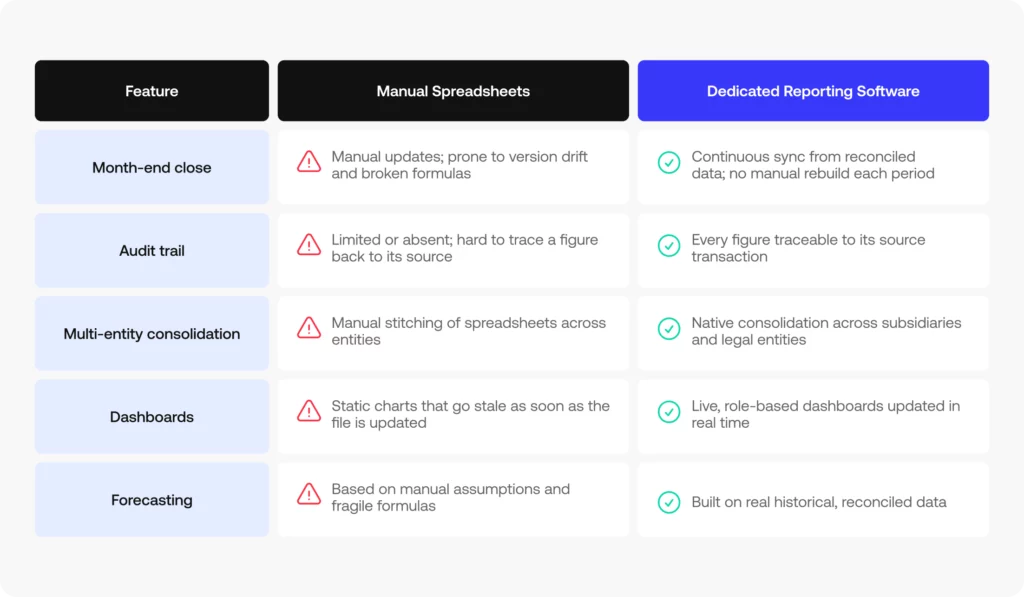
Financial Reporting Software vs. Manual Spreadsheets: A Feature Comparison

Spreadsheets are not the enemy of good reporting software; they simply were not built to do this at scale. Here is where the two approaches diverge on the features that matter most in any financial report software evaluation:

Financial Reporting Software FAQs

A few of the questions finance teams ask most often when comparing financial reporting solutions and weighing the key features of financial reporting software against what is sold as the best financial reporting software on the market:

What is financial reporting software?

Financial reporting software pulls data from accounting systems, banks, and operational tools to generate financial statements, dashboards, and reports automatically, instead of building each one manually in a spreadsheet.

What features should financial reporting software have?

At minimum: core statements (cash flow, balance sheet, income statement), forecasting and KPI tracking, customizable dashboards, data integration via APIs, and audit trails for compliance. The right depth depends on entity count, currencies, and audit requirements.

Does financial reporting software replace spreadsheets entirely?

It replaces the manual assembly of recurring reports, not every ad hoc analysis. Most finance teams still export data for one-off modeling, but the recurring statements and dashboards stop depending on manual updates.

How is financial reporting software different from accounting software?

Accounting software records transactions and manages the books. Financial reporting software sits on top of that data (and other sources) to produce statements, dashboards, and analysis; some platforms combine both, others specialize in reporting only.

Which features matter most as a finance team scales?

Multi-entity support, multi-currency handling, role-based access, and audit trails become priorities as headcount, entities, and regulatory exposure grow, features that matter less for a single-entity, single-currency business.

Next Step: Evaluate These Financial Reporting Software Features

Now that you have the full checklist of features, the next step is contrasting it against your current reporting stack to see where the real gaps are, whether you are benchmarking against the top financial reporting software on the market or evaluating financial reporting solutions for the first time. See how these controls connect to Simetrik’s financial reporting software built on reconciled data end to end reconciled data.

Request a demo