This bank reconciliation example starts with a company whose book balance and bank balance don’t match at month-end.
Six adjustments, from outstanding checks and deposits in transit to bank fees and a bank error, account for the gap until both sides reach the same adjusted balance.
Most bank reconciliation examples you’ll find online stop after one or two items, usually a single outstanding check.
Real statements are messier than that, so this example of bank reconciliation works through several items at once, each with its own figure. If you’ve ever wondered how to reconcile a bank statement when half a dozen things are off at the same time, the walkthrough below shows the order to tackle them in.
It also covers what happens after the statement is done: the journal entries it produces, which differences need a call to the bank, and a blank template you can fill in with your own numbers. If you’re working out how to do a bank reconciliation for the first time, following the steps in order is the fastest way through.
The same matching logic also works at scale: Simetrik, an AI-native financial control platform, applies it across bank accounts, payment processors and internal records, and the differences it finds appear in dashboards where the team can act on them.
Setting up the example: Book balance vs. bank balance
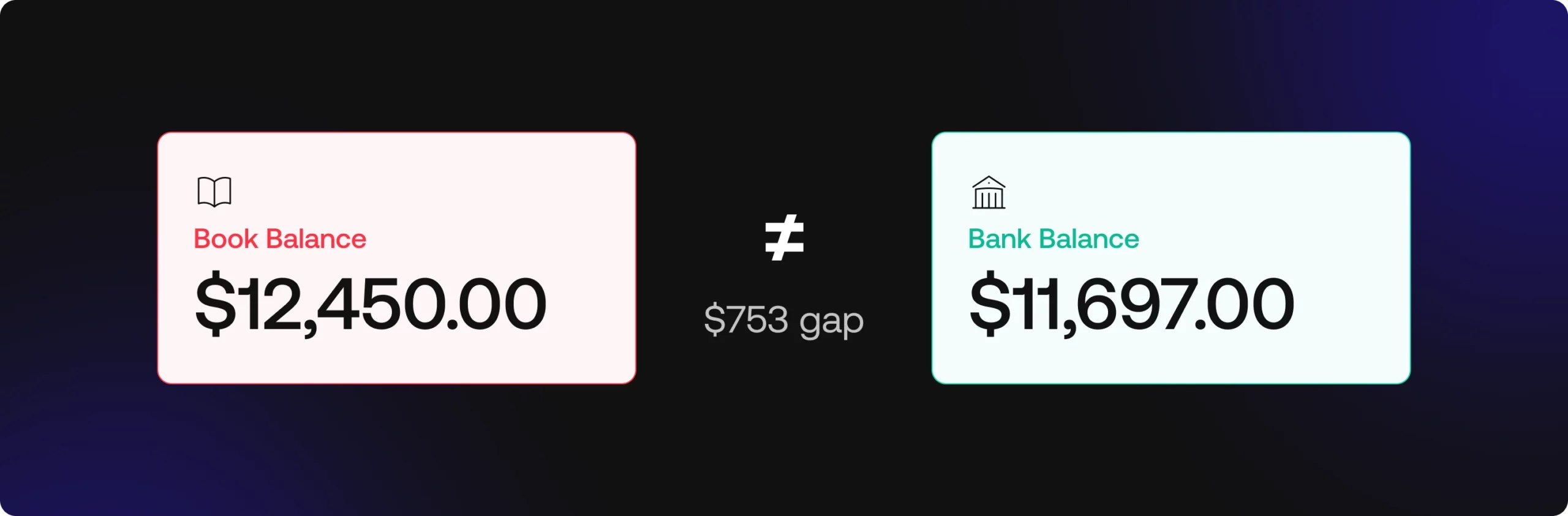
The example follows Sample Co., a small business closing out the month. Its cash book is the internal record where the accounting team logs every deposit and payment. On the last day of the month, it shows a book balance of $12,450. The bank statement for the same period shows a bank balance of $11,697, which leaves a $753 gap.
The cash book reflects what Sample Co. knows about its own cash, while the bank statement reflects what the bank has actually processed. Some businesses still use a passbook, the older physical form of the bank’s record, and it plays the same role in the reconciliation. The gap between the two figures is what the rest of this cash book and bank reconciliation statement example explains, one item at a time.
Most of that gap comes from timing. Each record includes transactions the other hasn’t registered yet. One item, though, turns out to be a genuine mistake on the bank’s side, which is part of why walking through each line matters.
Reconciling items: The adjustments behind the difference
A reconciling item is any transaction that appears in one record but not yet in the other, or appears in both with different amounts.
Sample Co. has six of them this month, which makes this closer to a complex bank reconciliation example than the single-check version most guides use. Some adjust the bank side and others adjust the book side. Sorting them correctly is the part a bank reconciliation template can’t do for you.
Deposits in transit and outstanding checks
On the last day of the month, Sample Co. deposited $900 in customer payments. The deposit is already in the cash book, but the bank hadn’t processed it by the time the statement closed. This is a deposit in transit, and it gets added to the bank balance.
During the month, Sample Co. also wrote two checks to suppliers for a combined $520. Both are recorded in the books, but neither supplier had cashed them when the statement was generated. Outstanding checks like these are subtracted from the bank balance, since the money is already committed even though it hasn’t left the account.
Any outstanding checks bank reconciliation example will show this item more than any other, because a check can take days or weeks to clear depending on when the recipient deposits it.
Bank charges, service fees, and NSF checks
The statement shows $35 in service charges and bank fees for the month. Sample Co. had no way of knowing the exact amount until the statement arrived, so the charge isn’t in the cash book yet.
Earlier in the month, Sample Co. also deposited a $250 check from a customer whose account didn’t have enough funds. The bank returned it as an NSF (non-sufficient funds) check, but the books still count that $250 as cash received.
Both items reduce the book balance once they’re discovered. The fees were never recorded, and the payment behind the NSF check never actually came through.
Interest earned and bank errors
The account earned $12 in bank interest during the month. The bank credited it on the statement, and since the cash book doesn’t have it yet, it’s added to the book balance.
The last item is a different kind of problem. Going through the statement line by line, Sample Co.’s accountant spots the same $100 charge posted twice.
The second posting is a bank error and has nothing to do with Sample Co.’s own records. Because the duplicate pulled $100 out of the bank balance that never should have left, the correction adds $100 back on the bank side.
Nothing changes in the books. The fix is a call to the bank to have the duplicate reversed on a future statement.
The completed bank reconciliation statement
Here is the full bank reconciliation statement for Sample Co., with every item from the previous section placed on its side.
| Book balance side | Amount | Bank balance side | Amount |
|---|---|---|---|
| Book balance per cash book | $12,450 | Bank balance per statement | $11,697 |
| Add: interest earned | $12 | Add: deposits in transit | $900 |
| Less: bank service charges | ($35) | Less: outstanding checks | ($520) |
| Less: NSF check | ($250) | Add: bank error (duplicate charge) | $100 |
| Adjusted book balance | $12,177 | Adjusted bank balance | $12,177 |
Both columns end at $12,177. That’s Sample Co.’s actual cash balance at month-end, and it’s the ending balance that belongs on the balance sheet.
If the two adjusted figures didn’t match, it would mean an item was missed or placed on the wrong side, and the reconciliation isn’t finished.
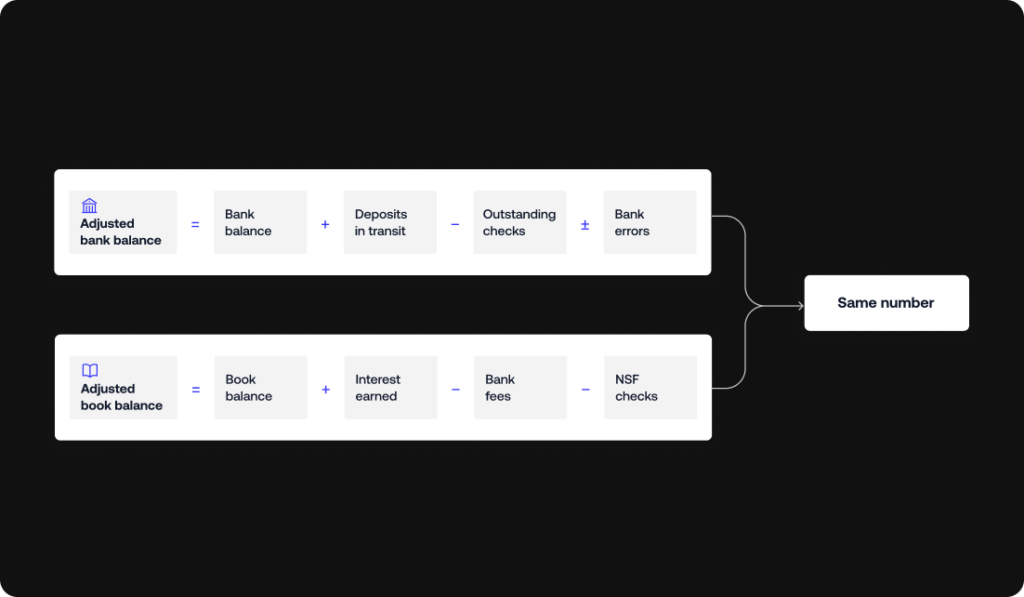
Any bank statement reconciliation example should follow this same two-column layout, whatever the amounts are. The order of the lines can vary from one company to another, but keeping bank-side and book-side items apart is what makes a reconciliation statement example easy to review later.
Journal entries from this reconciliation example
Only the book-side items need journal entries. Everything on the bank side either clears by itself next month or gets corrected by the bank, so Sample Co. doesn’t record anything for those. For the three book-side items, the entries look like this:
| Item | Debit | Credit | Amount |
|---|---|---|---|
| Bank service charges | Bank service charges expense | Cash | $35 |
| Interest earned | Cash | Interest income | $12 |
| NSF check | Accounts receivable | Cash | $250 |
The NSF entry deserves a second look. Debiting accounts receivable puts the $250 back on the customer’s tab, because they still owe the money even though their check bounced. Sample Co. can then follow up with the customer the same way it would for any unpaid invoice.
Once these three entries are posted, the cash book shows $12,177, the same as the adjusted balance on the statement. Most guides skip this part when they show a bank reconciliation journal entries example, and it matters.
Without the entries, the financial records still carry the old $12,450, and next month’s reconciliation starts from a number that was already wrong.
Posting adjustments right after each reconciliation is also one of the simplest internal controls a finance team can put in place.
Timing differences vs. bank errors: What each one means
The items in this example fall into two groups, and each group gets handled differently.
Timing differences are transactions that one side has recorded and the other hasn’t caught up to yet. Sample Co.’s $900 deposit in transit and $520 in outstanding checks are both timing differences. They’ll clear in the next statement cycle without anyone doing anything, so the only action is to check that they actually show up next month.
Bank errors are mistakes in the bank’s own records, like the $100 duplicate charge in this example. Other common ones include a wire transfer posted to the wrong account or a withdrawal that doesn’t belong to the business. These won’t fix themselves.
If you’re asking how to record a bank error in a bank reconciliation, the answer is that you list it as an adjustment on the bank side, leave the books alone and contact the bank with the details so it gets corrected.
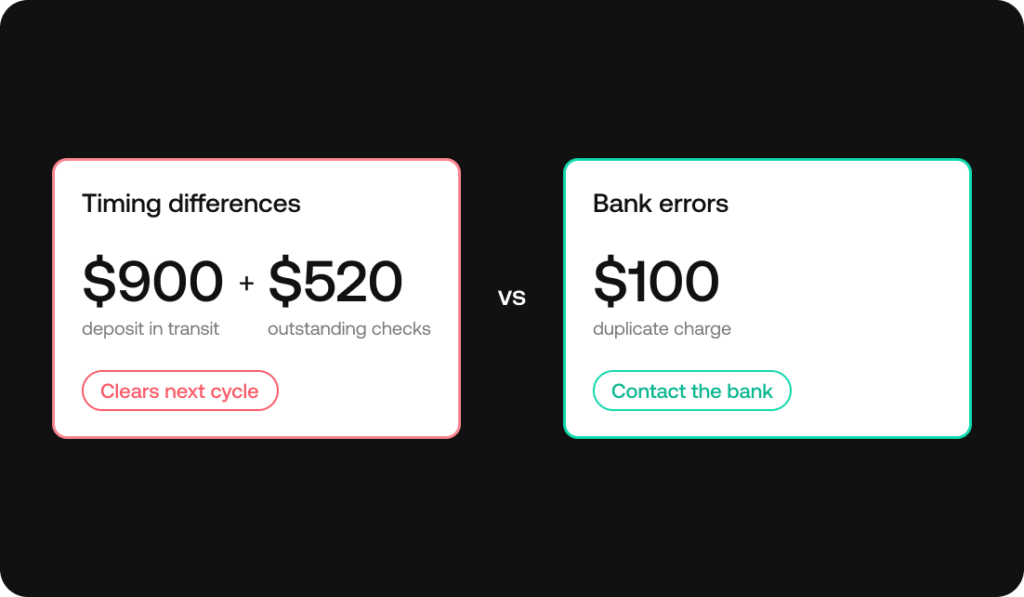
Telling the two apart quickly is mostly a matter of matching each transaction against its source. When transaction matching runs automatically, timing differences and genuine errors get separated almost right away, instead of after someone has compared both records line by line.
Accounting software vs. reconciliation: what gets automated
Everything in this example was done by hand, which is still how plenty of small teams work. Most modern accounting software takes over a good part of the bank reconciliation process.
- It pulls in bank feeds.
- Matches transactions between the cash book and the bank statement.
- And flags deposits in transit and outstanding checks without anyone having to hunt for them.
The cash flow and balance sheet views then run on data that’s already been reconciled.
A bank reconciliation accounting example done in a spreadsheet and the same reconciliation run inside an accounting tool end up at the same adjusted balance, and the second one just takes far fewer manual steps.
The picture changes as sources multiply or traceability becomes a requirement.
- A company with one bank account and a few hundred transactions a month can get by with the matching built into its accounting tool.
- A company handling thousands of transactions across several banks and payment partners, or one whose auditors need each adjustment traced back to its source, usually needs dedicated reconciliation, with its own matching rules and a record of every adjustment made along the way.
Simetrik, for example, reconciles bank activity at the transaction level and keeps an audit trail that traces each item back to the source transaction it came from.
It works alongside the accounting software or ERP a team already runs: Simetrik can generate journal entries like the three in this example from reconciled results and post them to ERPs such as SAP S/4HANA, Oracle or NetSuite, adapting the posting to how each system requires it.
Whichever tool is doing the matching, the logic underneath is the same one in the Sample Co. example. Automation just applies it to every transaction instead of waiting for month-end.
Common mistakes to avoid in a bank reconciliation example
Most errors in a bank reconciliation come from the person preparing it rather than from the bank. These are the ones that show up most often.
- Recording a deposit or check twice: This happens easily when you’re reconciling across a spreadsheet and a paper statement, and it throws off the book balance by the full amount of the duplicate.
- Missing a bank fee for months: If nobody reads the statement line by line until reconciliation day, small recurring fees can pile up unrecorded and make the gap look bigger than it should.
- Using mismatched periods: Comparing a calendar-month book balance against a bank statement that closes mid-month creates differences that aren’t really there.
- Letting outstanding checks go stale: A check that’s been outstanding for six months or more was probably lost, and it needs follow-up with the payee instead of sitting on the list indefinitely.
- Typing amounts by hand: Keying in figures instead of matching them against the source document is one of the most common causes of transposition errors, like entering $520 as $250.
Quick-reference bank reconciliation example template
If you only need the format, here’s the condensed version. Fill in the “Your figures” column with your own amounts, and use the Sample Co. column as a solved reference to check your work against.
| Line | Your figures | Sample Co. |
|---|---|---|
| Book balance side | ||
| Beginning book balance | $______ | $12,450 |
| Add: interest earned | $______ | $12 |
| Less: bank charges | ($______) | ($35) |
| Less: NSF checks | ($______) | ($250) |
| Adjusted book balance | $______ | $12,177 |
| Bank balance side | ||
| Beginning bank balance | $______ | $11,697 |
| Add: deposits in transit | $______ | $900 |
| Less: outstanding checks | ($______) | ($520) |
| Add or less: bank errors | $______ | $100 |
| Adjusted bank balance | $______ | $12,177 |
Copy the table into a spreadsheet and you’ve got a working bank reconciliation template.
If you came looking for a bank reconciliation example PDF, having the blank and solved versions side by side covers the same ground as most bank reconciliation examples and solutions PDFs, without needing to download anything.
Bank reconciliation example FAQs
What is an example of bank reconciliation?
A typical example of a bank reconciliation starts with a book balance and a bank balance that don’t match. You then adjust for items like outstanding checks, deposits in transit and bank fees until both sides reach the same adjusted balance. In the Sample Co. example above, a $12,450 book balance and an $11,697 bank balance both end at $12,177.
What is a good example of reconciliation?
A good example includes more than one adjustment. It should mix timing differences like deposits in transit, fees like bank charges and NSF checks, and at least one bank error. A bank reconciliation problem example built that way is much closer to a real month-end than one that only shows a single outstanding check.
What is the bank reconciliation formula?
- Adjusted bank balance = Bank balance + Deposits in transit – Outstanding checks ± Bank errors.
- Adjusted book balance = Book balance + Interest earned – Bank fees – NSF checks.
Once every item is accounted for, both formulas give the same adjusted balance.
How do you record a bank error in a bank reconciliation?
A bank error doesn’t get a journal entry, since the mistake is in the bank’s records. You note it as an adjustment on the bank side of the reconciliation and contact the bank so it’s corrected on a future statement.
Is a passbook the same as a bank statement?
A passbook is the older, physical version of the record a bank statement provides today. Both show the bank’s view of an account’s activity, and you use either one the same way in a reconciliation.
How often should you prepare a bank reconciliation?
Monthly is the most common cadence, since it lines up with the bank statement cycle. Businesses with high transaction volume often reconcile weekly or even daily so discrepancies surface sooner.
Does Simetrik replace the bank reconciliation in accounting software?
Not necessarily. Simetrik complements the accounting software or ERP a team already uses. It reconciles bank activity against payment processors and internal records before and as that data reaches the ledger, and it keeps each adjustment traceable to the transactions behind it, which helps when auditors review the close.
Can AI automate bank reconciliation?
Partly, and the share keeps growing. Simetrik, an AI-native financial control platform, applies AI first to the differences. Working from the data already in Simetrik:
- AI can investigate and manage differences at the autonomy level the team sets, and it builds datasets and trend analyses from plain-language requests.
- Teams can also ask Simetrik Agent, or agents such as Claude or Copilot connected through MCP, to set up or adjust a reconciliation in plain language.
- AI reads non-standard bank files (Smart Parser) and suggests matching rules too, while a deterministic engine applies the configured rules, so each result can be traced and reproduced for an auditor.
- In the Sample Co. example, an item like the $100 duplicate charge would show up as a difference for the team to review instead of waiting for someone to find it line by line, and a person still approves the adjustment.
Next step: See the bank reconciliation software process run automatically
If this example looks a lot like the way your team reconciles today, with a spreadsheet open next to a downloaded statement, it’s worth seeing how much of that work can run on its own, well beyond what a bank reconciliation template can do. Take a look at how bank reconciliation software handles the same process at scale.