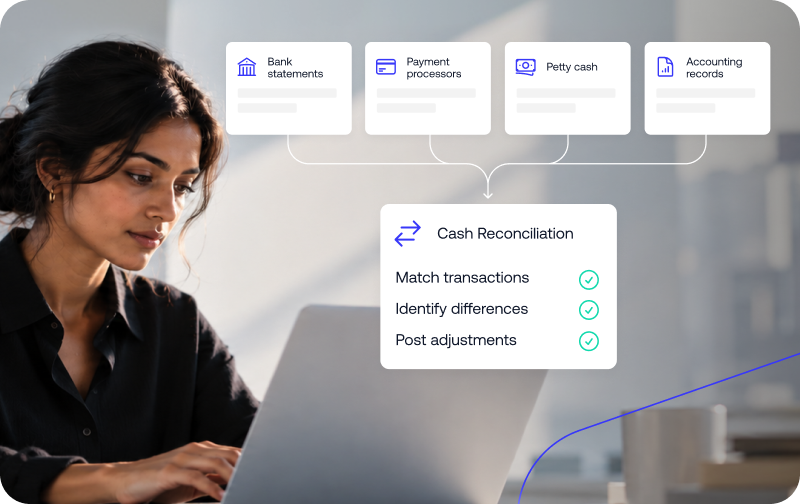
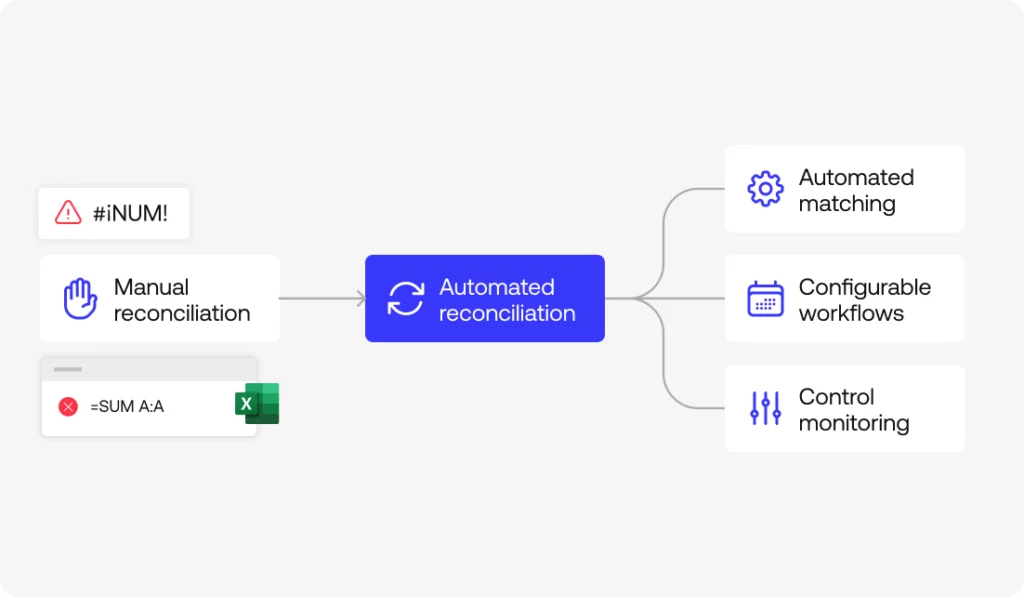
The cash reconciliation process compares what your accounting records say you have in cash against what your bank statements, payment processors, and petty cash counts actually show. Run through it consistently and discrepancies get caught in days, not discovered months later during an audit.
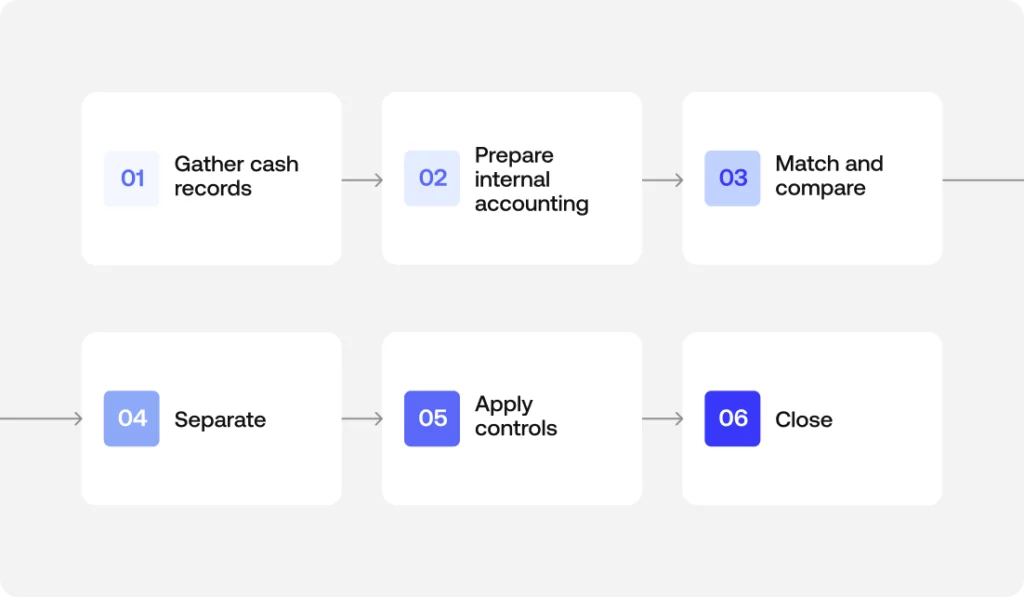
Knowing how to do cash reconciliation comes down to running the same set of checks every cycle, on a fixed schedule rather than as a reaction to something looking off. This guide walks through how to reconcile cash across every source you handle, from bank accounts to petty cash to processor payouts, in six steps you can repeat on a schedule.
What the cash reconciliation process actually compares
The process crosses three layers: the accounting records or internal records your team maintains in the accounting system, the general ledger where those movements get consolidated, and the external evidence, bank statement, payment processors, cash on hand, that confirms whether what was recorded actually happened.
Why the cash reconciliation process matters for cash flow and financial integrity
Without this process, cash flow management rests on figures nobody verified against the source. That distorts financial reporting and financial statements, weakens the financial integrity and financial accuracy that treasury operations depend on, and leaves the balance sheet showing a cash position that may not actually exist.
The cash reconciliation process in 6 steps
Step 1: Gather cash records from every source
Pull the bank statement from every account, the reports from payment processors, the cash on hand count if you handle petty cash or cash registers, and the detail of customer payments and withdrawals for the period.
Simetrik can ingest financial and operational data from banks, processors, and other compatible sources, preparing it for a reconciliation workflow.
Step 2: Prepare your internal accounting records
Before comparing anything, your accounting records or internal records, what the accounting system says happened, need to be complete: all cash inflows and withdrawals from the period, with nothing left unrecorded.
Step 3: Match transactions and compare balances
This is where transaction matching happens: crossing each movement against its counterpart to compare balances, checking the calculated ending balance against the bank balance and the cash balances reported by each source.
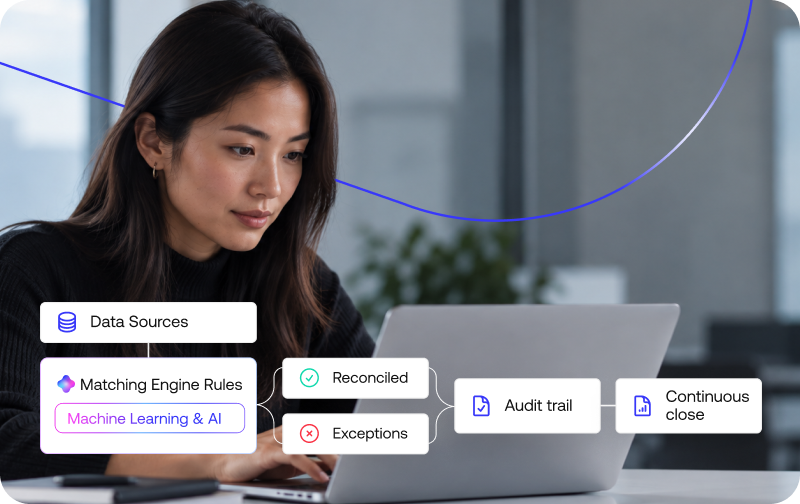
Simetrik’s reconciliation engine applies configured rules to compare records and separate matches from the exceptions that need investigation, with data preparation capabilities, source unions, date format normalization, before the matching runs.
Step 4: Separate timing differences and unrecorded transactions from real errors
Timing differences, deposits in transit, outstanding checks, resolve on their own in the next cycle. Unrecorded transactions (something that happened but nobody logged) and data entry errors need active correction. Unauthorized transactions and unexpected bank fees fall into the same review.
A $2,000 deposit recorded in the books but not yet showing on the bank statement is a timing difference. That same amount with no internal record at all is an unrecorded transaction, and it needs to be traced back to its source.
Step 5: Apply controls and flag anything unusual
Segregation of duties, making sure the person reconciling isn’t the person approving, is the most basic internal control here. Documenting every adjustment supports the audit trail and answers to regulatory requirements and regulatory compliance, even though reconciliation on its own isn’t a fraud prevention tool. The error detection that happens in this step is what functions, in practice, as early fraud detection.
Simetrik’s product materials describe approval flows with maker-checker separation for manual adjustments, along with a traceable audit trail over the rules, actions, and results of a reconciliation.
Step 6: Post adjusting entries and close
Every real difference becomes journal entries or adjusting entries reflected on the balance sheet. With cash reconciled, forecasting and treasury planning start from a reliable number instead of an estimate built on unverified data.
How Simetrik’s Cash In domain reconciles inbound cash
Every step above applies differently depending on which side of cash movement you’re reconciling. On the inflow side, that means confirming that customer payments, payment processor settlements, and deposits actually landed as recorded, before revenue gets booked against money that hasn’t cleared, the core of managing cash inflows well.
Simetrik’s Cash In domain reconciles collections across processors, acquirers, and bank statements on a continuous basis, rather than only at the point of deposit.
Cash Out and Simetrik’s control over outbound payments
The outflow side works the same way in reverse: every payout, withdrawal, or disbursement needs to be traced from the instruction that authorized it to the bank confirmation that it actually went out, with no duplicates and nothing sent to the wrong account, whatever mix of payouts, withdrawals, and disbursements make up your cash outflows.
Simetrik’s Cash Out domain applies the same logic, validating outbound payments from instruction through to bank confirmation.
Cash reconciliation vs. bank reconciliation and account reconciliation
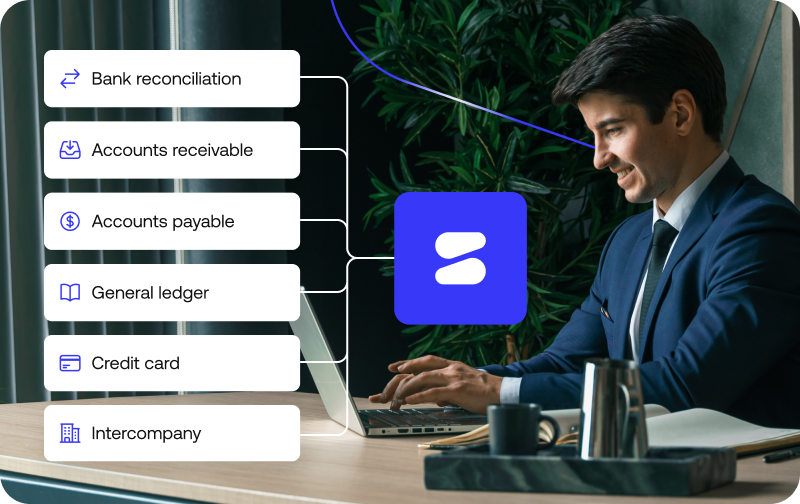
Bank reconciliation is one source within the cash reconciliation process, specifically, crossing the bank against the books. Account reconciliation is the broader category still: it covers cash, but also accounts receivable, accounts payable, and any other account on the balance sheet. Cash reconciliation sits in the middle, more specific than account reconciliation, broader than bank reconciliation alone.
Manual cash reconciliation vs. automation
Manual data entry works when volume is low and sources are few. As accounts, currencies, or daily transaction counts grow, keeping the 6 steps running by hand becomes the bottleneck, since reviewing line by line stops scaling no matter how good the judgment behind it is. That’s exactly where cash reconciliation automation changes the equation.
Within its Cash In domain, Simetrik can compare expected movement against the records of the systems and participants involved, identify differences, and maintain a traceable view of status, the same kind of high-volume comparison that steps 1 through 4 of this article describe doing by hand.
Cash reconciliation process FAQs
What are the steps in the cash reconciliation process?
At a minimum: gather records from every cash source, prepare your internal accounting records, match transactions and compare balances, investigate discrepancies, apply controls, and post adjusting entries. The order matters more than the exact number of steps a given team uses.
What is a cash reconciliation form?
It’s a template, paper or digital, used to document the comparison: the recorded balance, the actual balance from source documents, each reconciling item, and a sign-off from whoever reviewed it. It’s the evidence trail, not the reconciliation itself.
What is a cash reconciliation statement?
It’s the finished output of the process: a document showing the starting balance, every adjustment that explains the difference, and the final adjusted balance that both the accounting records and the source documents agree on.
How often should the cash reconciliation process run?
Daily for high-volume cash operations, retail, payment processing, multi-location businesses. Monthly, tied to the close, is the minimum for lower-volume operations. The right cadence depends on how fast unresolved discrepancies would otherwise pile up.
What causes discrepancies in the cash reconciliation process?
Most are timing differences that resolve on their own. The ones that don’t are usually data entry errors, unrecorded transactions, unexpected bank fees, or occasionally an unauthorized transaction that needs investigating right away rather than waiting for the next cycle.
Next step: Run this process on connected, rules-based data
The cash reconciliation process works the same by hand as it does with cash reconciliation automation running underneath it, the difference is how much of the daily matching holds up on its own, without someone reviewing it transaction by transaction. You can compare expected movement against connected records.
An account reconciliation example compares what your general ledger says a balance sheet account holds against outside evidence – a bank statement, a vendor invoice, a subledger – and shows exactly how any difference gets explained.
The account changes; the logic stays the same across bank, receivables, payables, and every other balance sheet account.
What an account reconciliation example actually shows
An account reconciliation example is only useful if it shows more than two numbers that don’t match. What matters is the reconciling item – the specific timing difference, fee, or error that explains the gap – and the internal control behind it: who found it, what evidence backs it up, and whether it got fixed before the account closed.
A bank reconciliation example, an accounts receivable reconciliation example, or a balance sheet reconciliation example are the same demonstration applied to a different account type: internal record, external evidence, the gap between them, and the explanation that closes it.
The documents behind every account reconciliation example
Every account reconciliation example starts from two sides: the internal financial records – the subledger, the general ledger – and the external evidence that’s supposed to confirm them, a bank statement, a vendor’s external statements, or source documents like invoices and contracts. Without both sides, there’s nothing to compare. Get the financial records right on both sides, and the comparison itself is usually the easy part.
Account reconciliation examples by account type
Six account types, six versions of the same comparison: internal record against external evidence, gap identified, gap explained, across bank, receivables, payables, and every other balance sheet account.
Bank reconciliation example
A book balance of $12,450 against a bank balance of $13,180: the gap is explained by a $900 deposit in transit and $520 in outstanding checks.
Accounts receivable reconciliation example
The AR subledger shows $45,000 in open invoices; the accounts receivable balance in the general ledger shows $44,800. The $200 difference comes from a partial payment that wasn’t fully applied (customer reconciliation).
Accounts payable and vendor reconciliation example
A vendor invoice for $8,200 shows up on the vendor’s own ledger, but accounts payable only recorded $7,900 – vendor reconciliation turns up an early-payment discount that was never recorded internally.
General ledger and balance sheet reconciliation example
General ledger reconciliation checks each balance sheet account against its supporting detail. A typical example: the equipment account on the balance sheet shows $150,000, but the fixed-asset register details $148,500 – a difference that also affects income statements if it isn’t corrected before close.
Credit card reconciliation example
The corporate card statement shows $3,400 in charges for the month; internal records capture $3,250. The $150 difference is usually bank fees or duplicate charges that only turn up when matching transaction by transaction.
Intercompany reconciliation example
Entity A records $25,000 as a receivable from Entity B; Entity B records only $24,600 as a payable to A. Intercompany transactions, and intercompany reconciliation, exist exactly to find and explain that $400 difference before consolidation.
Common reconciling items and errors in any account reconciliation example
Timing differences, a deposit in transit, an invoice just issued, resolve themselves in the next cycle without anyone stepping in. Data entry errors and unauthorized transactions don’t: the first need correcting, the second need immediate investigation, not just an accounting adjustment.
What every account reconciliation example needs for audit readiness
Segregation of duties, the person who reconciles isn’t the person who approves, is the most basic internal control across all six examples above. Every real adjustment turns into documented journal entries, and the resulting audit trail is what supports audit readiness when someone asks, months later, why a number changed. Frameworks like GAAP set the underlying accounting standard, but they don’t substitute for the evidence itself.
That evidence trail matters most when it holds up on its own, independent of any single person’s memory – see segregation of duties and the rest of the best-practices checklist for how to build that in.
How account reconciliation examples fit into month-end close
Left unresolved, each of the six examples above becomes an obstacle to month-end close and to financial close more broadly. Close management exists so that no reconciling item reaches the last day unexplained, the kind of gap a controller or accounting team catches during close, and a CFO doesn’t want to discover after: when that discipline slips, financial reporting and cash flow decisions end up resting on financial records nobody verified in time.
How Simetrik approaches account reconciliation examples
Accounting software and automated reconciliation change which of the six examples above needs the most manual work; they don’t remove the need to review exceptions, but they do remove the line-by-line review of everything that already matches. The same logic applies whether the account in question runs through a full bank reconciliation process or shows up as a one-off intercompany difference.
Simetrik’s ability to connect data from every source, banks, processors, ERPs, feeds the matching step: configured rules separate matches from exceptions, unmatched items route to exception and approval queues with maker-checker separation of duties, and a traceable audit trail covers every action, per Simetrik’s product knowledge base (verified August 2026). That’s the same kind of evidence each of the six examples in this article needs to hold up under an audit.
This covers data preparation, rules-based matching, exception and approval workflows, and audit trail. It doesn’t extend to running financial close end-to-end, automation of intercompany eliminations, or producing financial reporting as a standalone output.
See how these examples run without manual matching
Explore the platform to see how data preparation, rules-based matching, and audit trail work together on your own accounts. See the platform
Account reconciliation example FAQs
Questions that come up once someone’s looking at a specific account reconciliation example rather than the general definition:
What is account reconciliation?
Account reconciliation is the process of comparing what your general ledger says a balance sheet account holds against outside evidence – a bank statement, an invoice, a subledger – and explaining any difference before the books close.
What is an example of account reconciliation?
A bank account showing $13,180 in the bank versus $12,450 in the books, with a deposit in transit and two outstanding checks explaining the $730 gap, is a typical example – the same logic applies to receivables, payables, or any other balance sheet account.
What is a good example of reconciliation?
A good example includes more than one reconciling item at once – not just a single outstanding check, but a mix of timing differences and at least one item that turns out to be a real error, since that’s closer to what an actual reconciliation looks like.
What documents are needed for an account reconciliation example?
At minimum, the internal record (general ledger or subledger) and the external evidence that should match it – a bank statement, a vendor invoice, a credit card statement, or another source document, depending on which account you’re reconciling.
What problems come up in an account reconciliation example?
Most commonly: timing differences that resolve on their own, data entry errors that need correcting, and occasionally an unauthorized transaction that needs immediate investigation rather than a routine adjustment.
What kinds of questions come up in an account reconciliation example?
Accountants preparing or reviewing one typically ask: what’s the reconciling item, is it a timing difference or a real error, what document supports the adjustment, and who approved it. Those four questions cover most of what an auditor asks too.
Is there a template or PDF for an account reconciliation example?
Most accounting teams use a simple two-column template – recorded balance on one side, supporting evidence and adjustments on the other, ending in a matching adjusted balance. The format matters less than having every reconciling item documented with its source.
How do you reconcile a bank statement with the general ledger?
Compare the ending balance on the bank statement against the cash balance in the general ledger, then account for deposits in transit, outstanding checks, and any bank fees or interest earned that hasn’t been recorded yet. What’s left after those adjustments should match.
Next step: see these examples on connected data
These six examples work the same way on a spreadsheet as they do on a connected platform, the difference is how much of the data preparation and matching happens on its own. See the platform in action to run this same logic against your own accounts.
Automatic reconciliation software works by pulling transaction data from every connected source, matching it against rules and machine learning models, and flagging anything that doesn’t match for review.
The result is a reconciled, audit-ready set of books without someone checking each line by hand.
The sections below walk through the six-step engine behind automatic reconciliation software, what it actually reconciles in practice, and why the mechanism matters for month-end close, compliance, and scale.
How automatic reconciliation software works: the engine, step by step
So how does automatic reconciliation software work in practice?
Raw data becomes a reconciled, audit-ready set of books through six steps, not one black box.
Step 1: Connecting data sources: bank feeds, APIs, and subledgers
The mechanism starts with connection, not matching.
Bank feeds, APIs, payment processors, and subledgers all feed into the platform, typically through no-code connectors instead of custom-built integrations that need an engineering team to maintain every time a source changes.
That includes data integration with whatever ERP a company already runs, such as NetSuite, so the reconciliation engine has a live, direct line to the numbers instead of a periodic export someone remembers to run.
Simetrik, for example, offers 5000+ integrations with payment processors, card networks, banks, and ERPs through no-code connectors.
Step 2: Applying matching rules and matching logic
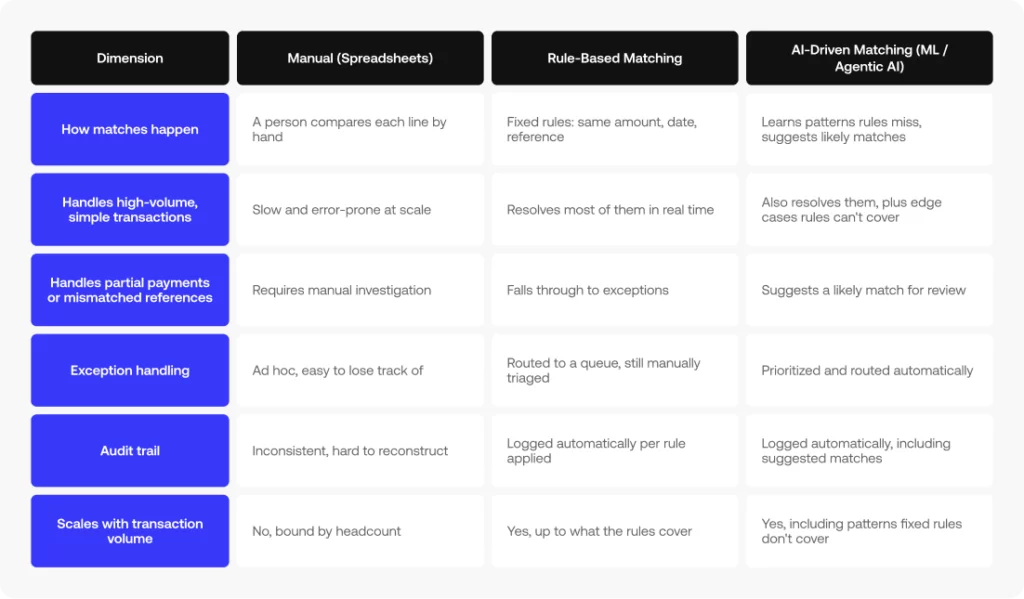
Once the data is flowing, most engines apply matching rules first: same amount, same date, same reference.
That matching logic resolves the majority of a business’s day-to-day volume (the straightforward payment that shows up identically on both sides of the ledger) without needing anything smarter than a lookup. This is the simplest form of transaction matching.
Step 3: Machine learning and agentic AI in the matching engine
But real-world reconciliation also includes cases that don’t fit neatly into fixed matching logic. That’s where machine learning and agentic AI come in: instead of waiting for someone to write a new rule for every variation, the model identifies patterns that don’t follow a fixed structure and suggests likely matches.
Simetrik’s engine, for instance, combines entity-level matching rules with AI-suggested mappings and automatic handling of FX differences.
Step 4: Handling exceptions: unmatched and flagged transactions
Whatever neither the rules nor the model can resolve doesn’t just disappear.
It becomes an unmatched transaction or a flagged exception, and gets routed to a review queue instead of getting buried in a spreadsheet somewhere.
That queue is where exception handling actually happens: someone looks at what didn’t match, resolves it, and that resolution becomes part of the record instead of a one-off fix nobody can find later.
Simetrik routes exceptions through automatic alerts and agent-driven workflows, with built-in fraud detection within that same flow.
Step 5: Building the audit trail and posting journal entries
Every reconciled transaction, whether it matched automatically or got resolved by a person, leaves an audit trail back to where it came from.
From there, the system can post journal entries and accruals directly to the general ledger, instead of a person re-entering by hand what the reconciliation already confirmed.
Step 6: Feeding continuous close and reporting
Once the data is reconciled, reporting stops being something that happens once a month. It can be watched in close to real time, which is what actually supports a continuous close instead of a days-long sprint at the end of the period.
Manual vs. rule-based vs. AI-driven matching, at a glance
Steps 2 and 3 above are really two different eras of the same job. Here’s how the three approaches actually compare:
What automatic reconciliation software reconciles, in practice
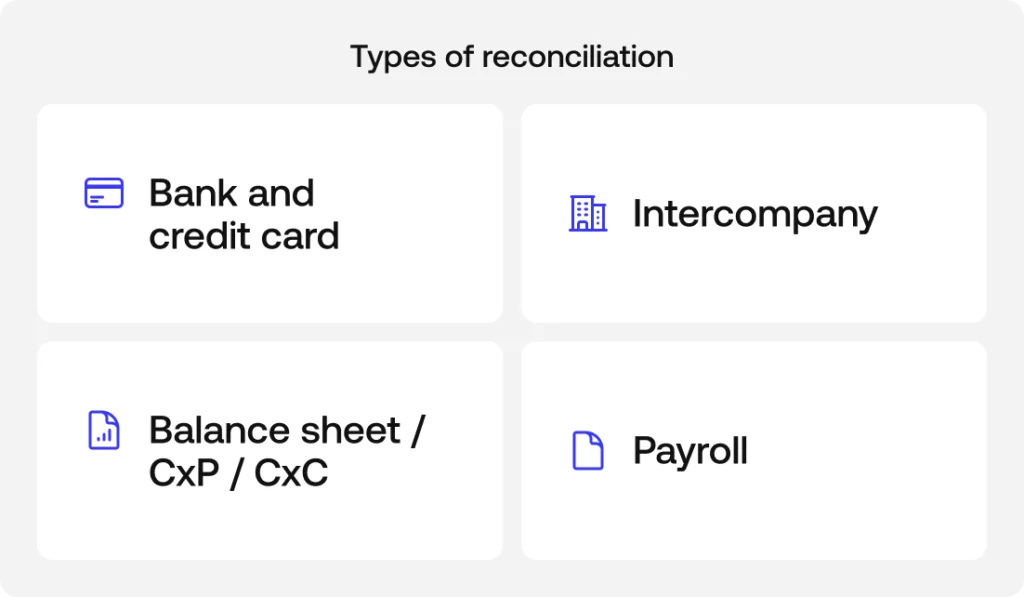
That same matching engine applies across different types of reconciliation, each with its own data sources and edge cases.
Bank and credit card reconciliation
One of the most common use cases is matching bank statements and credit card transactions against the general ledger.
In practice, bank reconciliation and credit card reconciliation compare what the bank or card issuer says came in or went out with what the company recorded in its books.
Intercompany reconciliation
Intercompany reconciliation runs the same engine against a trickier problem: a transaction between two entities in the same corporate group has to match on both sides’ books, not just against an external source.
Intercompany accounts that don’t tie out between entities are a common source of quiet, recurring differences that only surface at consolidation.
Balance sheet, accounts payable, and accounts receivable reconciliation
Balance sheet reconciliation checks that each account’s balance actually reflects what happened during the period, not just what a spreadsheet says it should be.
Accounts payable and accounts receivable get the same treatment against real invoices and payments, catching a duplicate payment or a customer invoice that never got recorded before it turns into a bigger problem at close.
Payroll reconciliation
Payroll reconciliation matches what a company actually paid and recorded against payroll runs, catching differences (a missed adjustment, a benefits deduction that didn’t sync) before they reach the close instead of after.
How automatic reconciliation software speeds up month-end close
Automatic reconciliation isn’t just faster, it changes when problems get discovered. Instead of finding discrepancies during the close itself, the team can watch cash flow and run variance analysis over already-reconciled data throughout the month, and accruals get calculated on numbers that already tie out instead of numbers that might not.
That shift, from discovering problems at close to seeing them in real time, is what actually changes how long the accounting processes around month-end close take.
Automatic reconciliation software, audit trails, and regulatory compliance
The same audit trail left by every reconciled transaction is what supports regulatory compliance: every number in a report can be traced back to its source instead of taken on faith. That traceability cuts both ways. The same data layer that flags a transaction that doesn’t match can also flag a pattern that looks like fraud. Fraud detection and reconciliation run on the same underlying engine, not two separate systems bolted together.
Simetrik, for example, leaves exportable, traceable audit logs and includes built-in fraud detection within that same exception flow.
How automatic reconciliation software scales beyond manual reconciliation and spreadsheets
Manual accounting processes depend on a person reviewing every line, and that stops working the moment transaction volume grows faster than the team reviewing it.
An engine built on matching rules and machine learning can process increasing transaction volumes without requiring headcount to scale linearly with them.
As companies connect more systems (ERPs like NetSuite, banks, and payment processors), the reconciliation workload grows not only with transaction volume, but with the number of data sources involved.
That’s the kind of scale automatic reconciliation software is built to handle, versus a spreadsheet or a script someone maintains on the side.
Frequently asked questions
What is automatic reconciliation software?
Automatic reconciliation software matches transaction records across systems (bank feeds, payment processors, ERPs, and the general ledger) without someone comparing them line by line in a spreadsheet. It flags anything that doesn’t match for review instead of requiring a full manual check.
How does automatic reconciliation software match transactions?
Most tools apply matching rules first (same amount, date, and reference) and use machine learning or agentic AI for transactions that don’t follow a fixed pattern, like partial payments or mismatched references across sources.
What happens when automatic reconciliation software can’t match a transaction?
Unmatched or flagged transactions get routed to an exception queue instead of getting lost in a spreadsheet. Someone reviews and resolves them, and the resolution becomes part of the audit trail.
Does automatic reconciliation software replace manual bank reconciliation entirely?
It replaces the line-by-line comparison, not human judgment. Exceptions that don’t match automatically still need a person to review them; the software just narrows that pile down to the transactions that actually need attention.
How does automatic reconciliation software help with compliance and audits?
Every matched or resolved transaction leaves an audit trail back to its source, which is what auditors and regulators actually check. That same trail is also what makes it possible to trace patterns that look like fraud.
Is account reconciliation software the same as automated reconciliation software?
Mostly, yes. Both terms describe the same category of tool: something that matches transaction records across banks, processors, and the general ledger instead of a person checking each line. “Account” points to what’s being reconciled: an account’s balance or activity. “Automated” points to how it happens: through rules and machine learning instead of manual work.
Does automated reconciliation software improve scalability?
Yes. Scalability is the main thing that separates automated reconciliation from a spreadsheet or a script someone maintains on the side. A rules-and-ML engine can absorb more transaction volume and more connected data sources without needing headcount to grow at the same rate.
What is account reconciliation automation?
Account reconciliation automation pulls transaction data from every connected source, applies matching rules and machine learning to resolve the bulk of it automatically, and routes only the exceptions (transactions that don’t match) to a person for review. It replaces the manual comparison step, not the judgment step.
Next step: see automatic reconciliation software in action
Financial reporting software is a tool that automatically compiles financial statements, dashboards, and compliance reports from a company’s accounting and transaction data. Instead of building each report manually in a spreadsheet, it pulls from connected systems, applies accounting logic, and helps maintain audit-ready reporting
What financial reporting software typically includes
Most platforms in this category -sometimes marketed as reporting software, automated financial reporting software, or financial statement software- cover the same five layers, regardless of vendor:
Core financial statements: balance sheets, income statements, cash flow statements, and profit and loss statements.
Connections to your accounting data: your ERP, general ledger, chart of accounts, and accounts payable/receivable, turning manual entry into automated financial reporting.
Compliance and audit controls: GAAP/IFRS alignment, audit trails, and multi-entity consolidation.
Analytics and forecasting: KPIs, variance analysis, and FP&A-style financial models used to analyze performance and plan ahead.
Dashboards and management reporting software: the outputs finance and non-finance stakeholders actually see.
Vendors also sell this under names like financial statement reporting software or financial automation software: different labels, same five layers. What separates a connected platform from a spreadsheet is financial reporting automation: reports get assembled from live data instead of rebuilt by hand every cycle.
Simetrik, for example, integrates no-code with ERPs and core systems, and leaves a traceable, exportable audit trail over every reported figure.
Benefits of using financial reporting software
Beyond the definition, here’s what teams actually gain when they move from manual spreadsheets to automated financial reporting:
Faster, more predictable close: automated data flows reduce the manual work required to assemble and validate reports at month-end.
Fewer manual errors: connected data reduces the need to copy and paste information between spreadsheets and source systems.
Stronger audit readiness: traceable reporting makes it easier to follow reported figures back to their source.
More timely visibility for decision-making: automated dashboards can surface updated KPIs without requiring teams to rebuild reports manually.
Better scalability: automation helps finance teams handle more entities, currencies, and transaction volume without increasing manual work at the same rate.
Common misconceptions about financial reporting software
Some assumptions about this category, sometimes lumped in with financial automation software or financial statement analysis software, are worth clearing up before comparing options:
Myth: it replaces your accounting software or ERP
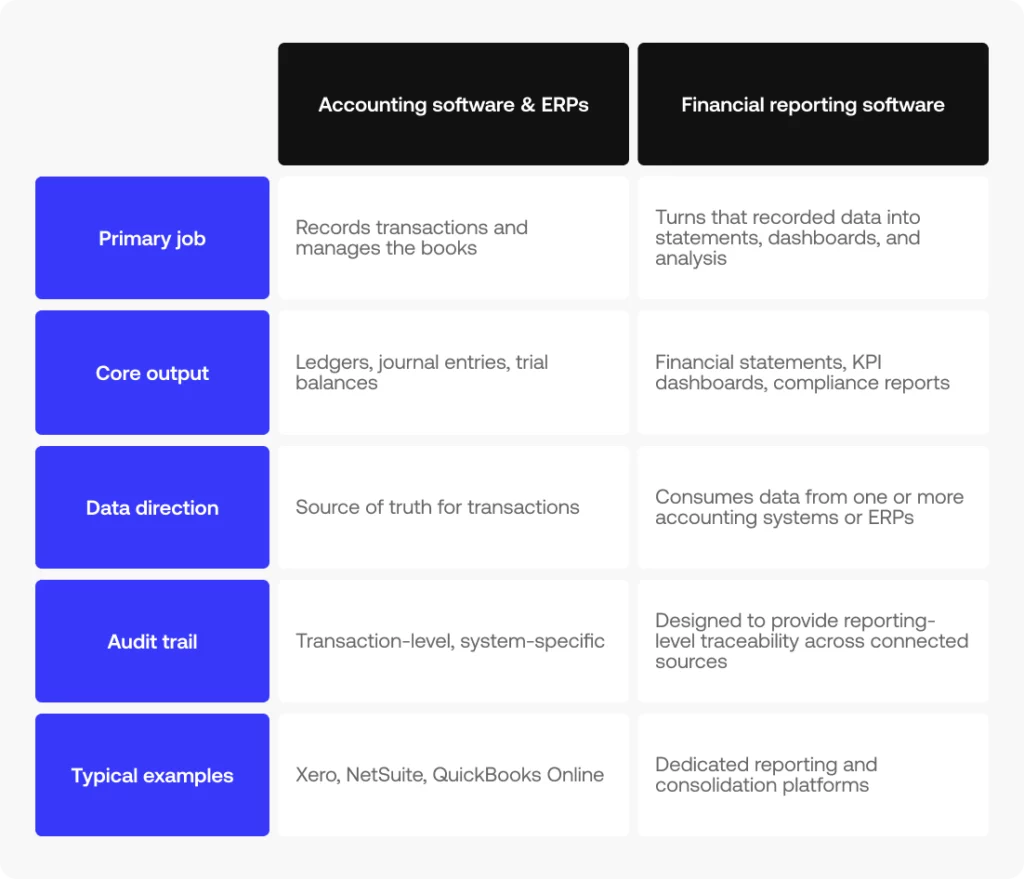
Reality: it sits on top of your accounting software or ERP, not instead of it.
Your ERP still records transactions and owns the books – the reporting layer just organizes that data into statements, dashboards, and audit-ready reports.
Myth: it eliminates all manual review
Reality: it narrows the amount of work that requires human review.
Automated data processing and reporting handle routine work, while exceptions and judgment calls still require human review.
Myth: any dashboard tool counts as financial reporting software
Reality: a BI tool can visualize numbers, but financial reporting software specifically connects to accounting data, applies accounting logic, and maintains an audit trail.
A generic dashboard on top of an export doesn’t do any of that.
Myth: it’s only worth it for large enterprises
Reality: the trigger isn’t company size, it’s complexity – multiple entities, currencies, or a reporting cadence that’s outgrown a spreadsheet.
Some mid-size teams hit that point well before they’re considered “enterprise.”
Financial reporting software vs. accounting software and ERPs
Accounting software and ERPs – systems like Xero, NetSuite, or QuickBooks Online – record transactions and keep the books. Financial reporting software sits on top of that data to produce financial statements, dashboards, and analysis; some platforms combine both.
That distinction matters when you’re evaluating options: the best financial reporting software for your team is the one that plugs cleanly into the accounting system you already run, not just the one with the longest feature list.
How Simetrik approaches financial reporting
Simetrik is an AI-native financial operations control platform.
It isn’t built around financial statements or FP&A by name, but it covers several of the capabilities reliable reporting depends on. It connects to ERPs and more than 100 payment, banking, and core systems through no-code integrations, continuously syncs general ledger and subledger data, and maintains traceability back to source transactions. Finance teams can then use no-code dashboards and alerts to monitor KPIs and exceptions in real time.
For finance teams already fighting manual reconciliation before they even get to reporting, Simetrik solves the reconciled data layer that reliable financial reporting software is built on.
See how reconciled data becomes audit-ready reporting If your reporting is only as reliable as the reconciliation behind it, it’s worth seeing how Simetrik connects the two. Request a demo
Financial reporting software FAQs
What’s the difference between an ERP system and financial reporting software?
An ERP system, like NetSuite or QuickBooks Online, is where transactions get recorded and the books get kept.
Financial reporting software sits on top of that: it pulls the ERP’s data and turns it into statements, dashboards, and compliance reports.
Most companies need both: the ERP as the system of record, and the reporting layer to make sense of what’s in it.
Does financial reporting software help with accounts receivable?
It can surface AR data inside reports and dashboards, but it doesn’t manage the AR process itself (invoicing, collections, aging schedules).
That still lives in the accounting system or ERP. What the reporting layer adds is visibility: AR balances flow into the same audit-ready statements as everything else, instead of getting pulled manually from a separate export.
Is financial reporting software GAAP and IFRS compliant?
Most dedicated financial reporting software is built to support both GAAP and international financial reporting standards, not just generate generic statements.
That usually means built-in templates and controls aligned to whichever standard applies, plus the audit trail to back up how a number was calculated.
Companies reporting across multiple jurisdictions should confirm exactly which standards a given vendor supports, rather than taking “compliant” at face value.
Can financial reporting software handle intercompany eliminations?
Multi-entity consolidation, including intercompany eliminations, is one of the features that separates dedicated financial reporting software from a basic ERP report or a spreadsheet. It’s not universal across every tool in the category, so it’s worth confirming directly if you’re consolidating across multiple entities.
What role does machine learning play in financial reporting software?
Machine learning shows up mostly on the data side: flagging anomalies, suggesting how new data should map into existing report structures, and catching patterns a person might miss at scale.
It’s less about generating the report itself and more about making sure what feeds into it is accurate.
Is bank reconciliation part of financial reporting software?
Not directly, though the two are closely linked. Bank reconciliation confirms that transaction records match what actually happened, and financial reporting software depends on that reconciled data being accurate before it builds statements or dashboards on top of it. Some platforms combine both; others expect reconciliation to already be handled upstream.
What are customizable dashboards in financial reporting software?
Customizable dashboards let different teams see the metrics that matter to them (finance might track close status and variance, while ops looks at cash flow) without either group having to rebuild a report from scratch.
The underlying data is the same. What changes is which slice of it gets surfaced, and to whom.
What does data consolidation mean in financial reporting?
Data consolidation is the process of combining financials from multiple entities, currencies, or systems into a single, comparable set of numbers, usually a step required before multi-entity reporting or intercompany eliminations can happen.
Without it, each entity’s data stays siloed and someone has to reconcile totals by hand.
Is financial planning and analysis the same as financial reporting?
They’re related but distinct.
Financial reporting looks backward, compiling statements and dashboards from what already happened. Financial planning and analysis (FP&A) looks forward, using that same data to forecast, budget, and model scenarios. Reporting is usually the foundation FP&A builds on, not a replacement for it.
Does financial reporting software include expense management?
Not usually as a core function. Expense management (capturing receipts, approving spend, categorizing transactions) typically lives in a separate tool or an ERP module. Financial reporting software picks up downstream of that: once expenses are recorded, it pulls them into reports and dashboards alongside everything else.
How does data visualization fit into financial reporting software?
Data visualization turns reconciled financial data into charts, KPI cards, and trend lines instead of raw tables. It’s less about the underlying accuracy of the numbers and more about making patterns (a variance spike, a cash flow dip) visible at a glance instead of buried in a spreadsheet.
Can financial reporting software help with financial forecasting?
Some platforms extend into forecasting, using historical reported data to project future performance, but it’s not a given across the category. Dedicated FP&A tools tend to go deeper here; financial reporting software’s core job stays closer to reporting what already happened rather than modeling what’s next.
Does financial reporting software show retained earnings?
Retained earnings typically appear on the balance sheet and the statement of changes in equity, both of which financial reporting software can generate automatically from connected accounting data. The software surfaces the number; the underlying calculation still depends on what’s recorded in the general ledger.
Does financial reporting software handle data migration?
Not as a primary function, though most platforms need some form of it during setup, pulling historical data from ERPs, spreadsheets, or legacy systems into the new environment. Once that initial migration is done, ongoing data flow happens through live connections rather than repeated manual imports.
Next step: see financial reporting software features in detail
Now that you know what financial reporting software does and how it differs from your ERP or accounting system, the next step is understanding which capabilities matter most. See the key features of financial reporting software to know what to evaluate.
Acquiring banks, ISOs and merchant portfolios depend on TSYS to process card payments. TSYS handles authorization, and clearing, and it reports on the activity it processes. But confirming that the processed activity matches what lands in your bank accounts and general ledger is a separate job. For many finance teams, that job still runs on manual checks, copy-pasted totals and spreadsheets.
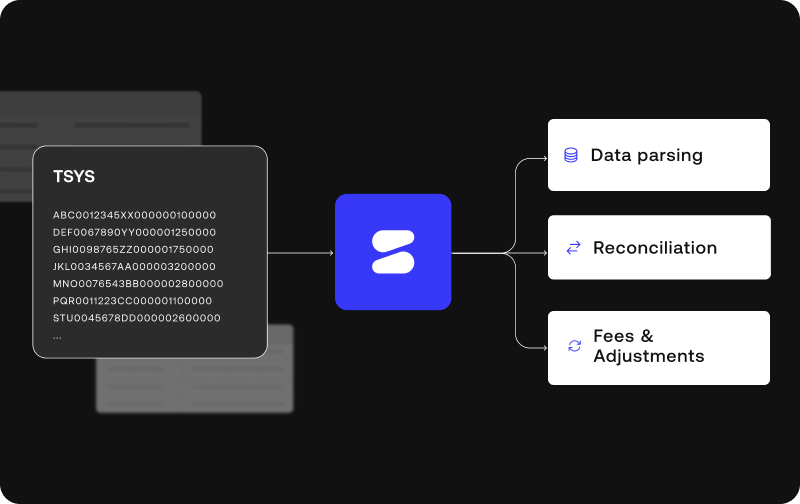
Simetrik is built for that gap. TSYS processes the transactions. Simetrik helps TSYS clients verify that the data TSYS produces matches their deposits and their books, down to the transaction.
This guide explains why TSYS acquiring data can be difficult to work with and what the manual process looks like today. It also covers how Simetrik turns raw TSYS output into automated, auditable financial checks.
The challenge of managing TSYS acquiring data
On the acquiring side, TSYS processes card transactions for merchants on behalf of acquiring banks and ISOs. It routes authorizations, submits transactions to the card networks for clearing, and calculates interchange and processing fees. It also funds merchants through settlement deposits.
Every step leaves a data trail. Finance teams have to reconcile several things:
authorizations and cleared transactions, which often land on different days;
settlement batches and the net deposits that reach the bank;
interchange, network assessments and processing fees, which are usually netted out of the deposit instead of shown line by line;
chargebacks, reversals and adjustments, which can change settled amounts after the fact.
None of this is a flaw in TSYS. It’s how card acquiring works. But it creates exactly the kind of multi-source, transaction-level matching that manual processes struggle with as merchant volume grows.
The manual reality: from green screens to unstructured data
Green screens as the daily system of record
Many TSYS environments still rely on legacy host-based systems accessed through 3270-style terminal screens, informally called “green screens.” Analysts log in, navigate across multiple screens, and copy-paste values into daily balancing spreadsheets. Each screen has its own format and its own tables.
Several of the reports teams depend on are only available inside these screens and don’t feed into any BI tool. The screens also have no export function, so every number that reaches a spreadsheet is typed or pasted by hand.
This makes TSYS reconciliation a variability problem as much as a volume problem. The effort comes from how many formats a team has to pull together each day, not only from how many transactions there are.
Built to investigate, not to reconcile
Green screens are designed to look up a known exception, not to reconcile a full population of transactions. To query anything, you already need the right identifier: the STAN (system trace audit number), the merchant or the terminal.
When the day’s balance doesn’t match the bank statement, the screens offer no drill-down. The analyst has to work backward through several screens and into a spreadsheet to find the difference.
There’s also a recurring date mismatch. The processing date used for daily verification doesn’t always line up with the effective date the bank uses. That breaks the balance on a regular basis, even when nothing is actually wrong.
Face value numbers without the detail behind them
Much of what teams see in these views are bulked amounts. For example, a single $1,000,000 settlement figure is a face value number. It says how much moved, but not which transactions, fees and adjustments make up that total. Reconciling at this aggregate level (high-level totals with no transactional detail) leaves variances unexplained until someone investigates them manually.
Raw TSYS files are hard to read
The underlying data exists, but not in a usable form. TSYS delivers financial movement data as large, unstructured files made of dense character strings and code lines, without the readable columns a finance team would expect. Before anyone can calculate or match against this data, it has to be parsed and converted into structured tables.
What this costs finance teams
Every figure copied from a terminal screen adds validation work to each downstream journal entry. The process depends on the few people who know how to navigate the screens. And each manual step is another chance for an entry error that ends up in the books. Transaction-level matching becomes too labor-intensive to run every day, so most teams settle for reconciling totals and investigating differences after the close.
How Simetrik transforms TSYS data into verified, transaction-level detail
Simetrik is an AI-native financial control platform. Its core is transaction-level reconciliation. For TSYS clients, Simetrik works from the raw data files TSYS delivers rather than from green screens. It turns those files into a structured, rule-based reconciliation workflow.
Data parsing: turning raw TSYS output into readable tables
Simetrik ingests TSYS files through compatible methods. It parses the unstructured strings into clean, tabular data with defined columns, dates and amounts. AI can suggest how to interpret non-standard file layouts, and the team reviews a preview before the configuration is applied.
The value is that the team no longer has to rebuild the day’s numbers by hand from screen after screen.
With the data in structured form, Simetrik can compare three things: the transaction-level detail behind each settlement, the net deposit in the bank statement, and the entries in the ledger. Matching rules can relate one deposit to the many transactions it contains. Tolerances and timing rules can account for the gap between processing date and effective date.
A face value number stops being a black box. Records that match are separated from the ones that don’t, and each exception is traced to the rule that flagged it.
Automated enrichments: fees, adjustments and deductions
Simetrik applies configured calculations, transformations and enrichments to the parsed data. These cover interchange, processing fees, authorization fees, adjustments and deductions. This makes it possible to rebuild the path from gross transaction volume to the net amount deposited, and to see where the two diverge.
Chargebacks, reversals and adjustments can be brought in as their own data sources. They’re then matched back to the original transaction and settlement. A late change shows up as a specific exception to investigate instead of an unexplained variance in a period the team thought was closed.
Auditable by design
AI helps teams configure and adapt matching logic when file layouts, merchant portfolios or volumes change, including through natural-language setup. The matching itself runs on a deterministic core. With the same data and the same rules, Simetrik produces the same result. Every match, exception and manual action can be traced back to a visible rule and a named reviewer.
Business impact: automated tracking of financial movements
For TSYS clients, the shift is from checking totals to verifying transactions:
Less manual effort. Analysts spend less time copying numbers across green screens and rebuilding daily balancing templates, and more time investigating the exceptions that matter.
Lower operational risk. Fewer hand-keyed figures mean fewer entry errors reaching the books and less dependence on the few people who know the screens.
Clarity on money movements. Bulked amounts are unpacked into the transactions, fees and adjustments behind them, so the team can explain the gap between processed volume and net deposits.
Cleaner inputs for accounting. Verified, transaction-level data gives downstream journal entries a traceable source, which reduces the extra validation each entry needs today.
Better control of financial discrepancies. Teams can identify incorrectly charged fees, unexpected charges, and chargebacks that are missing, mismanaged, or incorrectly accounted for, making it easier to investigate and recover discrepancies.
See how Simetrik reconciles your TSYS acquiring data, from raw file to ledger. Book a demo.
Frequently asked questions
Is TSYS a reconciliation platform?
No. TSYS is a payment processing platform. On the acquiring side, it authorizes, clears and settles card transactions for merchants and reports on that activity. It doesn’t reconcile that activity against a client’s bank accounts or internal ledger. That verification is the job Simetrik is built for.
Why is reconciling TSYS acquiring activity harder than it sounds?
A single merchant portfolio on TSYS generates several parallel data streams, and they rarely arrive at the same time or in the same file. These include authorizations, cleared transactions, settlement batches, netted fees, chargebacks and adjustments. As the number of merchants, entities or currencies grows, so does the number of streams to align. That makes manual tracking harder to sustain.
What is the typical process for checking financial movements in TSYS?
Many finance teams check financial movements by logging into legacy green screens and reviewing bulk totals. They then copy those face value numbers into daily balancing spreadsheets and compare them against bank statements and ledger entries. Because this depends on manual copy-paste, matching usually happens at the aggregate level rather than per transaction. With automated ingestion, the raw TSYS data is parsed and matched at the transaction level instead.
Why are TSYS data files so difficult to parse for financial reconciliation?
TSYS delivers financial movement data as unstructured files made of dense character strings and code lines, with no readable column structure. Before any calculation or matching can happen, those strings have to be parsed into tabular data with defined fields such as dates, amounts, merchant identifiers and fee types. Simetrik handles that parsing as the first step of the reconciliation workflow.
How does Simetrik handle fee calculations, adjustments and bulked amounts from TSYS?
Simetrik ingests the bulked amounts (face value numbers) along with the underlying TSYS data and parses the line-item detail. It then applies configured fee calculations, adjustments and deductions. This lets teams rebuild how gross volume becomes the net deposit, and match each component against the bank and the ledger. Differences are flagged as exceptions for review.
Why do many organizations use processor portals?
Processor portals and reporting interfaces give teams operational views of processing activity. They’re used to monitor authorizations, pull daily settlement reports and handle administrative tasks such as chargeback responses. They’re built to report on processor output, not to run transaction-level financial controls. Finance teams still have to extract that data and reconcile it against their bank deposits and accounting records.
Which legacy tools, such as green screens, create bottlenecks in TSYS reconciliation?
Many acquiring banks and ISOs still rely on 3270 terminal green screens to verify daily balancing totals. These screens have no export function, so analysts copy and paste figures across multiple screens by hand. This creates dependence on a few key people and increases the risk of data entry errors. It also adds audit risk to every downstream accounting entry built from those numbers.
How does Simetrik work with TSYS data?
Simetrik works with the files and reports TSYS delivers to its clients, not with the green screens. It ingests settlement, clearing, fee and adjustment data alongside bank statements and ledger data, parses it into structured tables and applies configured matching rules. Matched records are separated from exceptions that need investigation.
Do TSYS clients still need a separate reconciliation platform?
Usually, yes. TSYS processes the transactions, but it doesn’t check that what it processed matches what settled into the bank and what’s recorded in the ledger. For clients with growing merchant volume, multiple data streams or manual green-screen processes, that independent check is where a reconciliation platform like Simetrik fits.
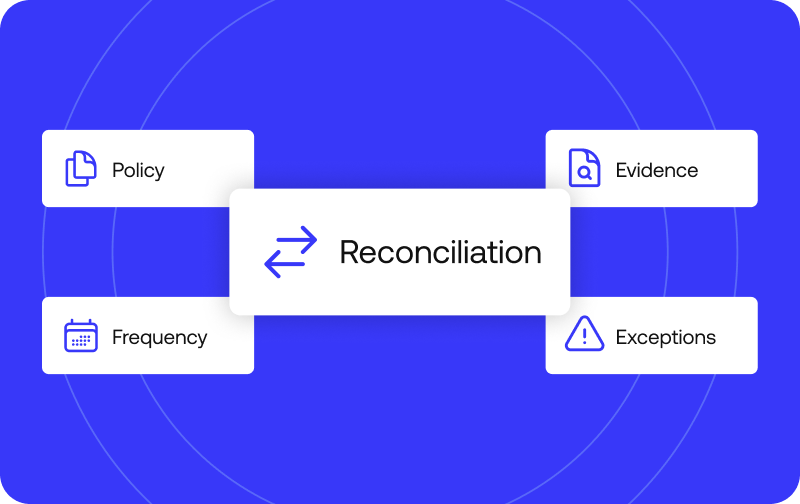
Account reconciliation best practices fall into four areas: policy (who owns what, and which accounts get reconciled), evidence (what backs up each balance), frequency (how often), and exceptions (what happens when something doesn’t match). Skip any one of the four and the process tends to break down somewhere, usually at month-end, when there’s no time left to fix it.
Some teams describe this as data reconciliation best practices in general, since the mechanics of matching one data set against another look similar across finance, operations, and IT. The scope here is narrower: financial account balances specifically, the ones that feed a balance sheet, an income statement, or a regulatory filing, where an unresolved gap has a dollar amount and an owner attached to it. The four categories below apply to every account type a finance team is responsible for, from a simple bank account to a multi-entity intercompany ledger, and the difference between a process that scales and one that quietly falls behind usually comes down to how deliberately each of the four was designed.
This framework is written for controllers, staff accountants, and CFOs who already run some version of reconciliation and want to know where the gaps are, more than for someone reconciling an account for the first time. These reconciliation best practices cover the same ground a mature program has to cover eventually: who owns the process, what proves a balance is real, how often to check it, and what to do the moment something does not agree.
Why account reconciliation best practices matter for financial accuracy
Without consistent reconciliation, financial statements and financial reporting rest on numbers nobody has actually checked against a source. A controller can close the books on schedule and still be wrong, because closing on time and closing accurately are separate achievements, and only one of them shows up on a calendar.
That gap tends to surface as distorted cash flow visibility and shaky financial accuracy right when it matters most: at close, during an audit, or in front of a board. A CFO presenting quarterly results built on unreconciled balances is presenting an opinion dressed up as a fact, and the room usually finds out only when the numbers get challenged. The cost rarely shows up immediately. It builds quietly in accounts nobody is watching closely, until an audit, a bank covenant review, or a cash shortfall forces a reconstruction of months of activity under real time pressure.
There is also a compounding effect that makes early gaps expensive later. A discrepancy left unresolved in one period tends to carry into the next, since most reconciliation processes start from the prior period’s ending balance. A $12,000 gap that goes uninvestigated in January becomes the starting point for February’s reconciliation, which means February inherits January’s mistake before a single new transaction has been recorded. Financial accuracy, in that sense, is cumulative: a team recovers it one clean close at a time, or loses more of it every month it stays unaddressed.
Consider a mid-size marketplace running reconciliation manually across a handful of payment processors. A small, unexplained variance in one processor’s settlement account gets logged as “to investigate” in month one. By month four, three more unexplained variances have piled up in the same account, none of them individually large enough to trigger an escalation, but together they represent a meaningful percentage of that account’s balance. That is usually the moment an auditor, an investor, or a new finance hire asks the question the internal team had stopped asking months earlier: what actually backs this number.
Policy: define ownership, controls, and which accounts to reconcile
The first category is governance: who does what, and which account types are actually in scope. Treating this as a policy decision, rather than something each preparer figures out individually, is what makes the rest of the framework hold together. Without a written policy, reconciliation becomes a personal habit that survives only as long as the person who built it stays in the role.
A reconciliation policy answers three questions before a single transaction is matched: which accounts require reconciliation, who prepares each one, and who reviews it. Financial controls exist precisely to make those answers explicit and repeatable, instead of leaving them to whoever happens to be available at month-end. Without that written policy, two preparers working the same account type in different entities will often reach different conclusions about what counts as reconciled, simply because nobody ever wrote down the standard both of them were supposed to meet.
That is also where standardization enters the picture. A policy that treats every account, every entity, and every currency with the same template turns reconciliation into a repeatable operating procedure instead of a set of one-off exercises that a new hire has to reinvent from scratch. Standardization does not mean every account gets identical treatment regardless of risk. It means the method for deciding treatment, which accounts, which cadence, which evidence, is consistent across the organization, so a controller reviewing five subsidiaries is reading five versions of the same report rather than five unrelated ones.
Segregation of duties, internal controls, and reconciliation procedures
Segregation of duties, meaning the person who prepares a reconciliation is not the person who approves it, is the most basic internal control in this category, and the one most often missing on small teams. When the same person prepares and approves, an honest mistake and a deliberate one look identical on paper, since nobody with independent judgment ever looked at the work.
Documented reconciliation procedures are what turn that control into something durable. Instead of knowledge that lives in one person’s head, a written procedure spells out the source systems to pull from, the matching logic to apply, and the escalation path when something does not tie out. That documentation is what makes the process itself auditable, in addition to the numbers it produces. It is also the foundation for standardization: once a procedure is written down for one entity or one account type, it can be applied consistently across every other entity and account type a company operates, rather than reinvented locally in each business unit. A controller overseeing five subsidiaries benefits far more from one standardized procedure applied five times than from five different procedures that happen to produce similar-looking output.
In practice, this often starts small. A finance team of three people might rotate who prepares which reconciliation each month, with a second person always reviewing before it is marked complete, even when that second person has a full plate of their own work. It is a modest control compared to a full approval workflow, but it is the difference between an error being caught in the same month it happened and an error surviving three closes before anyone notices the pattern.
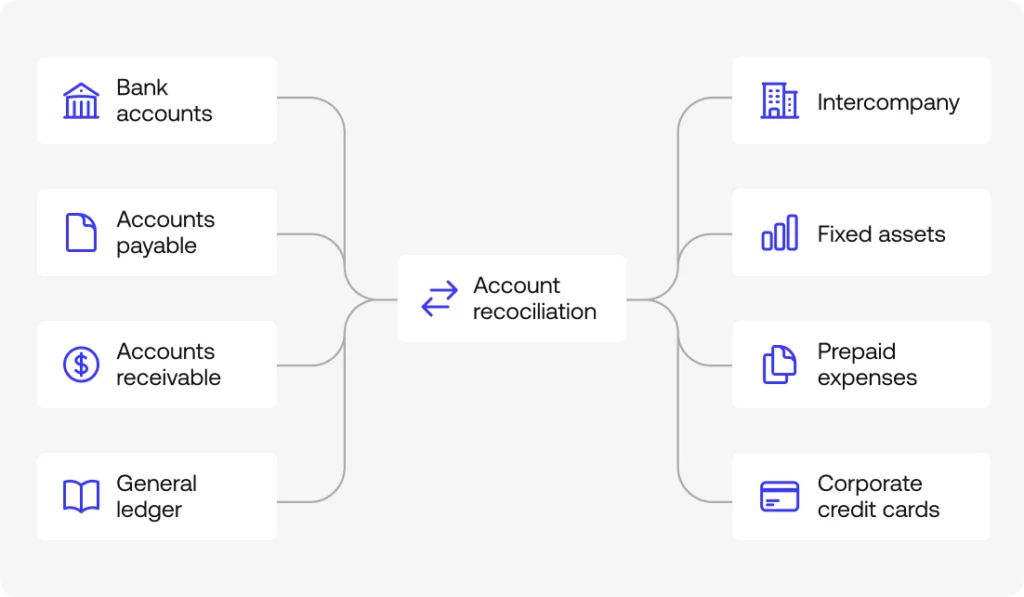
Which accounts need reconciliation: bank, AP, AR, and balance sheet
Bank reconciliation is the obvious starting point, and it is usually the first entry point into a broader bank reconciliation best practices discussion inside a finance team. But accounts payable reconciliation and accounts receivable reconciliation close the cash cycle from the other two sides, matching what the company owes and what it is owed against the subledgers that track each vendor and customer relationship. Balance sheet reconciliation, taken together, is the proof that every figure on the balance sheet has real support behind it. A balance that simply looks reasonable at a glance has not cleared that bar.
Solid balance sheet reconciliation best practices treat every one of these account types the same way: nothing gets marked complete without a verified source behind it, regardless of whether that source is a bank statement, a vendor invoice, or a customer contract.
This is where balance sheet account reconciliation best practices tend to diverge sharply between mature and immature finance functions. A mature function reconciles every material balance sheet account on a defined cadence, with a named owner and a documented procedure. An immature one reconciles the accounts that are easy to check, like the operating bank account, and leaves the harder ones, like accrued liabilities or deferred revenue, to be revisited only when an auditor asks a pointed question. The CFO is usually the one who feels the consequence of that gap first, since it is the CFO’s signature that goes on the certified financial statements, even when the underlying reconciliation work sat with a controller or a staff accountant several layers below.
Simetrik, for example, sets up configurable workflows and control monitoring by account type, so a bank account, an AP subledger, and a balance sheet accrual can each follow their own matching logic and review cadence without living in three unrelated spreadsheets.
General ledger, intercompany, fixed assets, prepaid, and credit card accounts
General ledger reconciliation is the accounting backbone, since every other reconciliation in this list eventually rolls up into it. Intercompany reconciliation, meaning accounts between entities in the same group, tends to be where differences go unresolved longest, mostly because a discrepancy between two internal entities rarely triggers the same urgency as a discrepancy against an external bank. Both sides can point at the other and assume it will get sorted out eventually, and eventually stretches into quarters.
Fixed assets, prepaid expenses, and credit card reconciliation round out the map. These are accounts that rarely get the same discipline as bank or AR, even though they distort the balance sheet just as easily when left unchecked. A prepaid expense schedule that is never reconciled against the underlying contracts will keep amortizing an expense long after the service it paid for has ended. A fixed asset register that is never checked against physical inventory will keep depreciating equipment that was scrapped two years earlier. Neither error is dramatic on its own, but both compound quietly across every reporting period until someone finally reconciles the account and has to explain the gap.
Intercompany accounts deserve particular attention in any company operating across more than one country or legal entity. A parent company invoicing a subsidiary for shared services, a subsidiary lending working capital to another subsidiary, or two entities splitting a shared vendor cost all create intercompany balances that have to match exactly on both sides of the entry. When they do not, the difference cannot simply be written off, since it usually represents a real timing gap, a currency translation issue, or a booking error on one side that has to be traced back to its source before consolidated financial statements can be trusted.
Evidence: what backs up every reconciled balance
No reconciliation is more reliable than the evidence behind it. A balance that matches on paper but has nothing backing it up is not reconciled, no matter how clean the spreadsheet looks. It is just two numbers that happen to agree, and numbers agree by coincidence more often than most finance teams would like to admit.
Evidence is also the category where a reconciliation earns the right to be trusted by someone who was not in the room when it was prepared, whether that is an external auditor, a new CFO reviewing the books for the first time, or a regulator asking for support six months after the fact.
General ledger, subledger, and bank or credit card statements
The general ledger and each subledger need to be checked against an outside source: the relevant bank statement or credit card statements. Without that cross-check, reconciling becomes comparing two internal numbers to each other, without ever validating either one against reality outside the company’s own systems. That is the core distinction that separates real general ledger reconciliation best practices from a cosmetic exercise: the outside source is what makes the comparison meaningful, since two internal systems can be consistently wrong with each other for years without anyone noticing.
A subledger, whether it tracks accounts receivable by customer or fixed assets by serial number, exists precisely so that the general ledger balance can be broken down into its component parts and checked line by line. When the subledger total does not match the general ledger control account, the difference has to be found before either number can be trusted, and that difference is usually where the real reconciliation work happens.
A common example: an accounts receivable subledger shows $840,000 owed across all open customer invoices, while the general ledger control account shows $845,000. The $5,000 gap could be a manual journal entry posted directly to the control account without a matching subledger update, a credit memo recorded in one system but not the other, or a customer payment applied to the wrong invoice. None of those explanations are visible from the two totals alone. They only surface once someone reconciles the detail underneath both numbers.
Source documents, vendor invoices, and journal entries
Source documents, meaning vendor invoices, receipts, and contracts, are what support every journal entry that adjusts an account. An adjustment with no document behind it is usually the first thing an auditor flags, and for good reason: a journal entry without support is a number someone typed in, with no way to confirm it reflects anything that actually happened.
This matters most for manual adjusting entries, the kind that correct an error, true up an estimate, or reclassify an amount between accounts. Each one should reference the source document or the calculation that justified it, filed in a way that someone outside the preparer’s head can find it later. A reconciliation that relies on memory for why an entry was made is one resignation letter away from becoming unauditable.
This is also where reconciliation procedures and evidence overlap directly. A documented procedure should specify how a match is made and what document justifies an adjustment when one is needed, so a new preparer joining the team knows exactly what to attach before an entry is considered complete, rather than learning it after an auditor sends the first request back unanswered.
Audit trail and financial records
An audit trail connects every reported figure back to where it came from, and organized financial records are what make it possible to reconstruct that chain months later, just as easily as on the day the adjustment was originally made. A well-kept audit trail means a controller can answer “where did this number come from” for any balance on the books, going back several periods, without having to reconstruct the answer from scratch.
Simetrik, for one, backs every reconciled item with a traceable, exportable audit trail, on top of the same configurable workflows and control monitoring described above, so the evidence behind a balance is available the moment someone, internal or external, asks for it.
Regulators and auditors both tend to ask the same underlying question in different words: can this number be traced. A company preparing for its first audit, or expanding into a jurisdiction with stricter reporting requirements, usually discovers how strong its financial records actually are only when someone outside the finance team starts pulling on that thread for the first time.
Frequency: how often to reconcile each account
Most account reconciliation guidance treats frequency as an afterthought, something that defaults to monthly because that is when the books close. Handled well, frequency is a risk-based decision, revisited account by account, rather than a single event that happens to line up with the calendar.
Month-end close and the accounting period
Most accounts get reconciled at the close of each accounting period, as part of month-end close. But treating frequency as a once-a-month event is exactly what turns the financial close process into a multi-day sprint under pressure, where every discrepancy discovered on day one competes for attention with every discrepancy discovered on day five, all against the same filing deadline.
A finance team that reconciles only at month-end is, in effect, choosing to discover every problem at the worst possible moment: right when the close timeline is tightest and the appetite for surprises is lowest. Spreading reconciliation work across the period, rather than compressing it into the days immediately after close, is less about working harder and more about not saving every hard problem for the same narrow window.
A finance team that reconciles its highest-volume accounts continuously through the month, rather than waiting for day one of close, effectively pre-solves most of its close-week problems before close week starts. What remains for the actual close period is the smaller set of items that genuinely could not be resolved earlier, which is a very different workload than reconciling everything from scratch under a filing deadline.
Risk-based frequency for high-risk accounts
High-risk accounts, meaning accounts with high volume, multiple sources, or a history of discrepancies, need a shorter cadence than monthly: weekly, or even daily. Reconciling everything on the same schedule, without weighing risk, wastes effort on low-risk accounts while high-risk ones go too long between checks.
A high-volume payment processing account with thousands of transactions a day and three different upstream data sources is a different risk profile than a low-activity intercompany loan account that changes twice a year. Applying the same monthly cadence to both means the payment account accumulates a month’s worth of undetected discrepancies before anyone looks, while the loan account gets checked far more often than its risk actually justifies. A risk-based frequency policy assigns cadence based on the account’s own risk profile rather than a fixed calendar habit.
Determining which accounts qualify as high-risk does not require guesswork. Transaction volume, the number of upstream data sources feeding the account, and a history of prior discrepancies are all observable, and together they make a reasonably objective case for which accounts need daily or weekly attention and which ones genuinely only need a monthly check.
Exceptions: handling discrepancies without losing control
The fourth category covers what happens when something does not match, and it is usually the one that separates a reconciliation process that scales from one that quietly falls behind. Policy, evidence, and frequency all exist to make exceptions visible quickly. What a team does once an exception surfaces is where the value of the first three categories is actually realized.
Timing differences vs. real discrepancies
Most discrepancies are not errors. They are timing differences: deposits in transit, bank fees not yet recorded, checks that have not cleared. Those tend to resolve on their own in the next cycle, once the slower side of the transaction catches up to the faster one. The ones that timing does not explain are usually data entry errors, and those do need correcting, since they will not resolve themselves no matter how many cycles pass.
The practical skill here is distinguishing the two quickly, because treating a timing difference as an error wastes investigation time on something that was never broken, while treating a real error as a timing difference means it sits unresolved for another full cycle. A documented pattern of what “normal” timing differences look like for a given account, built up over several periods, is usually enough to make that call in minutes rather than hours.
A bank reconciliation showing three uncleared checks and one deposit in transit, all dated within the last five business days, matches a pattern any experienced preparer recognizes immediately. The same reconciliation showing an uncleared check dated four months ago is a different situation entirely, and deserves investigation rather than being carried forward as routine.
Fraudulent activity and fraudulent transactions
A smaller share of discrepancies are fraudulent activity or fraudulent transactions, and that possibility is one reason no reconciliation process should depend on a single person reviewing everything from memory. A pattern of exceptions that keeps showing up in the same account or the same period is the kind of signal a well-documented reconciliation surfaces quickly, well before it would show up in an annual audit sample.
Fraud in reconciliation rarely announces itself as a single dramatic transaction. It tends to look, at first glance, exactly like a timing difference or a data entry error, which is precisely why segregation of duties and a documented audit trail matter as much here as they do in the Policy and Evidence categories. The controller reviewing an exception report is often the first line of defense against exactly this kind of pattern going unnoticed for months.
This is one more reason frequency and evidence matter as much as segregation of duties in preventing fraud. A discrepancy reviewed weekly, with a clear source document required for every adjustment, gives a bad actor a much narrower window to operate in than a discrepancy that only gets a serious look once a quarter, based on a spreadsheet nobody outside the preparer’s team has ever opened.
Manual reconciliation vs. automation: where spreadsheets break down
Manual reconciliation in spreadsheets works fine while volume is low and the account list is short. A single entity with a handful of bank accounts and a small vendor list can run this process by hand indefinitely, and many companies do, successfully, for years.
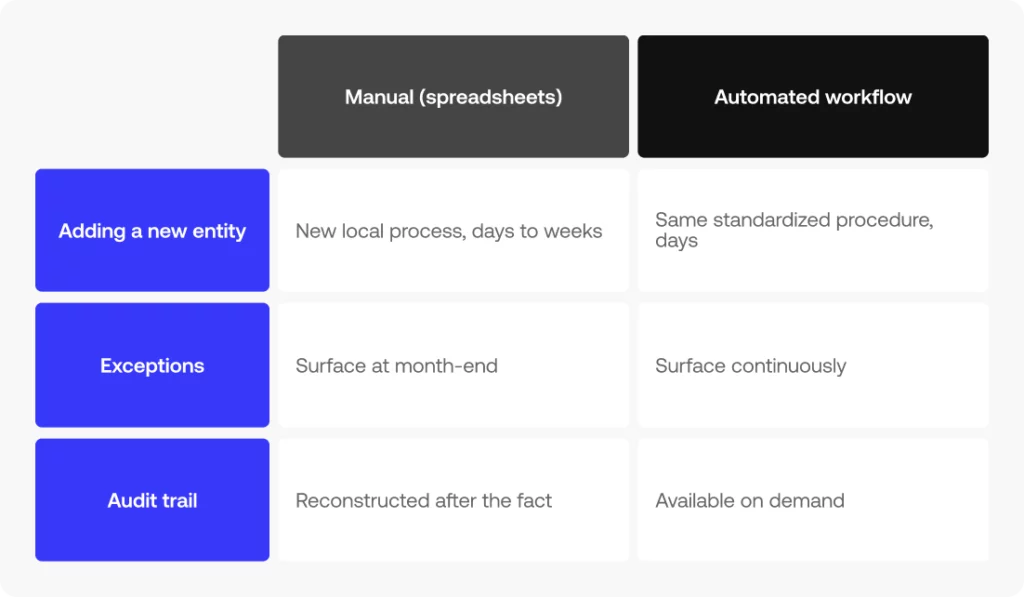
The trouble starts as entities, currencies, or the number of high-risk accounts grow. Holding all four categories of the framework together by hand gets harder to sustain, and the underlying judgment involved is usually not the problem. The problem is that manual reconciliation stops scaling: doubling the number of entities does not double the manual effort required, it multiplies it, because every new entity brings its own bank formats, its own currency conversions, and its own set of intercompany relationships to track against every other entity already in the mix.
This is also where standardization pays off most visibly. A company that standardized its reconciliation procedure early, before volume forced the issue, can extend that same procedure to a new entity in days. A company that let each entity develop its own local process ends up needing a separate migration project every time it adds a new subsidiary, a new currency, or a new acquisition to reconcile.
The tell: a manual process rarely fails with a single dramatic event. It is usually a slow accumulation of small signs: reconciliations that used to take an afternoon now take three days, a growing list of accounts that get reconciled “when there’s time” rather than on schedule, and a controller who can no longer describe, with confidence, exactly how many accounts are current and how many are behind. Spreadsheets do not announce that they have become the bottleneck. They just quietly stop keeping up.
Automated reconciliation and modern accounting software exist to take over the repetitive part: matching, evidence gathering, and frequency scheduling, without removing human judgment from where it is actually needed, the real exceptions that timing differences and data entry errors do not explain.
Simetrik, as one example, automates the matching itself and leaves configurable workflows by account type and risk level, with centralized control monitoring, so the controller’s team spends its time on the exceptions that need a human decision rather than on re-checking thousands of transactions that already agree.
Quick-reference checklist: account reconciliation best practices at a glance
A condensed, copyable version of the four categories above, one line per practice, whether you are after a general account reconciliation best practices checklist or a narrower bank account reconciliation best practices routine for a single ledger:
Policy: segregation of duties, documented reconciliation procedures, and a clear owner per account type.
Evidence: every balance backed by a source document, a bank or credit card statement, a vendor invoice, or a journal entry, with an audit trail.
Frequency: month-end for standard accounts, weekly or daily for high-risk accounts.
Exceptions: timing differences resolved on schedule; anything else investigated and documented before the books close.
Account reconciliation best practices FAQs
What is the most important best practice in account reconciliation?
Segregation of duties is usually cited as the foundational one: without it, the other three, evidence, frequency, and exceptions, end up depending on one person’s judgment with no independent check on it. A controller can design an excellent procedure and still have it undermined if the same person who prepares a reconciliation is also the one who signs off on it, since every other practice in this framework assumes that a second, independent set of eyes will eventually review the work.
How many accounts should a company reconcile?
Every account that feeds the balance sheet, in principle: bank, AP, AR, GL, intercompany, fixed assets, prepaid expenses, and credit card accounts. Frequency, rather than whether to reconcile, is what should vary by risk. A small, low-activity account still belongs on the reconciliation calendar; it simply belongs there less often than a high-volume one. Leaving an account off the calendar entirely, rather than assigning it a lower-risk cadence, is usually how a small balance turns into a surprise finding two years later.
What’s the difference between account reconciliation and bank reconciliation?
Bank reconciliation is one type of account reconciliation, focused specifically on matching the cash book against the bank statement. Account reconciliation is the broader practice applied to every balance sheet account, cash included, which is why bank reconciliation best practices are best understood as a subset of a much larger discipline rather than a synonym for it.
H3: Who should be responsible for account reconciliation?
Ownership should sit with someone other than whoever approves the reconciliation, and that separation, segregation of duties, is the control itself, regardless of company size. In practice, a staff accountant or controller typically prepares the reconciliation, while a controller or CFO, depending on the size of the finance team, reviews and approves it. On very small teams where the same two or three people wear every hat, the separation can be as simple as one person always reviewing another’s work before it is marked complete, even without a formal title change.
Next step: put these best practices into a configurable workflow
These four categories work about as well on a spreadsheet as on a platform. The difference is how much of policy, evidence, frequency, and exceptions holds up on its own, without someone reviewing it by hand every month. That difference is what automated reconciliation actually buys a finance team: the manual re-checking that judgment never needed in the first place disappears, while the judgment itself stays exactly where it was. See how configurable workflows and control monitoring support these account reconciliation best practices in practice.
See how configurable workflows and control monitoring support this framework